[APP][Pro] Marstek Energy Storage

In the Homey app store there is another marstek battery app that works if yours has the local api enabled and available from the new preview firmware that is very slowly rolling out (mine doesn’t so can’t do a feature comparison)

I’ve now connected my Marstek to the Modbus, and it’s working perfectly. Has anyone already created any flows that they could share here for inspiration?

I had the same problem… I was lost regarding the various Cards available within the Homey app “Marstek-Energy-Storage”. Attempting to figure out how to use it, I compared the Cards with the API documentation (available here):

  • The API mentions 4 modes: Auto, AI, Manual, and Passive.

  • The Marstek mobile app has 3 modes: Self Consumption, AI Optimization, and Manual.

  • The Homey app “Marstek-Energy-Storage” has 4 modes: Manual, Grid zero mode, Trade on energy tariffs, and Use force Controls.

It seems that this is the correlation:

  • Auto = Self Consumption = Grid zero mode (charging the batteries instead of sending produced electricity to the grid) - no parameters.

  • AI = AI optimization = Trade on energy tariffs (similar to above, but also charging when there is no electricity production and the tariffs are low) - no parameters.

  • Manual = Manual = Manual (charging/discharging based on manually configured timeframes).

  • Passive = ??? = Use force Controls (define a duration for the battery to charge or discharge, targeting a predefined goal).

Based on this comparison, I mostly understand all the “Then” Cards. You can use the “Set work mode” Card to set one of the 4 modes listed above.

  1. If you set “Grid zero mode” or “Trade on energy tariffs”, I assume there is nothing else to do, since those modes do not need extra parameters.
  2. If you set “Manual”, I assume it’s going to use the timeframes defined via the Marstek Mobile App. So, no need to do anything else here, either.
  3. If you set “Use force controls”, then I assume you also have to next set the “force charge mode” with this Card:

NB: I don’t get what “Force mode off” does. But I presume that the other three options will respectively require setting a target charge, discharge, or SOC, using one of these Cards:

Or am I wrong, and will using a “Set Force Charge power” Card actually set the “charge mode” to “charge” automatically?

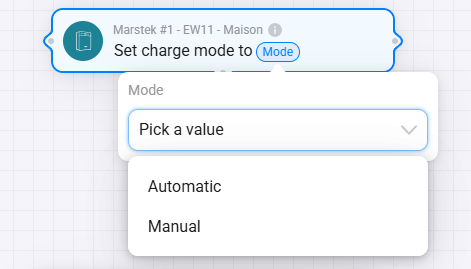
There is one card whose I don’t know the purpose… could anyone help me with that one:
Also, when looking at the “And” cards, I see this one:

What is the difference between “Sleep” and “Standby” ? And how can you force a “sleep” operating mode ?

The flow I would like to create is to set “Grid zero mode“ as “work mode” during the day but to set “force charge” ‘with a during the night (when electricity is cheaper) based on the solar forecast for the next day (I.e.: load my batteries just enough to not use the grid during the day, when electricity is more expensive).

I know that there is an App “SmartLoading for Marstek”, but I would like to implement my own logic :slight_smile:

Thanks for the great analysis, you are correct in your conclussions.
The Operation mode is a read only state based on the devices state. Those values are listed on the modbus documentation and I did not manage to trigger all of them myself. But most are rather clear (there is actually another one: Bypass = When the battery is standby but delivering power to the backup socket, the backup mode is when it is delivering power while there is no grid). The sleep vs standby is as far as I could tell: Sleep is true incapable of operation, SOC is below the minimal threshold and no grid power, while standby is it could operate but the current state doesnt require it do, like SOC at desired level or grid is around 0 in zero grid mode.

I think the set charge mode is a card that is deprecated and I should remove that one.

The set force mode is indeed a bit annoying. I need the first step else the other steps fail.
While this is activated the force mode is off on the modbuss. Forcing charge of discharge will work as actions and move the force mode in the right state. But the force SOC target works without changing the force mode, it remains off. That also means I have not been able to trigger that without truly giving that SOC target a value to trigger the battery in the right mode.

I hope this helps.

My todo:

  • Add forum post link to the app.
  • Remove Set charge mode to card
  • Should I rename the modes to match the API or APP :wink:

I still dont have the api available on my V2 so for now this app is still my best option to control it.

Doing logic in flows is heavy on Homey. I am making a EMS app to do a device independant system that can ALSO control batteries, but also cars and heating systems to get the most out of you solar panels.

I finally got a bit of time to try flows… And indeed, some cards are not working. But to be honest, I didn’t get all the details of what you mentioned :slight_smile:

To switch to force “charging” with a “SOC Target of 98%” during the night (slowly), I wanted to use this:

The two first cards fails The 3 last succeed.

Then to switch back to Self Consumption during the day, I wanted to use this:

The two first cards fail. The 2 last succeed.

You mention that “Charge Mode” is deprecated.. So I get that the first card of each flow is failing (Set Charge Mode to Manual/Automatic).

Possibly the same with the 2nd card of each flow: “Set Force Change Mode to…” ?

You mention that to use “set Force Charge Power”, you need a first step ?! Because indeed, the cards don’t fail, but in the Marstek App, the “Grid Power Settings” is not changed. If I force 800W it stays 2500W in the App (and vice versa). But in the App, this is clearly indicated that it’s only the “to grid export discharge power”…

Finally, you mention also that the Operating Mode is read only. I guess the “Operation Mode” = “Work Mode”, right ?

But when I do set “Work Mode” to “Grid Zero Mode”, I confirm that the battery switch back to “Self Consumption” in the Marstek App (on my mobile)…

And when I set “Work Mode” to “Use Force Mode”, nothing is selected anymore in the App (which only offers Self Consumption, AI Optimization or Manual)… So, it changes the mode but with a value that is not foreseen to be displayed in the Marstek App :slight_smile:

Correct, so for all force modes (force charge with a certain w speed or to the selected so) you need to set Work mode to force mode first. The error you should get as a result of trying to use a force card without that workmode should state this.

Once it is in force mode you can use the cards to set force charge or force discharge with the speed selected in setting that matches our you force reaching a certain soc level. That force mode behaves differently because you need to trigger that one by sending the desired force soc level.

To end force mode and use grid0/Ai mode or the manual(schedule) switch the Work mode back.

The manual mode is the one in the marstek app that us more like a schedule based system. So don’t use that one unless you want to use the schedule. Naming consistency is not Marstek strong point.

App and modbus use weird differences but I do think the modbus ones are actually explaining their expected behavior the best.

1 Like

MANY THX !!! It’s now very clear.

I will see tomorrow the outcome, but my flow seems to work just fine now

Next step, calculate the SOC Target based on the forecast from Solarcast :smiley:

But this version is good enough for winter time…

1 Like