I tried to https://[cloudid].connect.athom.com/api/app/nl.scanno.owntracks/events/?token=[tokenid from user]
for hours but it should be: https://[homey cloud-id].connect.athom.com/api/app/nl.scanno.owntracks/events/[user token]
As you can read in an older post above.
Hello Everyone !
This Is My first Day Here but I have already read a lot about setting Owntracks / geofences and all your posts have helped me a lot so thanks guys
I still have a few questions though as it is not working for me yet…
I have a HP2023 v10.3.1 & iPhone 14 Pro iOS 17.3.1
On homey :
Owntracks / Location and présence app installed.
HTTP mode.
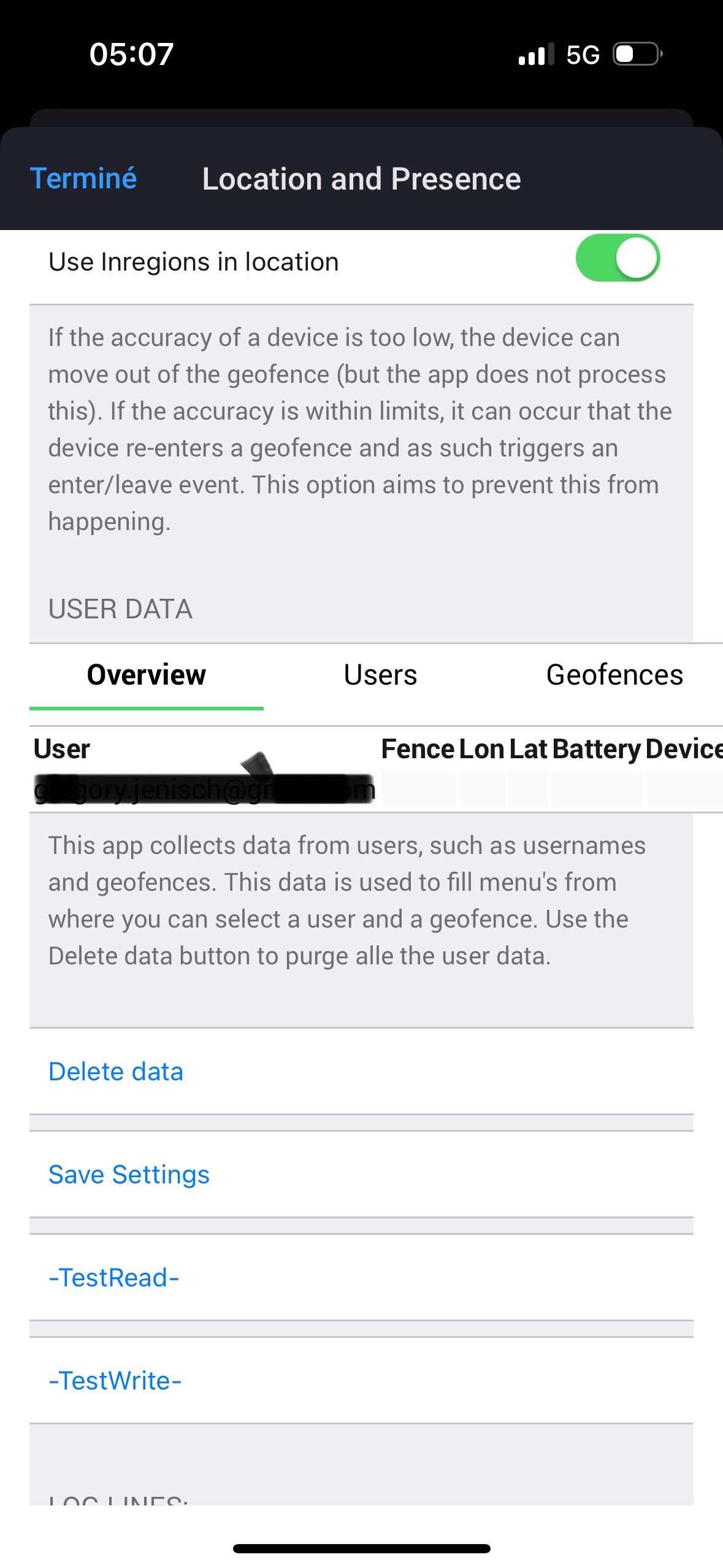
I created a user and received my token. So far so good… but … when I create a geofence I get '0’s for the lon/lat/rad and I can’t input the proper settings. Is that normal? Is the data entered somewhere else?
Thank you so much for your support/help and please shoot if you need more info from me.
On my iPhone:
Owntracks app installed.
Settings page: url ok (?) with homey host ID and token … but there is a connection status error: invalid certificate ???
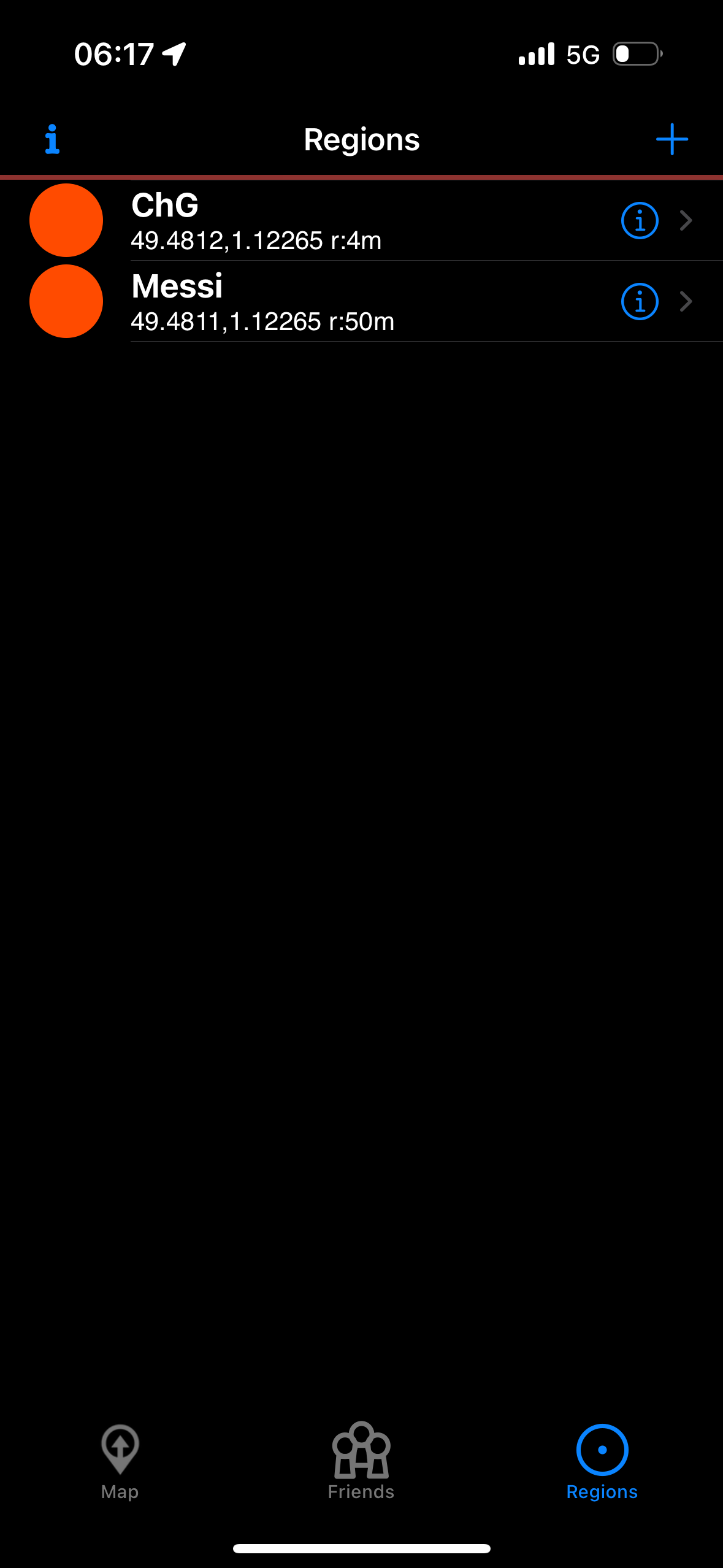
Also I guess the big red dots are not normal for the regions that I have created (same name as in the HP App geofence tab)?!
Hello Everyone !
This Is My first Day Here but I have already read a lot about setting Owntracks / geofences and all your posts have helped me a lot so thanks guys
I still have a few questions though as it is not working for me yet…
I have a HP2023 v10.3.1 & iPhone 14 Pro iOS 17.3.1
On homey :
Owntracks / Location and présence app installed.
HTTP mode.
I created a user and received my token. So far so good… but … when I create a geofence I get '0’s for the lon/lat/rad and I can’t input the proper settings. Is that normal? Is the data entered somewhere else?
Thank you so much for your support/help and please shoot if you need more info from me.
On my iPhone:
Owntracks app installed.
Settings page: url ok (?) with homey host ID and token … but there is a connection status error: invalid certificate ???
Also I guess the big red dots are not normal for the regions that I have created (same name as in the HP App geofence tab)?!
Hi Peter,
first thank you For your welcome and Then For your answer.
YES I had read the referred « how to », which was what Had got me that far…
As per your suggestion I deleted the geofences displaying 0/0/0 in the geofence tab in the L&P app on may HP23.
Thanks.
Now, about the connection problem…
-1-
On iOS there is no such menu as Préférence/configuration management. The closest thing i could do in thé same spirit was to disable the 2 authentication option boxes. Hope you’ll be proud of me on That one . See picture.
-2-
On HTTPS mode
When i use the following url (with personal cloud/user id of course replaced with « XXXXX …. » in the error message) :
https://.connect.athom.com/api/app/nl.scanno.owntracks/events/?
I get this message :
-3-
On HTTP mode (i tried…instead of https)
When i use the following url (with personal cloud/user id of course replaced with « XXXXX …. » in the error message) :
http://.connect.athom.com/api/app/nl.scanno.owntracks/events/?
I get this message for 10 seconds :
Connecting
Then i get for 2 seconds (then back to « connecting ») :
Another question if I may :
i your previous Post you advised not to input any geofence (problem was that lat/long/rad = 0/0/0) in the related Tab in the L&P app on the Homey. I did that and then created a “region” in Owntracks (you have to define a fence somewhere don’t you…?) on my phone app.
==> when there is no geofence in the Tab on L&P, there is no geofence to choose from in the list of the “when trigger…” Card when creating a Flow.
I must admit i am quite confused…
Last but not least :
i created this morning 2 regions (radius = 45m & 60m and the center = my home)
how come the number of notifications rose from 1 this morning to 261 as I write, given the fact that I stayed home all day ?
Almost there
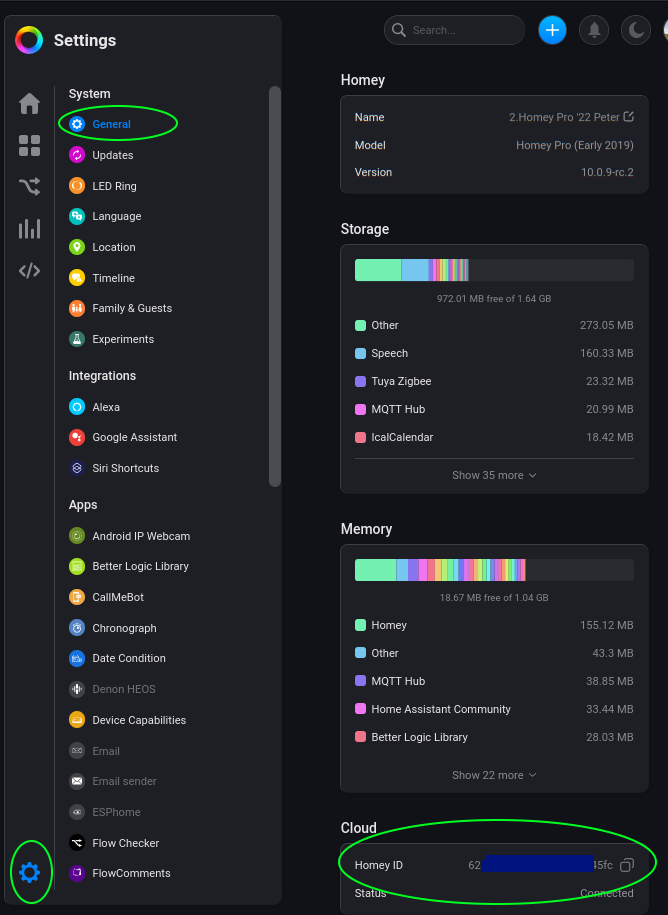
I noticed you being naughty and don’t use the correct homey cloud id . It does not start with hom and it does not end with 2.local for sure:
I guess it’s all error msgs for now, and I like to advice to start with a little bigger radius, like 100m. GPS does not provide for a 100% fixed location, so it can trigger in/out geofence without you moving. No clue how far it can be off.
So, better start with a bigger radius, and make it narrower bit by bit until it reports you in/out/in/out etc.
Also check the ‘Locator’ settings from the Advanced tab
For me it’s:
Inaccurate locations: ignore
Min. location displacement: 100m
Location interval: 90s
Location interval (move mode): 30s
Limit max locator frequency: yes
The intervals are a balance of update speed and phone battery life; shorter interval = shorter battery life.
Well, I hope you get it to work now, don’t hesitate to ask if not
Thank you MASTER PEET, all up and running……
Well… almost as my garage door just openned unexpectedly .
Fine tuning i guess.
There were 2 problèms :
-1- the one your expert eye saw : as it was for the input in the HOST Line of the CONNECTION dialog box (android »how to above ») i mismatched HOST ID for CLOUD ID.
Ahhh, didn’t think about that. But you’re right hehe, I can’t see unspottable whitespaces
It was very late Greg, couldn’t find the words for it
Yeah, you can consider temporary sending notifications first, instead of the actual door opening/closing, until it works as expected.
Or, you can temporary add this confirmation card below to the flows involved; the flow gets paused, until you confirm the push message question within 30 minutes:
→ you are right and that’s what i did, i mean temporarily disable all L&P related flows and test them one after the other… I had already added for each one of them a push notification card in order to make sure the flow had triggered… but imagine the mess that happened in the middle of the night the first time OT/L&P connected and initiated 8 flows…
→ good idea, the confirmation card, i will definitely try it, thanks Peet !
Talking about Cards…
You surely have noticed by now, i am not a developer/ITengineer…
Is there some reading/tutorial you recommend i should start with ? My goal is this (you may have more excellent pointers or solutions) :
→ I have 2 cars and 2 garage doors. I would like the garage door of the car i am driving to open when i come back home.
. When i leave it is no big deal as I have 2 flows, one for each door, with a 30"-delay before locking the house door, shutting off garage light and closing the garage door.
. When i come back (=enter a specific geofence) i don’t know how to proceed : 1) (best solution if it is possible) reverse last flow of user Greg ? 2) get a prompt asking for which door to open (could it be vocal by Siri for a vocal answer) ?
Thank you, i found and installed the app yesterday after digging in the community/tutorials ! I see this more like a workaround than a solution…
…and where is the fun ? :
More seriously…. I already have a camera above my two garage doors but it won’t be able to see the license plates, because there is a gate to our property at approximately 20 m away.
Why not install a new camera on the gate you would ask me? Well, at the gate, there is a very very poor and unsteady Wi-Fi signal, even with a repeater plugged in the Garage . I used to have a iSmartgate running to open and close the gate but I had it removed because its functioning was too random. That’s why I wanted an OTA solution, but not Wi-Fi such as L&P/OwnTracks using GPS and 5G.
We are still not connected to fibre and we have only a small 6 MB aDSL connection.
By the way is my idea of using a “Reverse last flow” crazy or not implementable?
Oh wow, I got myself started with the KB at https://support.homey.app
And you have to get familiar “how Homey thinks”, especially with the possibillities of using logic.
About the ‘reversing’ a flow
Idk what you had in mind for ‘reversing’, but yes, the ‘depart’ flow is the opposite of the ‘arrive’ flow.
But, the problem is to distinguish the cars from eachother;
it’s imho not possible to use geofencing to determine which garage should be opened. I assume they’re next to eachother?
When each driver always carries a phone with f.e. Bluetooth enabled, you can consider sticking a Shelly somewhere near the doors, which can determine if your phone is nearby.
I think it’s better to hide a Ble beacon somewhere under the hood, which can be detected by the Shelly
(please ask f.e. uncle Uwe @Undertaker for Shelly details, he knows his stuff).
BUT, it also needs a wifi connection to connect with Homey.
If somehow you could arrange for a network cable to near the garage, you could add a wifi access point there, an old wifi-router would do f.e.
Let me know what you think is possible.
I still like the licence plate trick hehe, but it’s not fool proof I now realize.
what i mean by reversing the last flow : Homey keeps track of all activity (entering, leaving, flows,…,…) so i was wondering if someone would know how to write some code (or any other solution ;-)) i could use in a flow to play the last item in the activity log but this time in the reverse order.
imagine :
→ i start my flow “leaving with car 1”. My garage door 1 opens and 10 seconds later the gate opens too. Then i have 30 seconds to pass through the gate before the flow’s last 2 cards are played : close door 1 and gate (30" delay). . Log#1.
What i would love is this : when i come back and cross the region/geofence 30m before the gate it triggers a flow playing the last entry in the activity log (=Log#1) in the reverse order (open gate and door 1 and 30" later close gate and 10" later close door 1)
→ it solves your question about distinguishing the cars or drivers
is it clearer ?
i like your idea with the Shelly/BleBeacon which indeed solves the car problem but i wonder how it will distinguish whether the BleBeacon is INwards or OUTwards
Hello !
Is there a solution to send the information to two different Homeys?
Unfortunately it’s not possible to configure multiple HTTP HOSTs in the mobile application.
That’s possible when you use MQTT instead of https. Not sure how easy/difficult it is to set up secured MQTT for using it on the internet.
Or, have the configured Homey send a webhook to the second Homey, with a flow, when users enters a geofence (and a similar flow for users leaving a geofence):
@ the other Homey, create two receiving flows for every user, one for entering a geofence, and one for leaving a fence:


 … when I create a geofence I get '0’s for the lon/lat/rad and I can’t input the proper settings. Is that normal? Is the data entered somewhere else?

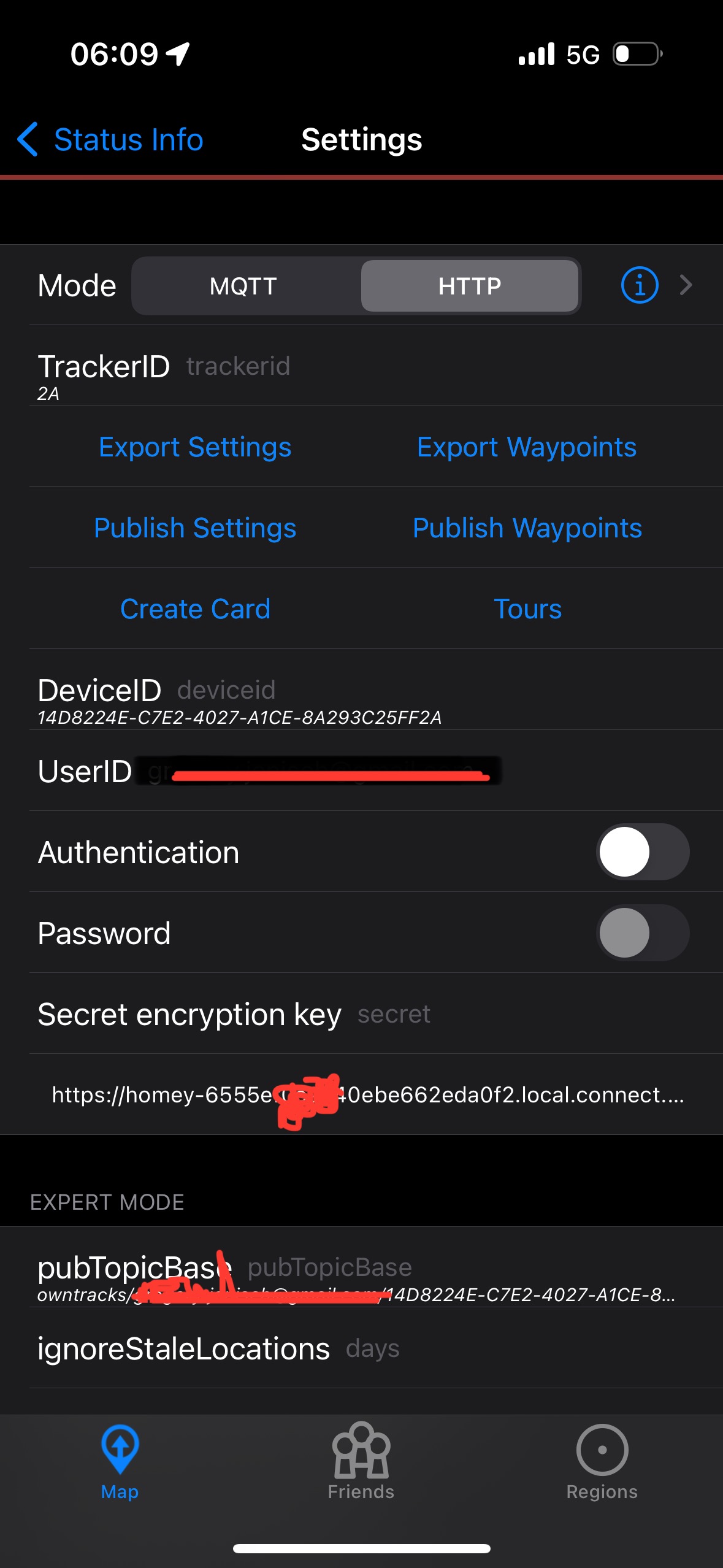


 . See picture.


 , It’s also somewhere in the L & P topic:


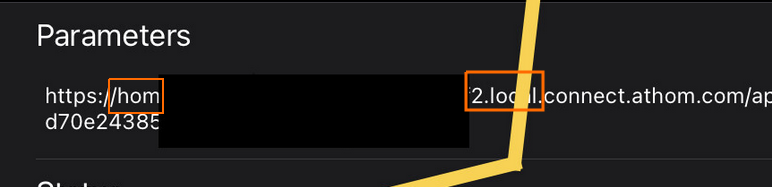



 ’
’

 There was an unspottable vicious blank « Space » character at the Very end of the url/userID !


 :
:  . I used to have a iSmartgate running to open and close the gate but I had it removed because its functioning was too random. That’s why I wanted an OTA solution, but not Wi-Fi such as L&P/OwnTracks using GPS and 5G.