Thanks. Found that in the manual…
But couldn’t find out exactly what to send, for eg the service code. Is there more comprehensive lists on commands?
To set the service code “1234” on your ID Lock 150 via Z-Wave, you need to send two raw commands in Homey (or other Z-Wave controller):
Set the service PIN to “1234” (on user ID 108): This sets the actual PIN.
0x63 0x01 0x6C 0x01 0x31 0x32 0x33 0x34 0x00 0x00 0x00 0x00 0x00
Explanation: 0x63
– Command Class: USER_CODE 0x01
– Command: USER_CODE_SET 0x6C
– User ID 108 (decimal 108 = hex 6C), reserved for service PIN 0x01
– Status: “Occupied/Enabled” 0x31 0x32 0x33 0x34 – ASCII for “1234” 0x00 × 6
– Padding to a total of 10 characters Enable service PIN for 1 time use (parameter 6): This temporarily enables the service code. 0x70 0x04 0x06 0x01 0x01 Explanation: 0x70
– Command Class: CONFIGURATION 0x04
– CONFIGURATION_SET 0x06
– Parameter 6 (Service PIN mode) 0x01
– Length: 1 byte 0x01
– Value: Valid for one-time use Or set restrictions inside Homey:

New transfer patient from Futurehome here - in Futurehome there was an option to set PINs, a simple name-field, slot ID-field and a PIN field, plus a send button. I still have my FH hub, if you know how to I can extract any useful info you’d want from there to get it working.
How were you able to change the pin from your code? I think I’m close by using USER_CODE_SET command. My original pin is not working anymore, so I think the command was correct. But I don’t think I’m able to send the new pin correctly, so it’s not working.
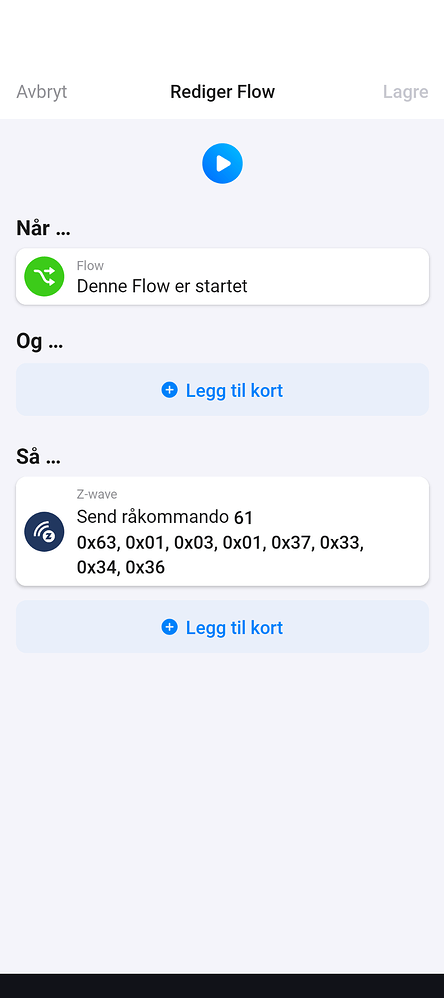
For setting user codes you can do this:
0x63, 0x01, 0x03, 0x01, 0x37, 0x33, 0x34, 0x36
The 0x03 is the index for the code (so like 0x04 etc)
The 0x37, 0x33, 0x34, 0x36 is the pincode. (change the last number in this to get your wanted pin) So this is pincode 7346
Husk å ha kontroll på index koden 1,2,3 så du ikke overskriver dine lagrede.
I meant in the code, as I’m forking the project. But I figured out that I was setting the delete status while trying to set the pin, so the pin code was removed instead  . But now it’s working. I’m adding a group to the settings with 9 pin codes, so it looks like this:

It needs some more work, but it looks good so far.
Nice one. Do you plan to publish the fork?
Yes, that’s the plan. Looks like the original one isn’t actively maintained anymore, so a PR might not help, but I’ll try that first
I think I found a better solution.
I modified the user mapping view to add PIN codes.

Then I added a maintenance button to the device for syncing the PIN codes. It should be possible to sync the PIN codes to multiple locks, but I haven’t tested that.

I made a PR to the app owner, hoping it will be merged:
The alternative is to upload a duplicate app with the changes, but I’m hoping to avoid that. For now I have published the app for testing, so it’s possible to try out. Unfortunately you will have to re-add the lock, since the app id is changed.
Hope you get a PR so we dont need to add the lock again. Lots of flows 

I did make a PR, but no response from the project owner unfortunately
@TedTolboom Are you still working on this app? Any chance you could have a look at my PR for adding PIN codes?
Works like a charm on my ID150 . Thanks:clap:
Update: Looks like only the tree first are working.Wont sync the fourth one.
Also I cannot get a flow to tell me who unlocked the door.
Update: Found a setting for how indexing worked, post and pre v1.6. Changed it and it works fine 
Great. Are you still unable to sync the fourth code? Did you get any error message? It works on my ID lock 202 with four codes, but I guess it could be an issue with sending the codes too fast since it’s one Z-Wave command for each code
@Doekse What’s the recommended approach when someone wants to add features to an app that’s no longer maintained by the original developer? I guess this is not the first case, as it’s quite common with community driven projects.
Adding an app named ID Lock 2 or similar would be a bit weird, and the users would have to re-add their locks.
In this case feel free to get in touch with @TedTolboom, maybe he’s open to publish the code or hand over development to somebody else.
Anyone bothered by the contact alarm being on at random times? If so, any fix to that?
Yes, I have been testing this a bit. The zwave module seems to be unreliable in reporting status changes. A possible workaround is to add a pollInterval (e.g. checking every 5 minutes). That will make sure the status is corrected within 5 minutes, but I’m not sure how much impact that will have on the battery.
I was kind of thinking along the same lines, but rather to initiate some sort of polling after the door reports being locked after being unlocked. Checking every minute or so (or even set a timer to see if it has reported a change itself) after unlock/lock sequence…Or just mount a #¤&#¤ door sensor, which shouldn’t even be an issue.
