Ok, everything else works. Homevolts own app has contact with the battery and Homey has contact with everything else.
When I first installed your app it quickly found the battery. The next day the connection was lost.
I guessed it had to do with the automatic nightly reboot of my router, it could have changed the ip address. So I made that static and when I found no way to change ip-address in your app I deleted the battery from Homey and tried to find it again.
Could it be that the app finds the battery, and identifies it as one already attached?
The message is ”no new item found”.

Version 1.2.1 is out with support for switching between local (local schedules) and remote (schedules controlled by partner, eg Tibber, …) as well as setting and clearing schedules via flow cards.
@Peter_Soderlund ,
Do you mind sharing the Flow you created to (as I understand it) avoid the power tariff peaks?
Hi!
I don’t mind at all, but not sure how to do it properly. So I made 5 print screens, hope you can follow. Only in Swedish.
The flow is not fully automated, just gives me a warning when I am about to exceed the energy consumption of the third highest hour that month.


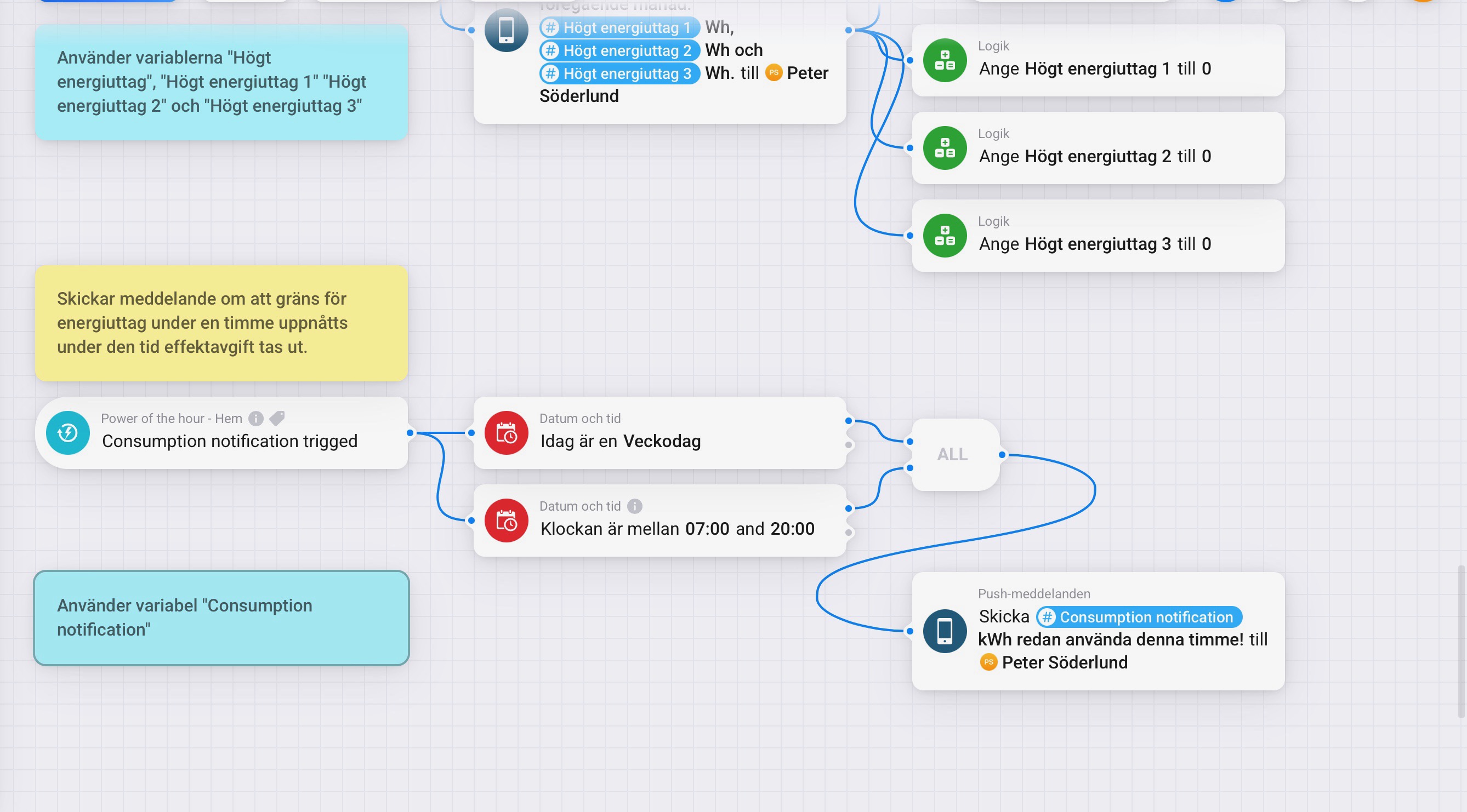
Please feel free to use or be inspired!
Peter
Hi
I have the same problem that after first installed Homevolt in homey all worked fine but after a day nothing worked so tried to reinstall the app and now I can’t add Homevolt again.
Did you find any solutions about this?
Hi,
Can you confirm all basic things are in place in “Getting started” above?
Hi,
all went fine first time i added Homevolt, but after a day Homevold at Homey dident work anymore so i deleted all. But now Homevolt in Homey cant even be find again.
I cant say if i follow this because i am a newbie and not know all i should do here.
Where should i not have a password?
- Ensure the local web server is enabled (without password)
- Install the Homevolt for Homey app
- Add your Homevolt battery and sensors
- Make sure you configure your sensors as per your requirement. If the Grid sensor is your only incoming measurement, feel free to use that. If not, disable the contribution to home energy in the advanced settings.
- If the web server is enabled you should be able to open and see your Homevolt battery using a browser by opening http://yourHomevoltsIPaddress/
- If password is disabled, you will just be able to open the web page straight away. If it is enabled it will ask you for a login/pw when browsing the url from 1. above
- https (ssl/tls) must be disabled. If the url from above is https instead of http it will fail.
Troubleshooting wise I’d recommend that you start by verifying that you can browse to the URL of your battery as per above.
If that doesn’t work, you will need to contact your supplier (Tibber or similar) to enable the web server.
Ps. It’s really strange it worked the first time and then stopped. The only thing I can think of is that they have the web server on during installation and then turned it off remotely later.
Ds.
Thank you for your reply even i not understood really what name i should put in my browser?
But maybe my homevolt was in somekind of service mood when they installed it and after around 24h that is gone.
Sorry, it seems formatting screwed it up, I updated it now.
Thank you and there will come an update later on?
No I meant I updated the post to clarify. The web server needs to be enabled for the app to work m. Step 1 is to confirm it is.
You probably added < > around the hidden text. Make sure to add whitespaces, otherwise you are using the ‘screw up’ system: everything betweem <> gets hidden when posted. It’s like a personal comment/reminder/note you’ll see in create post / edit post mode.
Ah, thanks @Peter_Kawa !
Would it be possible to have the force action cards available.
We have the console commands:
ems_schedule_force -o 1 -p 6000 (Force charging at 6000w)
ems_schedule_force -o 2 -p 6000 (Force dis-charge at 6000w)
Cards like Force Max Discarge / Force Max Charge would be great but card like Force (dis)Charge with a tag value 1 to 6000 would be handy dandy
We now only have cards for schedule or am i mistaken
Hey,
I just looked but according to console ems_schedule_force is deprecated and it’s pointing to the use of sched_set instead. I’ve added two new flow cards for charge now / discharge now. Bear in mind you need to clear the schedule manually after or the battery will remain that operation. It also overwrites any previously set schedules (including remote set ones).
I’ve submitted a test version v1.3.0. Please give it a go and let me know if you spot any issues. I’ll leave it in test for a while.
Hi!
Now Homevolt has activated the webserver in the battery and the battery is found by your app. So far, so good.
But now the app says Error fetching data.
The battery is connected to wifi, I’ve tried restarting the app, Homey etc.
Any ideas?
/Leif
Hi!
I finally tried to enable the Homevolt web server in order to be able to use the Homevolt app. It worked fine and here is a slightly more detailed description of how to do it.
- Remove the cover of the battery.
- Press the left button on the inverter for 3-5 sec to enable service mode. The blue led will flash and turn to steady green when in service mode.
- Connect your phone or computer to a network with the name format: HVSM-XXXX-XXXX-XXXX (= SSID of the Homevolt web access point).
- A web page will appear automatically (if not, try http://10.133.70.1).
- Choose “Params” in the menu.
- Scroll down to parameter 39 “webserver_force_enable” and change from “false” to “true”. Save!
Scroll down to the bottom of the page and click the button “Store params to flash”. Make sure you get a confirmation. - Press the left button on the inverter for 3-5 sec to leave service mode. The green led will turn back to blue.
- The other requirements for using the app (no password and no https) were already set in my Homevolt battery. But there are parameters for that as well.
- Install the Homevolt app.
- when everything works, put the cover of the battery back on again.
Enjoy!
Hi again Hyper!
I finally fixed the enabling of the Homevolt web server and installed your app successfully. Now I am eager to start designing a flow that will help me reduce the maximum power consumption on weekdays, daytime.
two questions:
- If I use the app to set the battery in “local” and use the card “Ladda nu med 1 W” (Swedish version of Homey Pro), it will (almost) shut off the charging of the battery when necessary?
- And by setting the battery in “remote”, it will go back to the the Tibber control again, i.e charging with full power when appropriate?
