Hi
i’m looking at the 2K battery version, without homebase (the additional unit)
Will i be able to connect it to homey without any homebase?
thx
Hi
i’m looking at the 2K battery version, without homebase (the additional unit)
Will i be able to connect it to homey without any homebase?
thx
Nope, the version without homebase is for when you already own a homebase.
ps. Did you see this link from @DON-PAPA in another topic:
https://www.cyberport.de/pc-und-zubehoer/netzwerk/netzwerkkameras/eufy/pdp/5b41-00k/eufy-video-doorbell-2k-batteriebetrieben-inkl-homebase-2.html
Not completely true, I bought this version without homebase - it works with the Eufy app and also with Homey -again, no homebase.
But you lose the option to add other camera’s that require a home base I guess?
You can wire the battery version? That sounds interesting, how did you do that?
On the back of the battery version to still find two contacts for continuous power 
Edit: found a picture on Google:
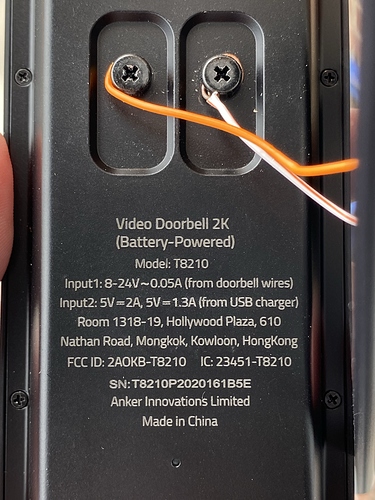
That’s amazing 
Currently using another doorbell, cause I could not find any others that fitted my needs, with this option 1 more thing is checked off my list, so if I can’t get my current doorbell connected to homey (still trying to work around some issues with that one), this seems to be a good alternative, although a bit expensive
Out of curiosity; what are the other things on your list?
Regarding the price; know that the doorbell (incl base) often is being discounted to €149 in the Netherlands
Yeah even saw one on Pepper.nl, from https://www.cyberport.de/ and they sell it for 129€ excluding shipping, and if you sign up for their newsletter (and unsubscribe afterwards ofcourse) you even get 5€ discount. Shipping is 9,99 to the Netherlands, so for 135€ it seems to be a goog deal.
Pepper link: eufy Video Deurbel 2K werkt op batterijen incl. Homebase 2 - Pepper.com
Thats a really good deal indeed!
Just ordered one to play around with, although i still hope I can get my cheap doorbell to connect to homey someday (and then pick one and give the other one to a friend who recently started using homey as well). So for now, just have to wait a few days I guess
When used wired, make sure you keep your original doorbell (edit: chime) in the circuit too. You can turn on or off if it rings when someone pushes the button. If you don’t the doorbell may short circuit your adapter.
Also make sure the adapter delivers enough power. I had a low power one which didn’t help, when I put in a heavier one it did. You can tell in the Eufy app, it either shows a battery or a power plug.
With doorbell, I believe you mean the chime (gong)?
yes, not the button of course.
You need an adapter from 12V - 24V I believe. I don’t understand your part of the chime. Why would you short circuit the adapter when using the doorbell? I’ve just seen pictures of the adapter directly wired to the Eufy doorbell. I’m using the Homey to ring some wireless chimes etc.
If your part is true (which may seem so, otherwise you wouldn’t write it like that) have you got an alternative? I don’t have a chime anymore…
It is supposed to act like the push button for the original chime. So in order to let the original chime ring, the circuit will be closed when the button is pushed. It will depend on the resistance of the Eufy, but that should be low if it has any hope of making the old chime work.
So any charging takes place while the Eufy is placed in series with the old chime.
There are different versions of the doorbell, so it may be different for versions that cannot be used with the original chime.
In the following Dutch post you hear people saying it can be done, but it ends with some-one saying the fuse of the adapter blows when the button is pushed, as I explained:
https://gathering.tweakers.net/forum/list_messages/2032036
The Eufy has an option to assume a digital chime, and also a selection not to ring it. I tried that hoping it would allow me to prevent the adapter from being short circuited, but alas. Luckily I had other adapters and an old chime lying around. I do use the setting not to ring it. Even so, I’m happy it is safe to use now. One wrong setting would blow it out again, if in a year or so I’d forgotten why disabeling the old chime was important.
Before that I had it wired with a relais connected to a Fibaro smart implant (my origial smart doorbel implementation). That relay was enough to prevent the short circuit, but the charging current for the Eufy also proved enough to keep the relay closed. So the Fibaro kept in alarm state after the doorbell was pressed the first time.
I found a bug (I guess), it seems like the (internal) ID’s(?) of that status’ aren’t fully static to its name(s).
I have now 3 pan and tilts, and they all have a bit of a different responce to status’, for example:
2 cameras have 1 custom status where:
“Custom 3” is that custom status.
“Home” and “Away” are correct.
1 Camera has 2 custom status’ where:
“Custom 3” is the 1st custom status;
“Custom 2” is suddenly “Home”,
“Home” doesn’t do anything,
“Custom 1” is the 2nd custom
“Away” is correct
@Caseda
I’ll check that, I have 1 pan&tilt.
The id’s are hardcoded in the app and they are always the same in Eufy.
Did you try via a flow or via the quick menu?
Both, flow and the capability give the same (weird) result, further it works perfect as long as I have a delay in between any commands, I guess eufy doesn’t expect an asynchronische communication
@Caseda Yeah that’s on my list. Everytime it reconnects to it’s base-station, we have to find the Port. So 2 calls at the same time will get 2 different ports. So I already had some queue in place. But that only works in the Then part of the flows.
