With version 1.8.18 changing the guard mode works perfect, no need to restart the app every 24h anymore. Great job Martijn!
Hi Martijn,
I try to login, but receive an error.
Can not read ‘property’ reverse of null.
Did I something wrong?
Hi @Peter_Br ,
I see there’s an issue in the app.
Will make a fix for it.
Still that wont solve your problem.
Propably you created an extra account in the eufy app And sent that account a invite. But you didn’t accept the invite.
Best way to do that:
- Logout in the eufy app
- Login with your extra account
- Accept the device sharing
- Logout with your extra account
- Login in the Homey-Eufy app with your extra account
Let me know if this solves your problem
This is the procedure I did.
The extra account is visible in the eufy cam app when I login with the main account.
Under ‘ gezin en gasten’ the second account is visible and shows 4 cameras.
I receive also the error: Response code 401 (Unauthorized).
Do you have Two factor Authenticaton enabled?
That doesn’t work in the Homey-Eufy app.
If you want you can enable DEBUG in the settings and send me your ACTOR_ID. Then I can take a look at the logs tomorrow
Did you also login with extra account in the official Eufy app?
In my opinion 2FA was diabled.
But it wasn’t.
Thanks a lot for yor support!
And for nice app!!
And the wired version has a 3-second pre-recording feature. So it records the 3 seconds before any event occurs. That is the reason why I chose that one.
There is now also a door lock available from Eufy.
Is it possible to use it in the future with Homey?
For both the Smartlok and the Keypad it would be a great addition, together with the other products of Eufy that can already be used with the app.
@J_Pouwels , for now there’s no sign this is going to work with homey. Homey to Eufy is a one way communication. Do sending commands work but receiving commands from keypads is not possible right now.
It’s on my list to Investigate.
Currently i’m working on integrating the door sensor and motion sensor.

1 Like
Is there a way to get the images full screen on my phone and or iPad when there is motion or click on my doorbell.
With the notifications from the Eufy app and Homey as push notification I only see there is a notification and need to click on it to get it fullscreen.
I searched but came up with nothing so far.
Thanks
Hi @Heula ,
I’m also not aware of something like that. Casting An image works for example with Google home. But on an iPad i dont know
Yes, I know that with Google Home this possible and also with pipup on my shield tv.
pipup is not useable on phones.
So it should work on a Google Nest Hub?
@Heula , Yeah I would say so. If you can access that via the chromecast app on Homey then it should work
Thanks.
FYI:
Homey V5 went live today.
Eufy is supported with V5 so no issues when you update.
Hi,
first I have to say that i like your eufy app, works great with homey 
but is it possible to combine the “video doorbell” with “NUKI smartlock”? I want to open the door with a push on a button in your eufy app.
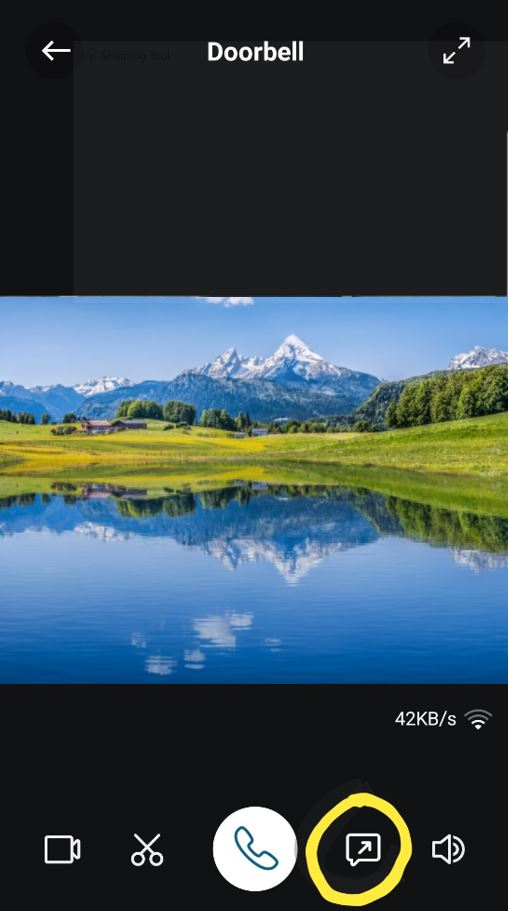
Maybe you could do something with the marked button? so that you can create a flow with it?
Hi @spuki05 ,
Via Homey flows you can combine devices.
The icon you show in your image i don’t know. I don’t own a doorbell. What does that icon do?
with that icon you can give a automatical short answer
@martijnpoppen send a prerecorded message 
