Great, thanks!
Best regards
Martin
Great, thanks!
Best regards
Martin
Hello Martin,
Regarding support for the Sunricher Push Button Coupler SR-ZG2833PAC:
This device is quite special as it’s a Green Power type Zigbee device, which cannot be connected like regular Zigbee devices. I’ve recently reviewed Homey’s documentation and couldn’t find any information about Green Power device support.
This issue has been discussed previously on the forum without a clear resolution. I’ve already sent an email to Homey’s official support team inquiring about this matter, but haven’t received a reply yet.
Based on the current situation, it seems highly likely that this device cannot be supported. If I receive any response from the official team, I’ll update you with that information.
Best regards,
niracler
Thanks a lot!
I have asked Sunricher about this, and they replied:
“We have tested that there is no option to add Sunricher green power devices in the homey APP. So our R&D department has sent email to engineers in Homey to find out why and try to find a solution for this."
Best regards
Martin
Thanks, I’ve applied for samples from Sunricher. Contains ZV9001T4 DIM/CCT/RGB.
Hello all,
I am looking to use SR-ZGP2801K4-DIM-G2-E and SR-ZGP2801-K4-E smart switches. Anybody used these?
Thanks
I have confirmed with Homey officials that there are currently no plans to support Green Power devices.
The SR-ZGP2801K4-DIM-G2-E and SR-ZGP2801-K4-E you mentioned are both Green Power devices, so they may not work properly with Homey.
Thanks for quick answer,
Do you know what is the difference between standard and Green Power devices?
Would there be any way to to try to integrate these by oneself? Scripts? What would you suggest?
Testresult 1.2.5
Very nice work with the flowcards. I made some testing and this is what i found:
Turn On-card = Works as expeted for 1, 2 and All. (Pass!)
Turn Off-card = Works as expeted for 1, 2 and All (Pass!)
Toggle-card = some minor issues
Input → Output
Both off → Both on (Pass!)
Both on → Both off (Pass!)
Ch1 on, Ch 2 off → Ch 1 off, Ch 2 off (Fail! Should be Ch 1 off, Ch 2 on)
Ch1 off, Ch 2 on → Ch 1 on Ch 2 on (Fail! Should be Ch 1 on, Ch 2 off)
So, theres some kind of missbehaviour for channel 2 on the toggle-card.
Thank you for your clear feedback. This is something I hadn’t considered before, and your expectation is reasonable.
I’ll make some adjustments.
Hi, please try this test version, it’s in review.
You’re faster than Sonic the Hedgehog! Good job!
So, I realized that I had done half the job by testing only the Then-cards. Now I’ve tested all of the flowcards and this is the result:
WHEN CARDS
Turned on Channel 1 (Pass!)
Turned on Channel 2 (Pass!)
Turned on Both (Discussion!)
This is a little tricky. If I use the device tiles (don’t know if that is the correct term - see picture below), and use the first option “Activate” as a trigger, both channels are activated AND the card fires. (Pass!)
BUT, if I turn the channels on individually, one at a time, the card doesn’t fire. I would guess, that it should be more usefull to fire the event when the state “Channel 1 is ON AND Channel 2 is ON” becomes TRUE. I think this solution also captures the “Activate-case” above.
I think the same reasoning goes for the turned off-card.
AND CARDS
Is turned on Channel 1 (Pass!)
Is turned on Channel 2 (Pass!)
Is turned on Both (Pass!)
THEN CARDS
Togge-card missbehaviour solved! Works as expected! (Pass!)
Again, my greatest appreciation for an excellent job!
Hello Jon !
ZV9001T4 DIM/CCT/RGB are all support now.
Hi, Magnus
I’ve carefully considered the issue you raised.
The activate, channel1, and channel2 buttons are designed to correspond directly to the triggers Turned on Both, Channel 1, and Channel 2. These triggers are not intended to reflect the state of both lights.
If we were to design it so that turning on channel 1 while channel 2 is already on triggers both channel 1 and both, then pressing activate would also trigger all three: both, channel 1, and channel 2.
This would unnecessarily complicate the card’s functionality. Therefore, I intend to maintain the original design and suggest using the And card for more complex scenarios.
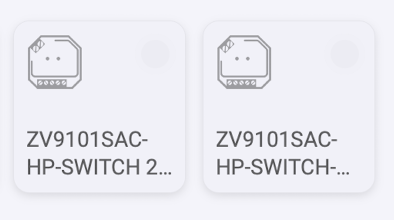
Additionally, it’s important to note that the ZV9101SAC-HP-SWITCH-2CH device will appear as two separate devices once connected. So, there’s no need to further differentiate between channel 1, channel 2, and both.
Thank you for sharing the design considerations and I lift my hat for the and-card solution proposed. That’s a more elegant way of reaching the goal without add more complexity into the your app.
I suppose I will have to reconnect the device to get the separate cards, or will that just happen magically when upgrading to next version?
Thank you for beeing so responsive and genuinely open to improve the app based on user needs. That’s five bright golden stars in my book!
The ZV9101SAC-HP-SWITCH-2CH, as a ZWARE device, was originally designed to appear as two separate devices. I initially planned to change this today, but I realized that the current approach is better, so I decided not to proceed with the change.
There has been no version release today. Zigbee devices will continue to follow the previous design to avoid impacting current users.
I have Homey pre-2019 model and the EasyLightning app installed. The app suddenly stopped working yesterday. I tried to reboot Homey, but it didn’t help.
I have had the app and devices for about a month, and the first problem appeared a week ago. Then reboot helped. Now, it doesn’t help.
When I attempt to control a device, I receive an error message stating, “Device is unreachable.”
All other apps and devices appear to function correctly.
I found this message from the forum https://community.homey.app/t/easylighting-app-stopped-working/135268, which suggests that I am not the only one having problems.
My devices are in difficult-to-access places, so I wouldn’t like to try to remove the app and reconnect them to test if it helps, if I’m unsure.
The devices are:
Sunricher HK-ZD-CCT-A
Sunricher ZG2833K8_EU05
Sunricher ON/OFF
Hello! I haven’t been able to reproduce the issue you’re experiencing.
Would you mind sharing more detailed screenshots or logs to help us better understand the problem?
Additionally, I’d like to know if all your easylight devices are showing the ‘Device is unreachable’ error message, or if it’s just affecting some of them?
Hello
I’m new to Homey still finding my way around. I have several Sunricher RGBW LED controllers (model SR-ZV9101FA-RGBW, the OEM version of RGB Genie’s ZW-1002).
Apart from basic on/off/dimming through generic ZWave driver, is full colour control supported for these as yet through a specific driver? If not, please is it possible to add support for these?
Many thanks
John
First of all, welcome to the Homey Community!
To make sure you are aware of the forum rules, please read the Welcome to the forum! post here.