Hi, I need your help. Add this ZV device to the homey gateway, then in the advanced settings page of the device, find the manufacturer ID, product type ID and product ID and provide them to me.
Thanks for the reply 
Here are the device details for the Sunricher RGBW LED controllers:
Manufacturer ID: 816
Pproduct Type ID: 512
Product ID: 53250
The publicly available manual for the device (with all the Command Classes) can be found here: https://www.sunricher.com/media/resources/manual/SR-ZV9101FA-RGBW%20Instruction%20V1.pdf

Many thanks for confirming 
Thank you for making this!
Would it be possible to add support for ZG2819S-DIM?
Hi, @olaberg .
The device ZG2819S-DIM is now supported in the test version. You can try it out via the following link:
Thank you so much @niracler! You are a legend! It works
Hi @Easy_Home , @niracler and thanks for a great app.
I’ve added the ZG9001T4-DIM-EU, and it mostly works, but I have an issue.
Btw., I looked on the GitHub repo that was linked somewhere in this thread, but I couldn’t find the code for the driver. Is the repo or this thread the correct place to ask?
Anyway, my problem is with the scene selections: I can’t seem to make the flows trigger.
I suspect it is because the cards say “Group X scene X long/short press”. I don’t think the group is relevant when selecting scenes (I certainly don’t want to use that, I simply want to click a scene), and I suspect no group is sent when a scene button is pressed.
Can you help?
For this device, the group is necessary—it sends recall and restore scene commands specifically to the selected group.
The top row of buttons on this device corresponds to group 1, 2, 3, and 4.
However, I have updated the design of this card. Now, the specific scene will send to the device as a token.
For example, you can configure it as shown in the two images.


Here is the test version
Hi @niracler , and thank you for great work on the EasyLighting app!
I have the Sunricher ZG9095B Thermostat, which works great with this app. I was wondering if it’s possible to make the following improvements:
- Make the status indicator on the device card configurable (eg. showing room temperature). Right now it’s not allowing me to select anything.
- I’m not sure if this is functionality in Homey or the Device, but there is an option to set “Power usage when on”. Is it possible to get the device to report usage so it shows up in the Energy section of the app?
Hi @wallin
Thank you for your optimization suggestions. I will apply for equipment to see how to design it. I have a lot of work arrangements recently, so it will probably take one to two weeks to give you accurate feedback.
Hi Easy Home,
I hope all is well 
I’m trying to add a Sunricher SRP-ZV9105-75CC Z-Wave Dimmable LED Driver to my Homey (EU frequency, 868.42 MHz), but I always get the same error:
“Unable to connect — Something went wrong while adding the device.”
I’ve tried multiple approaches:
-
Using the Sunricher app, ROBB Smarrt app, EasyLighting and Generic Z-Wave device
-
Factory reset of the device before each attempt
-
Adding both secure (S0 / S2) and non-secure
-
Creating my own custom app using the correct manufacturer and product IDs
-
Even forcing
"secure": []to disable security completely
In every case, Homey shows “Unable to connect” (sometimes request_timeout) and the app log shows no activity — meaning the pairing never actually starts communication.
Using Silicon Labs PC Controller (Simplicity Studio):
-
The device includes successfully and responds to commands normally.
-
Here’s the information from the Z-Wave log:
Manufacturer ID: 0x0330  (816)
Product Type ID: 0x0200  (512)
Product ID: 0xD002  (53250)
Z-Wave Plus Version: 2
Role Type: Always On Slave (AOS)
Node Type: Z-Wave Plus Node
So my driver.compose.json looks like this:
"zwave": {
  "manufacturerId": [816],
  "productTypeId": [512],
  "productId": [53250],
  "secure": ["S0", "S2_UNAUTHENTICATED"]
}
Still, Homey always fails with a timeout before reaching the onMeshInit() in the device driver.
It looks like Homey can’t complete the secure inclusion (S2 negotiation), or the product ID is not matching internally.
Interestingly, the same device includes and works fine through the Z-Wave PC Controller, so the hardware itself is okay.
Has anyone managed to include Sunricher SRP-ZV9105-75CC or a similar Z-Wave dimmable driver with Homey?
Is there any known issue with S2_UNAUTHENTICATED negotiation or Z-Wave inclusion timing on these devices?
Would forcing Homey to include non-secure only be possible through the app manifest?
Thanks in advance for any help — I’ve spent quite a few hours debugging this one and would really appreciate any insight.
hi @yuriestevan
If possible, could you send us a photo of your device? We’d like to check some details on the label, like the production date, to confirm which batch it belongs to.
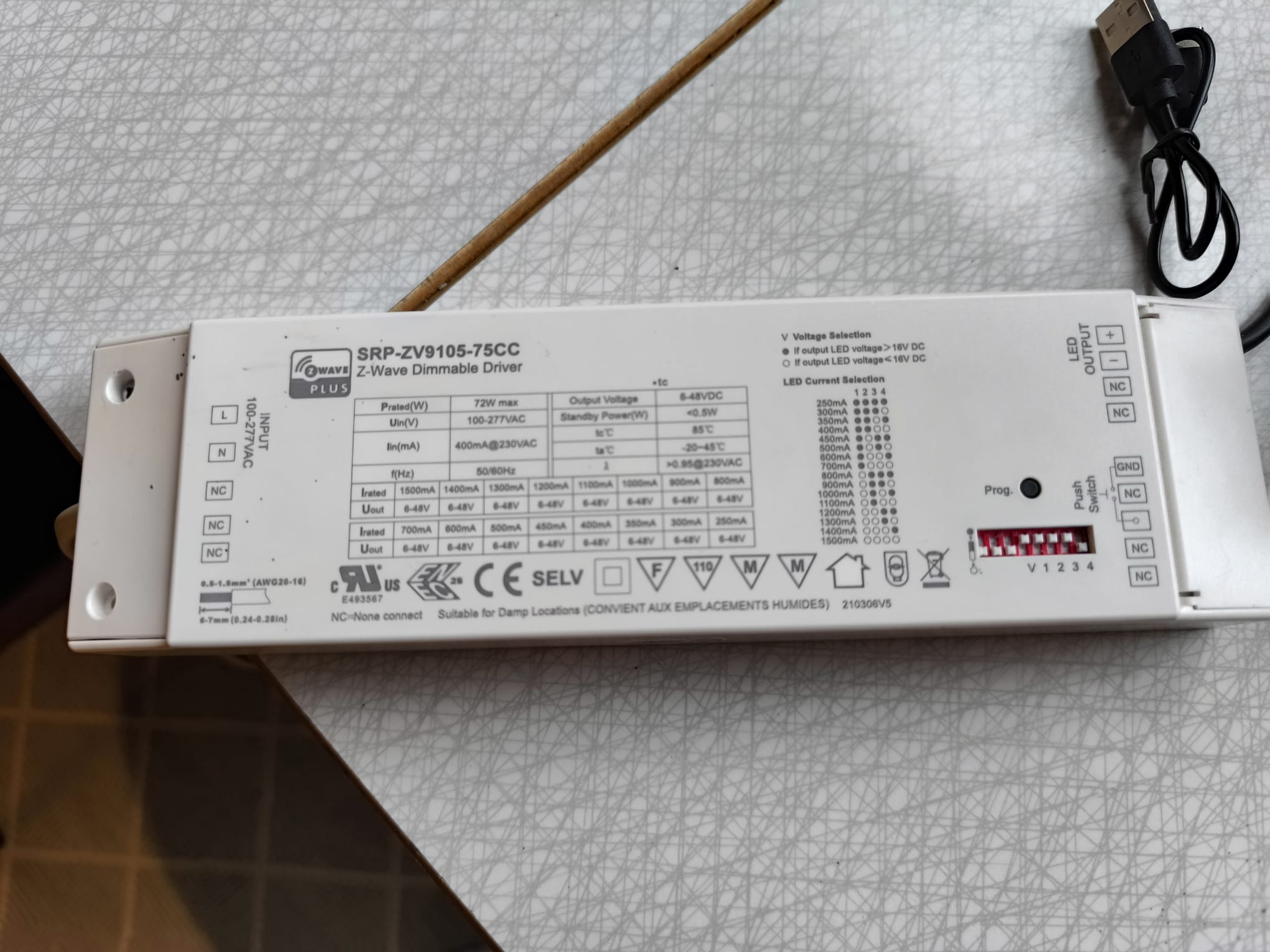
It would be amazing if you are able to make this work! I am very committed to these drivers, and they worked fine in my old homey.
thanks for your hard work,
Robin
Dear @Easy_Home ,
I’ve just got a demo package form Sunricher again, it contains a SR-ZG9030A-PIR which seems to be not supported, while SR-ZG9030A-MW has support for long. If you can duplicate the driver I can test it almost immediately.
Thanks,


Other issue with ZG-9030F-PS:
Motion alarm timeout can’t be adjusted, seemingly it’s 5 minutes by default. Is there any setting in the sensor what was not integrated into advanced settings in the user interface? After interviewing the device i found some setting:

Could you please implement this feature into advanced settings of the device?
@Fac3 Hi, I need your help. Add this SR-ZG9030A-PIR device to the homey gateway, then in the advanced settings page of the device, find the manufacturer ID, product ID and provide them to me.
Can i upp this? @Yriestevan who is also in this thread is an engineer friend who is helping me with this. Is there anything we can do to facilitate getting this to work in the app?
Thank you
Robin
