It worked for three weeks and again it lost its connection. Disconnect it from the power supply and reconnect, but it still doesn’t work. So I’ve deleted it again. Now i’am in the situation were the device can’t be found anymore… I’am dreaming of a world of stable Matter devices. Homey and APIs, it’s just not a happy marriage.
Hello everyone. I would like to express my gratitude for this application, as it has been working stably for about a month. I can say that the application never launched for me. I read the entire thread and did not find one thing about humidifiers like the Dyson ph04. Is it possible to get a trigger when the water runs out? I assume that when the water runs out, the “Humidification mode” should turn off, which could be the trigger that the water has run out, but in fact, this mode does not turn on or off for me. I try to turn it on manually, but it immediately turns off, regardless of the fact that the humidifier itself is working in this mode. Please tell me, are my assumptions correct? If so, then how can I make the application see the “Humidification mode”. Thank you!!!
Hi Evgeny,
Since I do not own a Dyson Fan that has the Humidifier functionality, I had to guess at the right implementation and haven’t been able to test that part.
However, if the app finds your Dyson device, you should be able to see and set the Humidifier mode and also set a Humidification Target. I have not (yet) seen a way to detect if the water reservoir is empty. Is this something you can see in the original Dyson App?
Reading your message, I’m a bit unclear as to how far you got using the app. Can you describe for me exactly what works and what doesn’t?
Cheers,
Mark
Hi Jan and Niels,
Did you have any luck reconnecting?
When I have some free time i’ll introduce a version that allows you to bypass the Homey device detection features and enter an IP-address manually. It shouldn’t be necessary but hopefully that will permanently fix this for you guys.
Cheers, Mark
Hi Ronwell,
This should no longer be a problem using the most recent version that I just published.
If the issue persists, please send me a PM and I’ll try to figure this out with you.
Cheers,
Mark
Good day. Thank you for your attention to the issue. In order:
- All functions work without problems, except for the “humidification mode”. Automatic mode, night mode, fan speed, blind rotation, etc. work.
- Regarding the “humidification mode”, if you turn it on through Homey, it turns on, but turns off after 2-3 seconds.
- In the native application, when you open it, there is information that the water container is empty.
I can test fixes for efficiency on my Homey by installing it through the CLI
Hi Mark,
Until one minute ago the device was still not listed. But I was able to connect again. Your suggestion of connecting the IP address manually sounds great. Thanks for all the hard work.
G,
Niels
As far as I can see there are 226 active installs of the app at this time of which 6 people so far have reported an issue with detection of devices. So at least it doesn’t seem to be a widespread problem.
The diagnostics i’ve received so far either indicate that for those people the devices either cannot be found at all (5/6) or the devices are found but something is blocking the connection to the ip address of the device on port 1883 (1/6).
Most should therefore be helped with a manual IP input option. I’ll try to add this some time after the holidays.
For now, happy holidays everyone!
Cheers,
Mark
just seen your message, yes its still happening, when I press the power button i this pop up
Missing Capability Listener: onoff
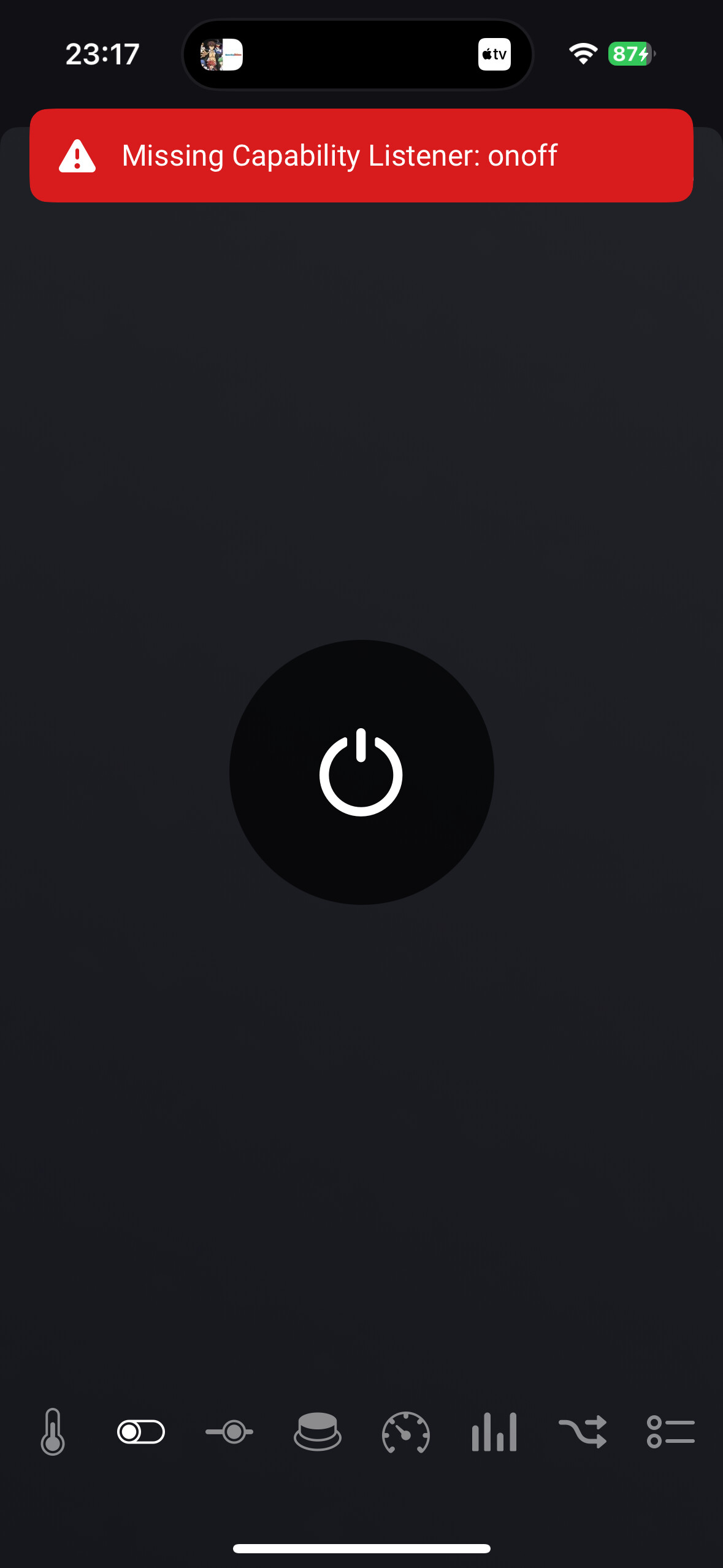

I am experiencing the exact same problem. The same device works via the app but the on/off button does not work via homey
I’m also having the same issue, in homey the Dyson fan started showing Device Unavailable so I deleted it and when I try to add it again its not finding it
Got the same until I signed out of the Dyson (company) app, opened it again sign in and joined my machine again in the Dyson app. After that this app recognised my fans
Maybe asking an obvious question, but does this app work with infra-red controlled Dyson fans ?
I had my two Purifier Hot + Cool fans connected in Homey Pro. Last week my network went down and when it came back online my fans would not reconnect. I deleted them and have tried to add them back with no luck. I keep getting the “No new devices have been found.” message. I’ve signed out of the MyDyson app, rebooted my phone, signed back in, and tried to add them in HP and get the same thing every time. They work fine in the MyDyson app. I’m in the USA so I’m assuming the country code is US but maybe entering that incorrectly? Any suggestions on what to try next after greatly appreciated.
Nice! The app works, but not sure about the quality of the readings. For example: the Dyson app itself says my air quality is good, while homey shows a completely different value (7). How to change this?
Oh and is there a widget?
I’ve been trying to include my dyson fan (Dyson Pure Cool PC1) with this app to Homey.
It will discover the fan just fine, and include it, but it keeps toggeling unavailable back to available, and no capabilities are included, so it kinda looks like it never gets the information or can’t get a connection at all.
Can you see what is going on? i’ve send a report to you, hope you can help me connect it.
Running on a Homey Pro 2023, but also tried on a Homey Pro 2019 with the same result unfortunatly.
The diagnostic code: be32cfcd-2397-447e-a3d0-7c62c7918730
In this thread you do say that it is either not finding (which it is), or the IP refusing, but don’t think anything should be blocked towards the fan in that manner.
Thank you in advanced.
Hi Caseda,
Thanks for adding your username in the diagnostic Report. Normally I have a hard time finding the person who sent it and then I cannot help.
Your case indeed looks different from other reports I have seen. Mostly, issues seem to be related to network detection issues, for which the app relies on the detection protocol of Homey itself.
In your case however, the device seems to connect just fine but then immediately disconnects and reconnects. This is repeated many times until a connection reset occurs.
I don’t have a solution for you on hand. Did the app work for you before or has it never worked? Can you connect it successfully using the other Dyson app?
I’ll see if I can do some research on this in the coming weeks and then I’ll also look into creating a version that doesn’t rely as much on Homey for device detection.
Cheers,
Mark
This is interesting! The issues some of you are having when you cannot find the device again might be related to some kind of credential caching. Weird that I’ve never experienced that myself, but i’ll also look into it.
I only have the fan for several days, so hadn’t much time to use any apps.
I’ve tried Athom’s app, but they say my particular fan isn’t supported yet  , there it is pretty much the same behaviour, I can include it, but never get any communication with the fan.
I pretty familiar with Athom’s apps (also coding wise), so if I can help you in any way, let me know.
