@Mithrandir86 please send a new report
@Mithrandir86 can you try this?
https://seatid.vwgroup.io/landing-page
top right click login
This works
@Mithrandir86 did you get a T&C notice?
No
@Mithrandir86 I don’t have a VAG car to reproduce this. Are you willing to temporarily share your account with me?
If yes i’ll contact you via DM
There is probably nothing left for me to achieve a successful result
@Mithrandir86 it’s not a must ofcourse. We can also wait for somebody else who’s willing to share 
I understand and we will try
This update tries to fix the Terms and Agreement error. After login in in Homey you might need to logout and login on the app on your phone to get it working. The VAG API expects a german consent in the APP.
New app update ( LIVE: 1.27.1)

Changelog:
- NEW: Terms and conditions API change in SDK
New app update ( LIVE: 1.27.1)

Changelog:
- NEW: Terms and conditions API change in SDK
New app update ( LIVE: 1.27.1)

Changelog:
- NEW: Terms and conditions API change in SDK
New app update ( LIVE: 1.27.1)

Changelog:
- NEW: Terms and conditions API change in SDK
New app update ( LIVE: 1.27.1)

Changelog:
- NEW: Terms and conditions API change in SDK
If you find any issues, send a report via the mobile homey app
More - apps - AppName - settings wheel right top - send diagnostic report (put your email in the input field to make it easier)
[Removed]
@LukasBr after the update I made you only had to logout and login again and it fixes itself
The country switch is already handled by the app
Could you maybe remove your comment to prevent confusion for other users? 
Ah, no worries. I tried many things, but it felt like it only worked after I did the switch manually, but maybe I wasn’t patient enough. 
Yes, I can also confirm because my VW Golf GTE (8) did also not work anymore.
I logged out of the origine app and logged in again and after that it was possible to see my car again in the Homey app.
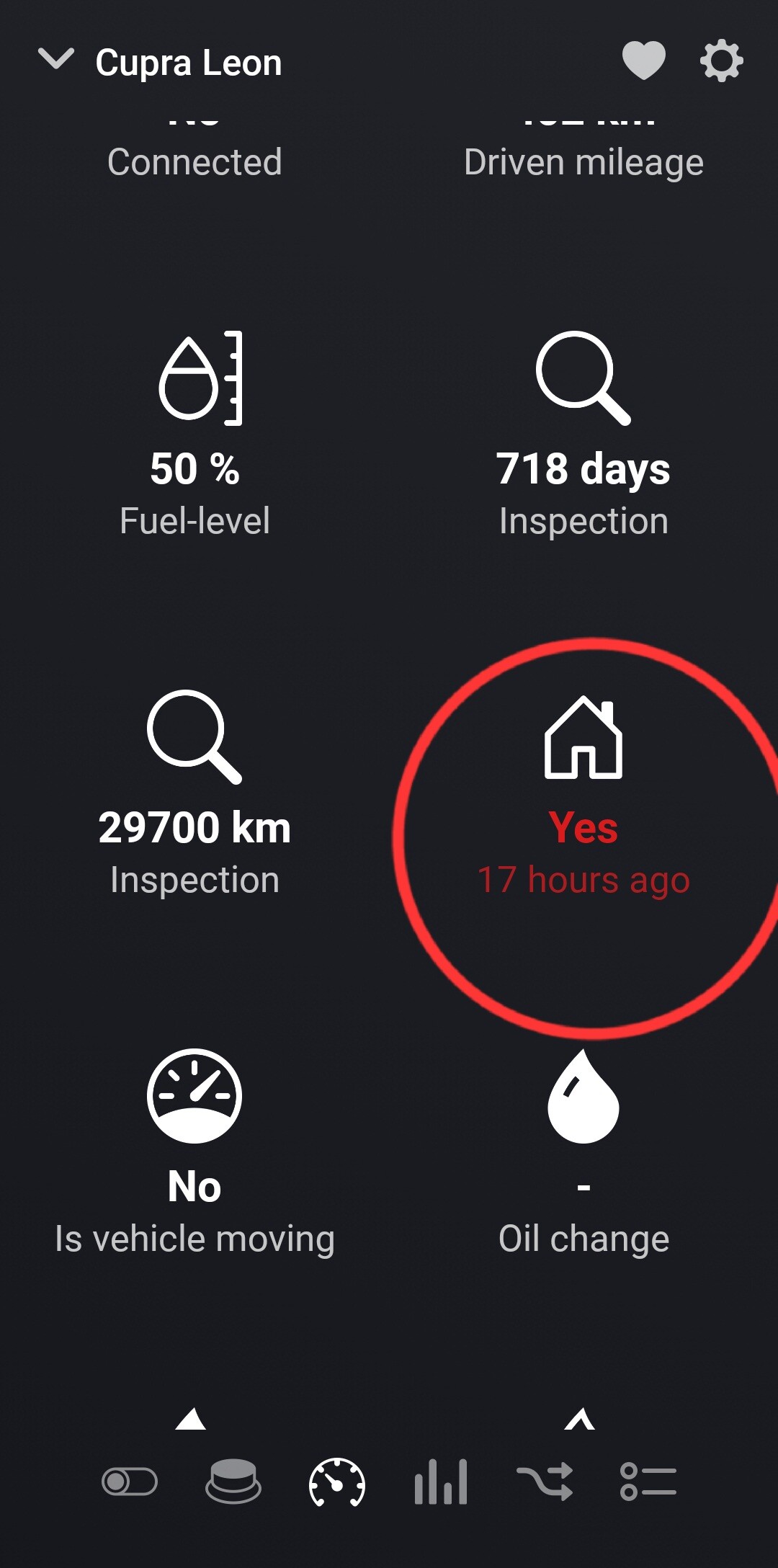
I have one more problem… In homey, the status of my fuel tank, for example, is automatically updated after a set time, but it is not updated whether the vehicle is at home or not. I have to restart the application to update. In the My cupra application, it works normally.
@Mithrandir86 please enable debug in the device settings and send a diagnostic report
Done
@Mithrandir86 in the logs I do see a change in the is-home so looks like it’s working
When I had an update interval of 5 minutes and left home in the morning, it showed at home until the afternoon and only after restarting the application did it fix itself. I set the update interval to 30 than and the switch happened, but with a delay.
What value of update interval is the best?
I tried again with different update times…everything works and updates, but vehicle at home still shows it as yes. Only restarting the app helps, but the value then stays the same again. In the My cupra app, the location changes, so I don’t know what the problem could be.
I’m attaching a screen when I was away from home for 1 hour, but the homey app didn’t recognize it.
However, everything else (vehicle moving, connected, fuel Level…) works.