I don’t think this can be compared. It really depends on when which value is updated and that’s why it might not be the same.
Send me 5 screenshots (with a difference of one hour) and if the values are the same everywhere, send me also a diagnostic report. One screenshot is not conclusive.
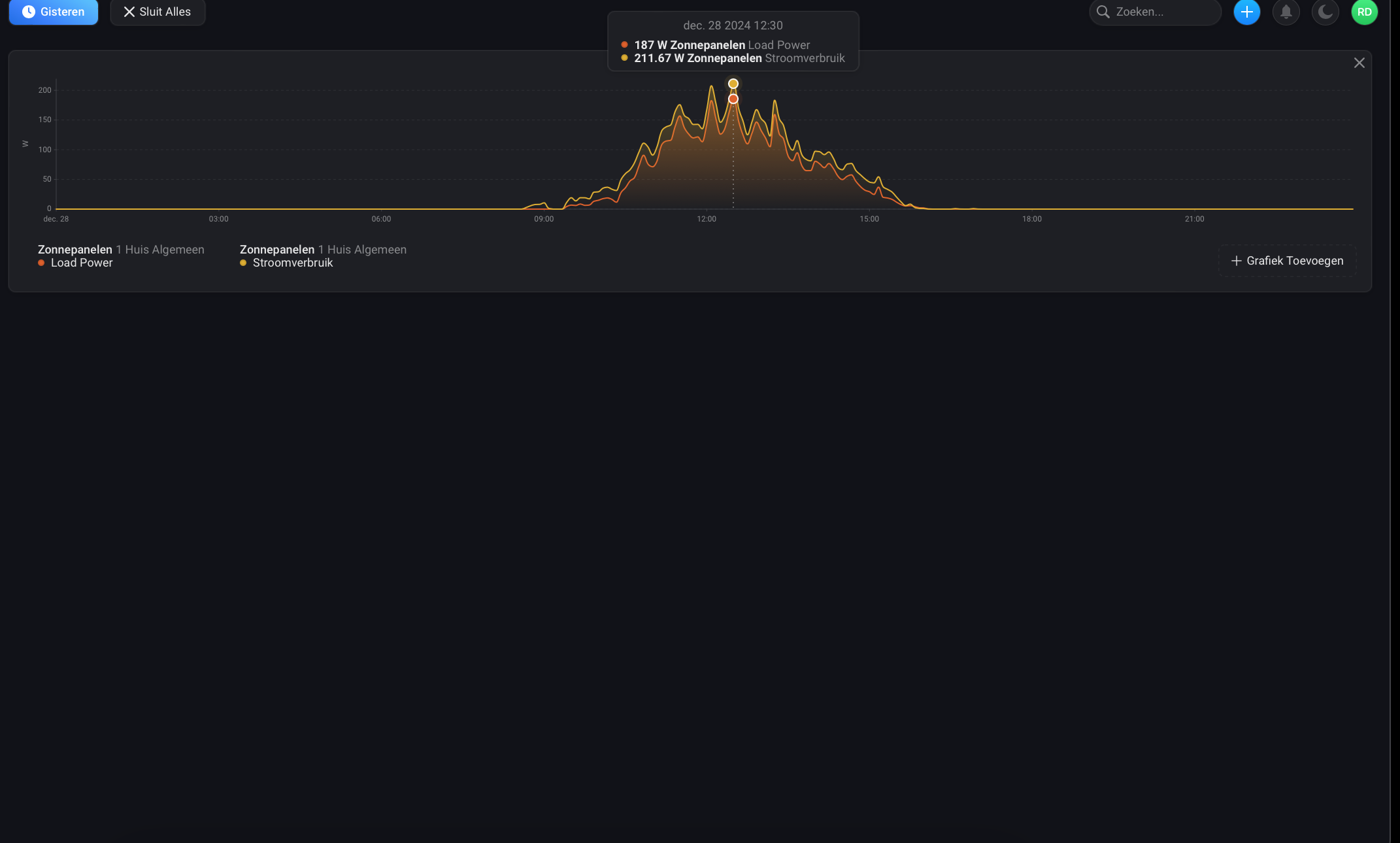
both are the same logic only one before the update and one after the update. as you can see yesterday before the update there was difference in both value, which corresponds to the insight on the solax own site.
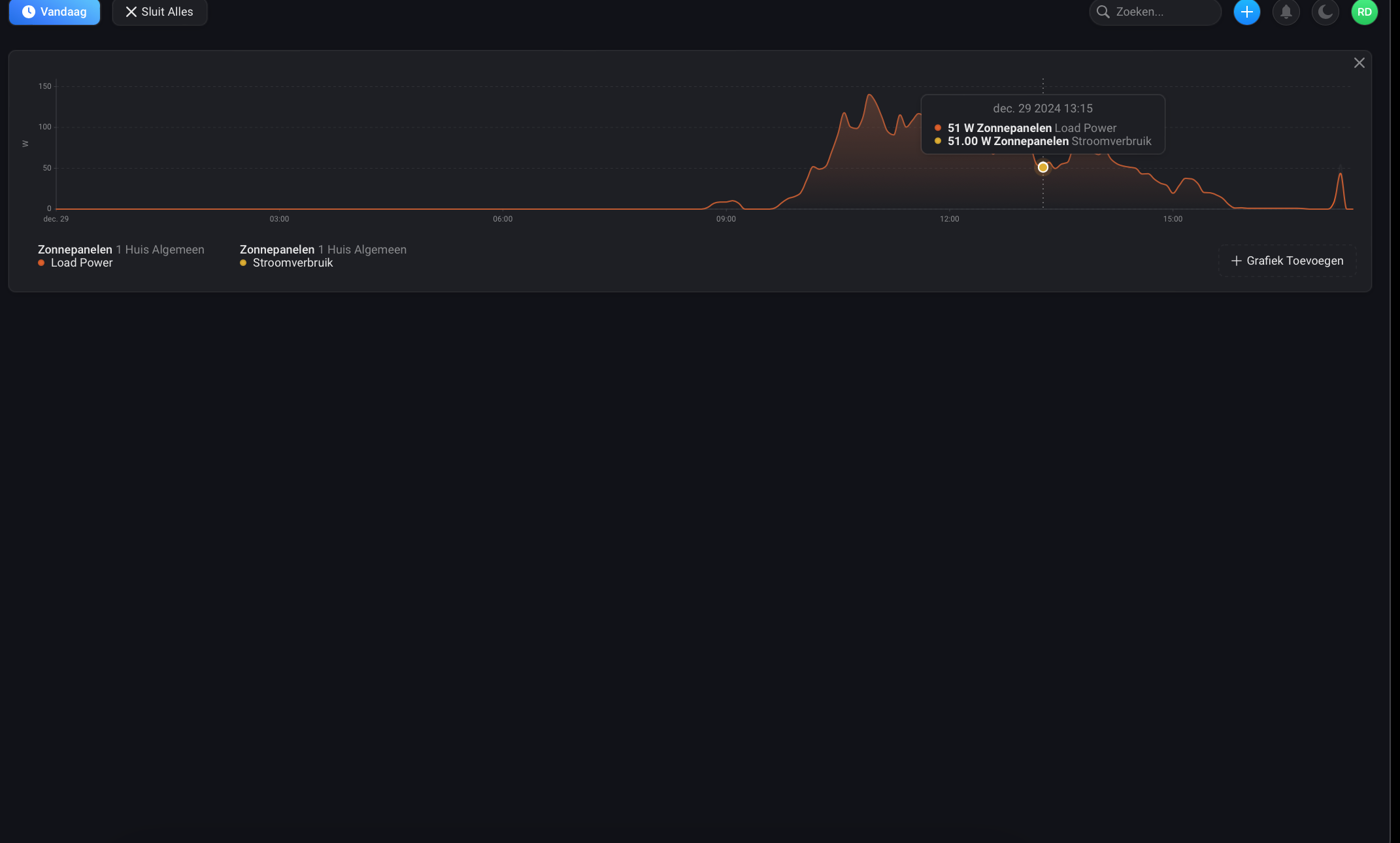
the 2nd insight is from today, so after the update. here the lines are perfect on each other
since i am connected via the cloud, all values update at the same time, (on your advice) every 5 minutes. so the values don’t change alternately.
Come on man, why do you have to react like that. I have now given you enough information to indicate that the 2 values load and solar are the same. Also in the other comments,.
that the name happens not to be English now doesn’t matter, does it? W of Watt, colors and numbers from a trend is always the same right?
You don’t have to be a racket scholar to see the difference in this 2 trend.
Everyone else will know what I mean and have the same problem via the cloud version.
I don’t know what’s wrong with asking people who want me to solve their problems for free to follow basic rules, such as everything being in English or sending a log.
Do you really think it’s okay for everyone to speak their own language here? Do you think this is the best approach for two people who don’t speak the same language to communicate? I don’t think so. Switching the system to English isn’t rocket science, is it?
Well actually I personally also don’t get what you mean…I tried to compare the same data I thought you shared and can’t replicate what you are saying. It’s really easier for everyone to use common language.
Based on translation, you are comparing Solar Panels Load Power with Solar Panels Power Consumption… it doesn’t make sense, so maybe translation is wrong, unless you are using other app
it does make sense because there are different value’s, one is value with inverter losses en the other is the value without inverter losses.
and now there are exact the same, so my inverter is perfect and I don’t have inverter losses more. but thats only in the homey app.
everywhere else I have it. the PV value and the actual value (load power) what goes to the electricity grid are not equal
what you see in the top photo is the value of the panels in yellow and the value of what goes to the electricity grid in green
the value in yellow is called in homey panels power and the green is called in homey load power. as you look in the 2nd graph, you can see that these are right on top of each other. this is not supposed to be the case and has never been like this. the value of the panels 50 is correct, but the load power should not be 50, but 27, because of the losses of my inverter
the 3rd picture is from before the update, so here you see the same behaviour in the graph as you see in solax’s graph, so then there was still a difference between the load and the solar power.
I think that is a translate mistake from the homey app, it translate automatic the app from English to dutch in insights.
maybe because it isn’t a value in minus that is sees it in insight as a power consumption.
its just solar power and load power that give the wrong values. solar power gives the right value but the load power has to give a value that is under the solar power value. because of inverter losses. first in version 3.1.4 and before this was correct and every 5 minutes all values changed at the same time and the load was always under the value of the solar power value
now I also change every 5 minutes all the values but the load power value is exact the same as the solar power value and thats not right.
Okay, I understand that you would like to deduct self-consumption from production. What I don’t understand is where I should get the information about self-consumption. If you look at the data I sent you, that information is not there. Or am I wrong?
no I would like the solar panel yields with inverter losses to be displayed as they were before the update. With version 3.1.4.
how is it possible that in version 3.1.4 and before, the values were displayed correctly and now they are not?
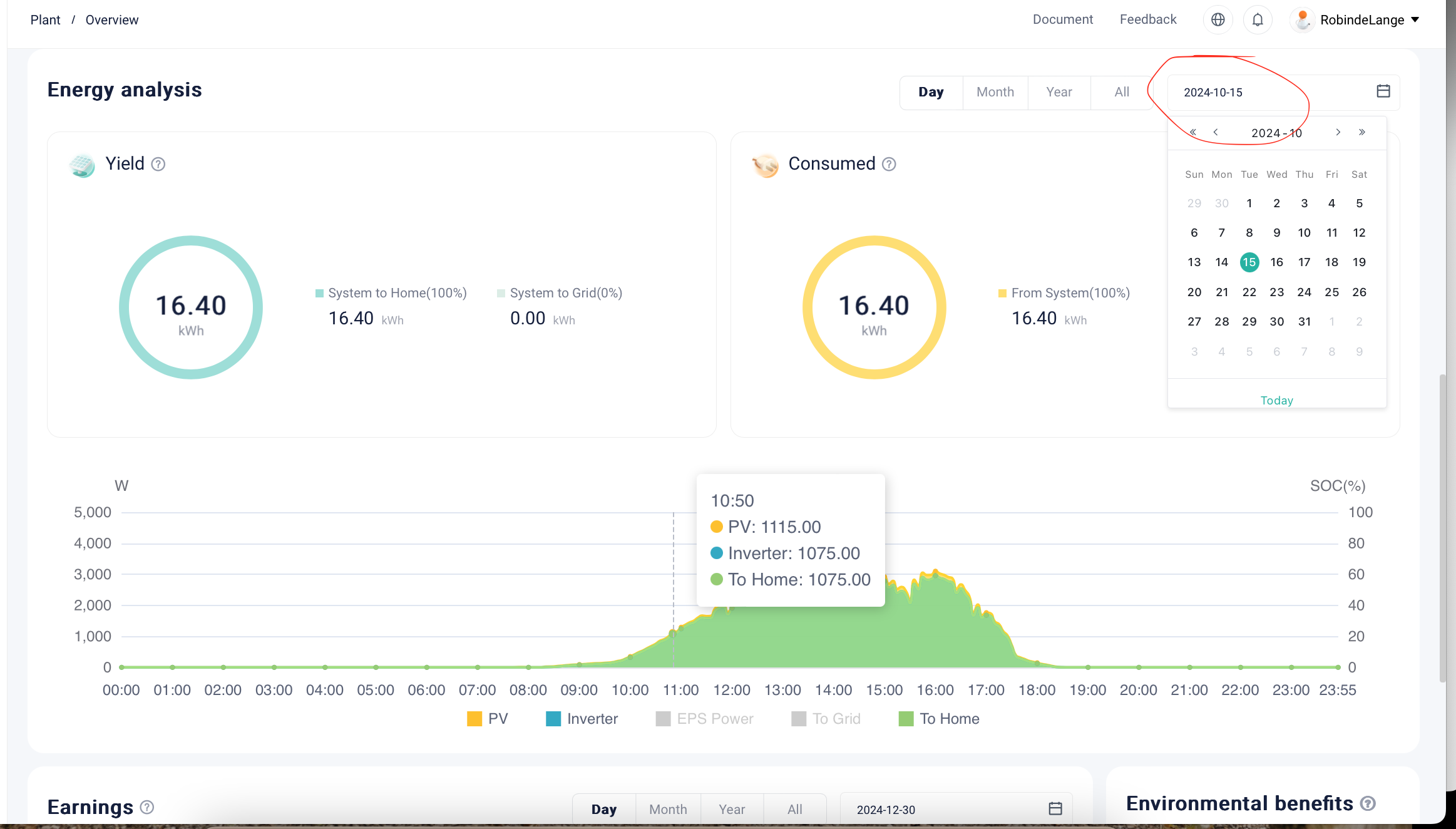
below is from the solax site, here I have added in red what the designation is in homey.
before this, these two different values were displayed correctly in update 3.1.4, but now they are the same. as you can see, this is not the case in real life, so something is wrong somewhere between update 3.1.4 and the current one.
the 4rd screenshot is from the old version 3.1.4 back than, there you can see that the load power lower is that the solar power.
You can see in the last screenshot that I looked up the date that fits that screenshot, (in October). here the values load and solar do equal inverter and PV
After update in December the ”Solar power” value gets strange when used as insight. I guess I’m maybe not the only one?
In picture below ”Solar power” should have been ”Solar string 1” + ”Solar string 2”, but instead it shows like 235W all the time.
But if I look att ”Solar power” in the Homey app under units (longhold on inverter icon) the value is correct.
That is probably bug in Homey app. Before Solax app has duplicated values, like “solar power” and “power” of solar device itself. I removed it, but I renamed default “power” value to “Solar Power”. Yet, in Insight, renamed value is presented as Power Usage. So delete “Solar Power” in Insight and use Power Usage instead.
When you open that URL from other source, do you also get cert. expired warning? The certification hasn’t expired, so could be time/date issue on your Homey, which shall however not happen due to the NTP synchronisation… anyway, long story short, it’s not issue of this integration
Ah, thank you for your quick response.
Yes, even when I use that URL in Chrome or Safari, I encounter an expired certificate issue…
It seems the certificate for solaxcloud.com (on my end) is set to expire on Friday, August 2, 2024 (1:59:59).
Thank you, Peter. I cleared the browser history in Chrome, and the certificate is now indeed as mentioned above. Now I just need to get things working on the Homey. How do I do that…?