I tried many times.. No effect 

I am currently looking for a bathroom ceiling lamp and came across one that I liked. It is a smart lamp that runs through DALI however. Since I don’t have any DALI wires installed, I went looking for a possible solution to this problem. I then came across the Shelly Dali dimmer gen 3:
A Shelly wifi device that connects to DALI wires and exposes them to wifi connectivity.
Is this device supported in Homey? It isn’t specifically listed, though it is said on the Homey Shelly app that ‘any wifi’ device is supported and technically, this is a wifi device. However, it is a very specific use case, hence my question.
Hi, after I upgraded the Shelly App in my Homey Pro to version 3.42.2 all three of my Shelly Plus 1 units have a problem when I use them in a flow. When I use one of the triggers from a Shelly Plus 1 there is always a delay of about 45-60 sec before there is a reaction in the flow. I checked it in de Shelly App on my phone and there the reaction is without delay. I hope that someone can help me with is or tell me how I can get to the previous version. Thanks Frans
Anyone an idea how to fix this?
do you have enabled “outbound websocket” in the shelly-app?
do you have firmware 1.6.1 or 1.6.2?
In firmware 1.5.1 it should be correct
Hello Bernhard, no on this unit I don’t have “outbound websocket” enabled.
My Shelly device has firmware v1.14.0
My Homey v12.4.2
Shelly app on Homey v3.42.2
can you try to enable outbound websocket
Connection type: TLS no validation
Server: ws://IP-AdressHomey:6113
Hello, in the Shelly App on my Android I got to settings of the Shelly Plus 1 and filled in: ca.pem and ws://Homey-IP:6113. After a reboot of the unit I got “Device is connected”.
If I use the input the Shelly App on my Android responds immediately but the Homey flow has still that long reaction time of 45-60 sec before sometime happens. So using Outbound websocket does not fix the Homey Shelly problem.
Regards,
Frans Smulders
------ Oorspronkelijke bericht ------
Van “Peitz via Homey Community Forum” <notifications@athom.discoursemail.com>
Aan fjsmulders@outlook.com
Datum 22-5-2025 10:46:36
Onderwerp [Homey Community Forum] [Apps] [APP][Pro&Cloud] Shelly
Hi,
Regarding the issue that I will add below I already contacted Homey and also Homey Shelly App support. Waiting the feedback from them.
I just want to share here, to see if any of you already had the same situation.
On Week 17 (21 to 27 of April) - All was good

On Week 18 (28 of April to 04 of May) - Started the issue with “Cover Light 1” - Shelly Plus 2 PM (Crazy High Consumption to a normal light)

On Week 19 (05 to 11 of May) - The issue continues with “Cover Light 1” - Shelly Plus 2 PM

On Week 20 (12 to 18 of May) - I excluded from Energy - “Cover Light 1” - Shelly Plus 2 PM. And all back to normal.
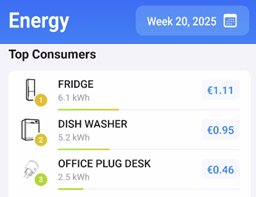
On Week 21 (19 to 25 of May) - Started the issue with “WC1 Main Light” - Shelly Plus 2 PM Gen3

On Shelly Cloud there is any of this data. All normal.
Thank you.
Hello,
here the same problem 
Moin,
gleiches Problem:
1 Like
Hello,
I have 3 Shelly 2PM Gen3 frimware version 1.6.2 and they do not receive information about current energy consumption, sometimes the watts show up sometimes they do not…
I have Shelly connected via wifi to Homey, I can also add them via Matter, but Homey does not allow me to define their class as light
1f1091c6-e305-400f-bbb1-cf305d85c4c9

Is it normal for Shelly products to take this long to ship? (Ordered it last Thursday, the 22nd of may 2025) and I still haven’t gotten a notification that it is on its way…
Might there be a bug reading/receiving the input state of Shelly Mini 1PM Gen3 on firmware 1.6.2. I upgraded one of mine and it is now not updating the (switch) input state anymore. Only once on reboot of the device. The other exactly same device I have that is still on firmware 1.5.1 works correctly.
Reading the http://device IP/rpc/Shelly.GetStatus manually seems to report correct input state. Also, things like Watt usage is also reported correctly.
I also have this same issue for over a few weeks now. Also tried everything. I have 3 BLU buttons.
Of course this has nothing to do with the Homey Shelly app.
Just contact the shop you ordered from about the status of your order / parcel.
Hi, i found a bug with Shelly RGBW Plus PM module and function Switch State temporary. When i try to use this function i always get Error404, but module is working correct. Its propably that becouse i Use this shelly as light option, so in Shelly this is 4 diffrent lights, but with one IP address. Propably in this function this is a problem.
1 Like
