Wait for a new version or install the test version.
Hi all,
I have 2 homeypro and one homey. In this last environment for a few days the devices status is read correctly (the sensors work well). The state of the switches is correctly read but when I Try to switch on or off a shelly switch device in homey app nothing is happening and nothing changes in the shelly app. If I switch in shelly app, in the home environment the change of state works. How can you help me?
best regards.
Gilberto
Wait for a new version or install the test version.
The new version is already available just reinstall the app. 
Sorry, but noob when it comes to github, how do I do that?
Den fre 6 okt. 2023 17:42Jelger Haanstra via Homey Community Forum <notifications@athom.discoursemail.com> skrev:
Use the link below.
And while you add your request please post the output of http://youshellyip/status and http://youshellyip/settings there as well so I know how this is implemented in the device. I do not have this device myself.
[EDIT] come to think of it, re-pairing the device might actually solve this for you with the current version of the app.
I have been in touch with Athom about this issue via email. Maybe good to know for @Phuturist too. I asked them for support to configure the Shelly Pro 3EM as the smart meter to measure the total energy drawn from the grid. I also explained that the app developer says he cannot do anything but I wouldn’t holistically understand the reasons. This what they responded to me just recently. In this text the “he” refers to the app developer i.e. @Phuturist :
This is indeed true from both sides, let me explain in a bit easier to understand language what is going on.
What he is basically saying that if he marks this device as being a whole house meter device in the way Homey expects them to behave, the device loses other capabilities that it has now. So he can do it, but this would also mean you lose other parts, this is a trade-off and he made the choice to make the device act like this. However, he says that if our system changes around these whole house meter devices, he can make it so it is capable of doing both things withouth losing any of its current capabilities.
This is why there is a loop in pointing fingers, the correct way to handle this issue is for the developer of the app to make a feature request/ issue ticket about our implementation (SDK) that it is missing this feature for him to implement your suggestion. I have now already made a remark about this internally to development so they know about this issue.
So both side are correct in a sense thath, he could at this very moment make the entire device capable of whole house metering, but he can’t do it in a way that removes other functionalities because of limitations in our system, so the cleanest option is indeed for us to chance the way the system works, however we would have to do that in a way that does not break all other device working with the current system, as you can see this can be quite the endavour. But know that we will look into issues related to the Energy and whole house metering to see if we can improve the system. I can’t guarantee if or when this will be implemented, but know that it is noted.

This going to be an long response, sit tight.
This is truly amazing, there must be some other guy with the same nickname as me that also develops a Shelly app for Homey and that’s been talking to Athom about this. Or I have a serious form of dementia. Because the only recollection I have about contact with Athom about this issue was a question if my technical implementation was correct. And the only response I got was that it was indeed correct and faulty reading could be related to using two cumulative energy meters in parallel (like a P1 and behind that a Pro 3EM messing up te readings). Although I cant verify this answer to be correct I have to trust it (even though i have my doubts about how Homey handles a device having both the channel reading and the total reading over all 3 channels like with the Pro 3EM). If Athom says it’s correct, it must be correct.
This was the only communication I had with Athom concerning this. There never has been any communication about trade offs and design choices made about the implementation of this functionality between me and Athom. So I have no idea what this support person is talking about.
The only thing I can remotely relate to this is that there was a discussion here on the forum about the device class used to pair the device. A suggestion was made that changing it from socket to other might make a difference. I was a bit worried about the consequences of this change for existing users. Although I planned to change it I forgot about it until a user having issues with the Pro 3EM as well reported that his problem was solved, thinking I had already changed the device class. The conclusion was, it’s not related to the device class and seems to be solvable by the user somehow. What needs to be done is unclear to me though. I have no clue what this support person means with he could at this very moment make the entire device capable of whole house metering. According to someone else at Athom my technical implementation is correct.
In the mean time I have changed the device class from socket to other for the Pro 3EM, at least for newly paired device with release 3.22.8. If it makes I difference when (re-)pairing the device remains to be seen.
I wont deny I do some fingerpointing to Athom on issues of which I believe are up to them to solve (like with the cloud connection bug / OAuth2 refresh token bug, the multichannel association bug, the zwave command class v6 bug, the zwave reset power meter bug) and yes, I have been wrong myself sometimes as well and unrightfully blamed Athom. Mea Culpa. But I never said it’s up to Athom to fix this issue. I’m actually still considering it a user configuration / setup related incident as according to Athom my implementation is correct and some user reported here he have solved it without me changing anything to the app.
I’ll leave it with this for now. I closed the ticket with my question about technical implementation after I got the answer all was OK. I’m not planning on submitting any feature / bug report on the Homey SDK as I dont consider anything to be wrong with it regarding this smart meter implementation (even though I still have my own doubts). I wont point you back to Athom as that seems useless and you could try a re-pair of the device and/or ask the user that got it sorted. But I cant help you with it.
Thanks for your efforts @Phuturist ! I could have read better but simply couldn’t find front or back in this mother of all threads. Tomorrow I’ll try the new version which I’m confident will fix my control problem.
The strangest thing is, for some users the Pro 3EM (and the older 3EM) appears as the smart meter of the house, whereas for others not. I belong to the latter group. It seems to be impossible to have any impact on it. Changing the device type is not doing the trick for me.
Btw. To me it’s just awkward that users cannot simply select a device type “grid source” for any device. That would then do the trick. Users should also decide to neglect the energy readings of any (faulty) devices. These are so obvious features, that I think they must be in the pipeline.
FYI: I have a Youless LS120 connected to my P1 port of the smart meter of the house, installed with the Youless and Enologic app. In the advanced parameters there is an option to include the energy in the totals or not. Might that be the option you are looking for? It does influence the number of Watts shown in Energy and in the pie chart.

Started anew the day before yesterday and still same issue.
Started anew yesterday and everything worked like it should. 
Only changes where new versions of the iOS app.
When a trigger doesn’t fire, how can we get information why it didn’t fire? Is this possible?
Really? You want a logging that something did not happen? How do you imagine that? That is impossible.
One can only follow the proces from begin to end, see where things are happening and where things are not happening any more. That is where the proces stops.
I have no idea what you already accomplished in analyzing and isolating your problem, but maybe start with a simpel normal flow, that starts at the required trigger and pushes a messages to you or in the time line. If you trigger the flow and receive no message, you have to make a best guess what could be the problem, and try to prove that guess is right. And so on, and on, and on. Until you find the batteries of your remote control are dead😁
The problem is that the trigger should have run because the data was registered in Homey but it didn’t.
These triggers work normally during the day, only on a certain event no. I was just curious if there is some way to get information on why a certain trigger didn’t fire. Maybe from the log or diagnostic report, I don’t know.
Example:
Works fine (all fired):
| Time | Flow |
|---|---|
| Nov 9, 2023 6:52:36 AM | Positioning wc blinds entered (trigger): 1, 1 |
| Nov 9, 2023 6:52:36 AM | Positioning entrance blinds entered (trigger): 1, 1 |
| Nov 9, 2023 6:52:36 AM | Positioning utility blinds entered (trigger): 1, 1 |
| Nov 9, 2023 6:52:37 AM | Positioning cabinet blinds entered (trigger): 1, 1 |
| Nov 9, 2023 6:52:56 AM | Positioning guest room blinds entered (trigger): 1, 1 |
| Nov 9, 2023 6:52:57 AM | Positioning Mija room blinds entered (trigger): 1, 1 |
| Nov 9, 2023 6:52:57 AM | Positioning living room blinds entered (trigger): 1, 1 |
| Nov 9, 2023 6:52:57 AM | Positioning kitchen blinds entered (trigger): 1, 1 |
Not working (missing living room, kitchen, Mija’s room, Guest room)
| Time | Flow |
|---|---|
| Nov 8, 2023 4:41:37 PM | Positioning entrance blinds entered (trigger): 0, 0 |
| Nov 8, 2023 4:41:39 PM | Positioning wc blinds entered (trigger): 0, 0 |
| Nov 8, 2023 4:41:39 PM | Positioning cabinet blinds entered (trigger): 0, 0 |
| Nov 8, 2023 4:41:39 PM | Positioning utility blinds entered (trigger): 0, 0 |
You mean that you’re missing entries in your list of messages?
To exclude as much possible, I can only advice to make this test flow.
Then you can make sure the flow is not triggered, and research more in detail, for example the network connection.
However I can understand you want see more detailed loggings from the Homey system, to have a look if anything is happening in the system. Developers will have that facilities. May be there is something in the developers tool? Just search for “system log”.
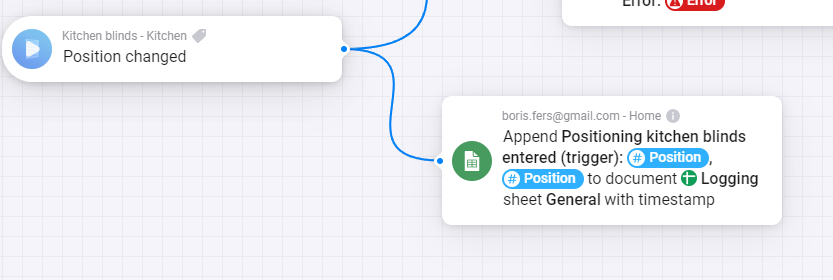
These entries are my Google Spreadsheet logs to figure out why the blinds positioning was incorrectly done at the sunset event. At first, I thought that there was something wrong with the flows themselves until I came to the conclusion that they were not triggered.
If I trigger flow for closing all the blinds now it will work 
I would just like to get info on why it is not triggered → any rate limit or something else.
The app itself works fine, just if a developer can get some logs out of it
What is the source of this Google spreadsheets, is it Homey?
By the way: if I was a developer, of whatever sub system involved in your home automation, I would not do anything, because you did not isolate the problem to be in Homey. Welcome to the world of system integration and ICT, debugging, problem analysis and isolation etc. 
Nice to know😁.
For Z-wave devices you can log the messages in Homey Developer Tools
But your devices are in Shelly Cloud? Cannot you see there anything, like status change? There are problems with cloud connections any way, I read above, is that already solved?
