is there any way of adding by IP in homey?
if i change the ip of an already added shelly bulb to the new bulbs ip, then homey can control it as good as the other GU10’s (until homey changes the ip back to the real ip of the bulb added to homey)…
People with no issues usually do not visit a support topic … 
When no devices are discovered you are given the option to manually pair a device using it’s IP address. As mentioned in the troubleshooting guide, device discovery works over mDNS. When devices are not discovered it usually means something is bloking mDNS on your home network. Seeying you also had issue with sending commands from Homey to the bulbs my guess is there is something more going on.
well, the funny thing is that i am only having trouble with GU10 bulbs as mentioned multiple times… all other shelly1 and bulbs gets discovered and works, so if its an network error, why would it target the specific bulb type, and only affect the homey app, and not the shelly app also… or home assistant for that mater, i have spun up an HA in docker to test, and the bulbs also work fine there…
All this says nothing about the connection between Homey and the bulbs. Feel free to send me a bulb though so I can actually test this myself. This is the only way I can actually test myself if there is an issue with my app.
2 Likes
well, all smarthome devices, including homey, is on the same network, so it seems unlikely that it would be a network error and not affect them all, or atleast the ones connected to the same AP…
I think i’ll just try adding them through MQTT instead, or via HA, and back into homey via the HA app from the community app store…
but thanks for the offer, if i had a spare you would get it 
and buy the way, i dont get an option to use an ip when nothing is discovered… i can only choose close, or the back arrow
Hmm, seems that only works when no other devices are paired yet. I’ll see if I can fix that in a next release.
that would be awsome, then i can atleast make a work around without jumping through to many hoops
Thank you for adding the manual via IP option, now i got the anoying bulb added to homey
1 Like
Hello,
As I found Shelly in the shop I ordered one to connect to Homey (pro)
Shelly v 3.5.4
Homey 7.2.0
Shelly 1 device
After creating an account in the Shelly app the Shelly 1 is added to the WiFi and accessible trough the web browser. It works from the app (testing on/of)
Now if I want to add the device in the Homey environment I get the error:

The account and passwd are the same as in the Shelly app (android).
Tried is several time with or without passwd / username but stil the same error.
Could someone point me in the right direction please.
1 Like
You seem to be using your Shelly cloud account as login credentials but the username and password requested here are the ones set on device level. It’s the username and password you enter when accessing the webinterface of the device at http://theipaddressofyourshelly/ .
And why are you using the manual pairing? Your device should be discovered by mDNS during pairing. If it isnt, are you sure Homey Pro and the Shelly are on the same LAN and your router is not blocking traffic?
Hi, thanks for the excellent work done on this app.
Here’s my issue though:
I’ve followed the steps and successfully configured a Plus1PM device with the shelly app. However, when trying to add it to Homey, it cannot find it with automatic search. If I add it with manual settings, i get an error (when i set it as gen1 i get “Error: Error 401: user credentials are missing or this user is not authorized, make sure you have copied the correct user credentials as entered in the Shelly smartphone app or Webinterface. Error message: Not Found”, and when i set it as gen2 i get “Error: An unknown error has occurred [unknown_error]”).
I tried both with and without passwords enabled, I am sure credentials are not the issue. This device is now on Firmware version: 0.9.1 Firmware build ID: 20211203-130231/0.9.1-ga939435 Web build ID: 1.5.5-34db4f9. I also tried 0.9.2-beta2 but with the exact same results. Tried factory resetting, rebooting everything, same result.
Since I didn’t know how to downgrade it to original firmware, i tried setting up a new Plus1PM, and this time I added it to shelly but DID NOT update to current version so it’s still on 0.7.0. Adding this one to homey was completely seamless, it discovered it automatically and it added it with absolutely no issue.
So I am guessing there is an issue with the current (and beta) firmware for the Plus1PM.
Any help would be highly appreciated. If you need more info, pls do let me know.
All the best!
@Phuturist The Shelly 1 does not need a username/passwd when I login to it’s interface with a web browser.
They, Homey and Shelly 1, are both on the same LAN and mDNS does not seems to work.
The router, Fritzbox, is as far as I know not able to block internal traffic.
Just to make sure, there is no (shelly) router the interface is:
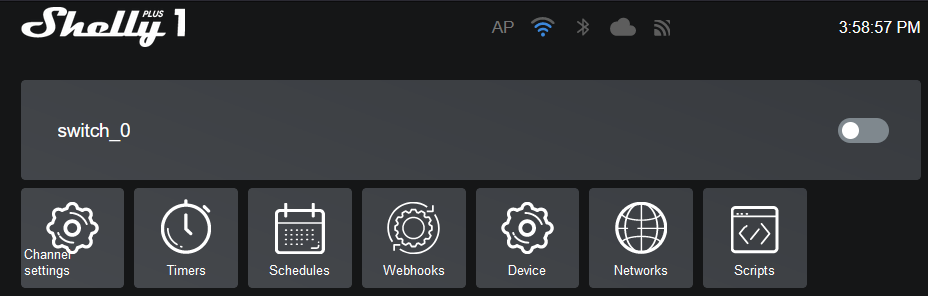
The firmware version is 0.9.1
It’s probably a bug I’m looking into right now. Hope to release a fix later today.
If it does not need a username you should not use one during the pairing of your device. It’s probably not discovered because there is a bug with pairing I’m looking into right now.
1 Like
@Phuturist
With the 3.5.5 it’s working. With Autodiscover on 0.9.1.
Thanks.
I can also confirm manual setup works now on the plus1pm with the new release. mDNS still can’t find it, but you are probably aware, and having a way to set it up makes that less important.
Excellent support!
I also tested mDNS on a Shelly Plus 1 on the latest beta firmware. Worked fine. So this could be an issue on your end.
Will check with the next plus1pm that I will setup (there’s about 8 more to setup). I will upgrade first, then add to homey with no other changes to settings.
Will report back after testing extensively.
89ce602e-a6ab-4d5e-b1f3-8dd390deb1a2
And this is because of what?
