Thanks Arie! You created a beautiful app and I appreciate you jumping back in to address my error condition. I created a few test flows trying to figure out the app and then the error. I deleted those to make sure there wasn’t an incorrect name someplace.
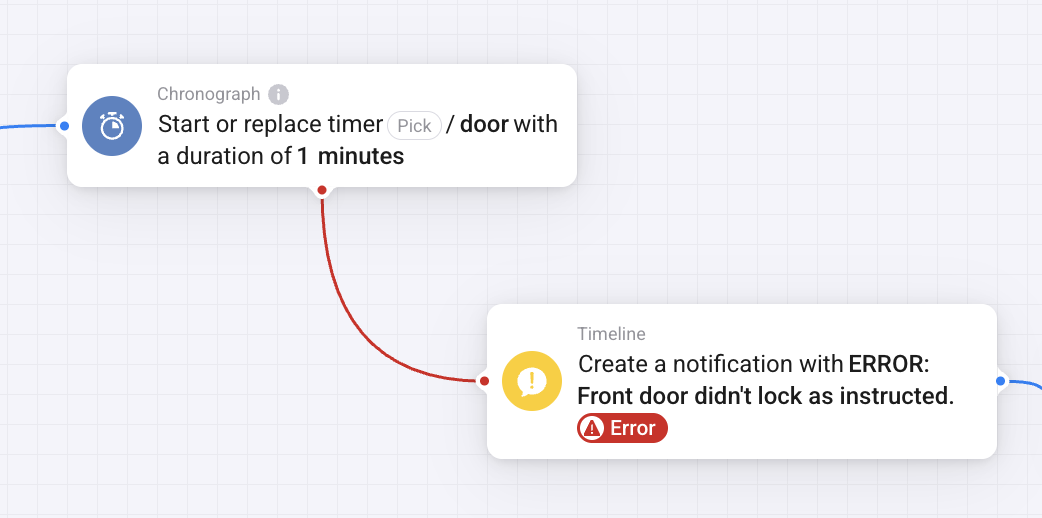
Arie, I just noticed the “Start or replace timer” and “Stop timer” cards trigger the error line but with no Error. More detail: I have a Timeline “Then” card connected to the error line of the Chronograph “When” card. The timer starts, the timeline card is triggered with my text but doesn’t report an Error. There is no error to report.
Hm, strange. Ill have a look later.
Arie, It’s working fine this morning. Don’t know what was happening. Something on my side I guess. Thanks again for your help.
FYI for all, my issue here seemed to be with the Homey itself having power supply issues.
I ended up talking to Homey Support, who could see I was getting recurring “under voltage” alerts, even when using the original Homey-branded 5.2V power block (or any other). They shipped me a new power block and cable … Then my issues stopped.
I’m unable to add a device from the Chronograph app. After going “+ New Device”, searching for “Chronograph”, choosing the “Stopwatch” item and then clicking the “Connect” button, I only get a spinner for a little while, and then I get a dialog saying “No new devices have been found”.
I’m doing this on my Homey Pro (Early 2019), and the app version is 2.1.10. I’ve tried restarting my Homey, I’ve tried restarting the Chronograph app, and I’ve tried uninstalling and reinstalling the app. The result is also the same regardless if I try adding a stopwatch, a timer or a transition device. I’ve even tried doing the same on an Homey Pro (Early 2023) I’ve got in another house, and I get the same result there as well: “No new devices have been found”.
I find it hard to believe that there is something wrong with the Chronograph app itself, since such an obvious bug should hit lots of other users. Which it obviously doesn’t. But I’ve got no more ideas on what to try to fix/debug the issue. So if anybody have any tips on what I might try, that would be much appreciated!
(with the word timer I mean a timer or a stopwatch or a transition)
Adding a device is optional: you only can add an existing timer (you created in a flow) as a device→ now the timer gets created
Chronograph timers get created on the fly by adding f.e. a timer, enter a name in the “pick" field, then select the name you entered.
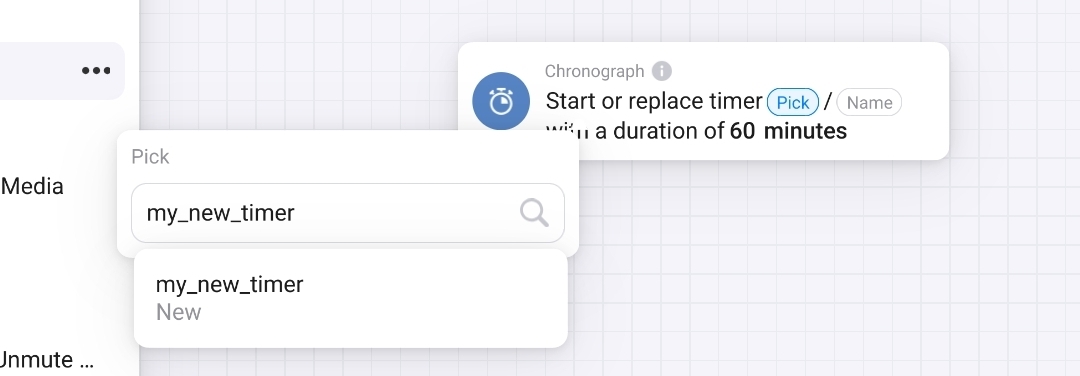
Enter the duration and unit and save the flow. Note: this way you can also select an existing timer
by opening the app “Configure” you’ll get an overview of your timers and their activity

I use this app for almost 5 years in gazillions of flows, it’s really rock solid (even after Homey restarted timers continue)
Ah, that’s how it works. My initial assumption was that I first had to create a virtual device for the stopwatch/timer/transition, and then I could use it in in flows and trigger logic. I see now that it works as expected when I create a stopwatch “on the fly” directly from within a flow.
Thank you for the prompt response @Peter_Kawa 
YW!
I do get your assumptions, often you’ll have to add a device to use a new app.
Topic Post 1 also reveals a bit of how it works btw 
Indeed it does! RTFM is always a nice thing to remember 

Hello SamHomey,
What was your issue, just curious as Im having device issues where data from device seems to be freezing up.
Thanks

Loose the AND ‘month is oktober’-cards and add:
WHEN
time i is 23:59
AND
End of month is today
THEN
Stop stopwatch
WHEN
stopwatch is stopped
THEN
get value of stopwatch
Write value to timeline
Wait 1s : AND ‘ventilator is on’ THEN start stopwatch
I did a simular thing but daily is this post:
Thanks, now lets wait til the first of November and see if i made it the right way
wil it automaticly reset after the ‘‘stopwatch is stopped’’ card?
When the stopwatch is paused it will resume with the card you are using.
When the stopwatch is stopped it will start at 0:00:00
thanks, i think i have it working, if i use the test buttom it works. so lets see ad the and of the month
It was an under volt issue with the device itself. Went away by talking to Homey Support, who can see diagnostic logs and give guidance.
Hi Arie,
Maybe a glitch, I don’t know, it seemed serious enough to report:
I noticed Chronograph using a whopping 100MB’s @ Pro 2019. Usually it’s 25 - 30MB.
Firmware v12.8.0-rc5 was installed 3 days earlier, last Friday Oct 25th (Node.js upped to v22.20.0 & Athom was fiddling with RAM limits), but not sure if that’s related.

Diag
5cdfc2b7-4401-41b3-90d8-d89736edb5ff
Firmware changelogs:


i made a flow last oktober and while testing i worked fine but i did not recive a timeline notification at the and of the month oktober.
what did i do wrong?
also if i try to place a new chart on the flow it wil nog reconice previous name’s of the stopwatcht, maby that is related?


is there another way to trace back how much a certain device was on ore of in the month oktober ore do i need to check the device log and calculate it manual?
