Always share your Homey model, firmware version, app version please.
When did the issue first occur (like, a certain update maybe, installing some app?)
All I can say is Chronograph has been very stable for the last 4,5 years.
Homey Pro 2019 v12.3.0 / app v2.1.2
You’re totally right @Peter_Kawa! I have adjusted the original post. Unfortunately I haven’t been home to realize something was off. But now I have some more time on my hand I realized that something is off.
Also the “Stopwatch (garasje) have reached a duration of x seconds” does not seem to trigger the following “then” step.
Please note that this is tested by forcing a “Stopwatch session” named “garasje” to run.
Maybe there’s a correlation between these issues?
Update: I have found that I experience this (invalid time) when using logic number-values as “reached a duration of …” value, in another “if” card in the same flow.
Hi Peter,
I have opened a ticket to Arie this last December: https://bitbucket.org/QlusterIT/nl.qluster-it.chronograph/issues/41
I have same issue related to Chronograph APP (several crashes on my HPE2023).
Please did you know about Arie?
Unfortunately I have still not received any update from him till now…
I recently integrated a “Start Timer” (Then card) from the Chronograph app into a larger Advanced Flow. Unfortunately, I forgot to give the timer a name. To my surprise, the flow saved without any warning or error message indicating that a required value was missing. I’m used to flows not being saved if a card is incomplete or missing required fields.
Shortly after that, my Homey Pro (2023) became unresponsive and began exhibiting side effects. For example, my Z-Wave network stopped functioning intermittently, and sensor values were no longer being processed. CPU usage and clock frequency increased significantly, as did the temperature (see attached screenshot). App resource usage appeared normal and did not indicate any issues.
Even after restarting Homey, the CPU and clock values spiked again shortly after booting up, suggesting that the underlying issue was still present in the system.
I spent a lot of time troubleshooting. Eventually, I noticed that none of the timers were running in the flow I had recently modified. That’s when I discovered the “Start Timer” card without a name. After fixing the flow and restarting Homey again, everything finally returned to normal—CPU and temperature values stabilized.
(Also, does anyone have a good tip for how I could detect such an error more quickly next time? Or any general troubleshooting ideas?)
Is this a bug in the Chronograph app that allows a card to be saved even though a required field is empty?
Actually, the way it is, is on purpose.
There are two ways you can name a timer/stopwatch/etc. Either one would be mandatory. But as developer i cannot make 1 of 2 mandatory. And making them both mandatory would not be correct. Thats why they are both non-mandatory.
Thanks for the quick reply — and yes, your explanation makes perfect sense.
I fully understand the logic behind not making either “Pick” or “Name” mandatory individually. Still, considering the rather heavy side effects this caused (timers breaking silently, CPU overload etc.), do you see any way the app could perhaps mitigate the impact?
Just a thought, more as a prevention suggestion than a bug report
@Jumpingtrees What happens when you remove the name of the trigger in the first card en fill in a name under “name” like 12345 (and save the flow)
And the next two card choose in the pulldown menu the name 12345
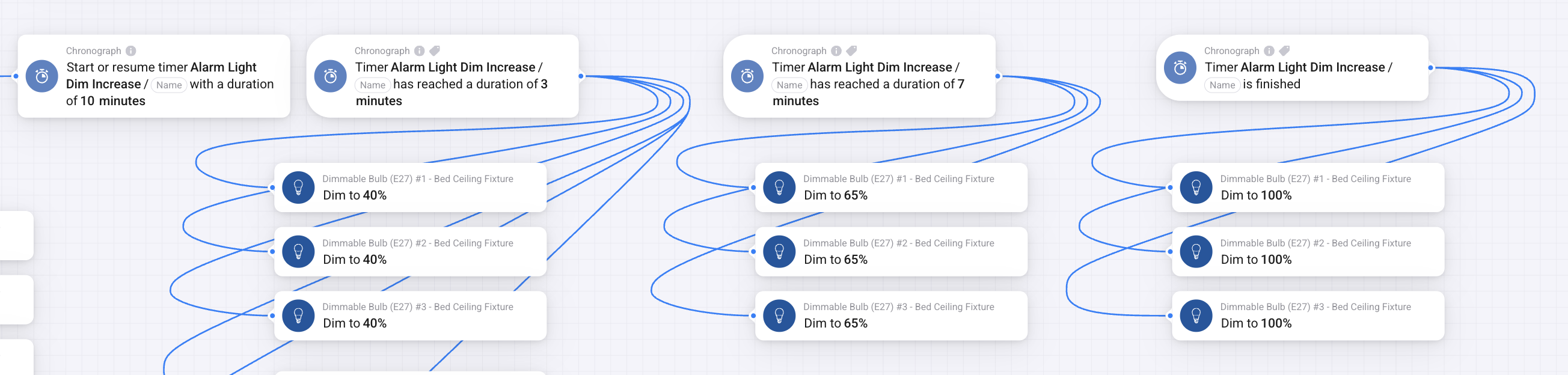
I’m also having this issue of timer not detecting the When card for reaching duration. Adding another post and screenshot for investigation. This is inside of a flow that has multiple triggering events.
It still detects “when timer is finished”, but not any of the elapsed durations in between for this specific timer.
I created a new timer as a test, and for that the trigger does still work.
But of course I am hoping to not have to recreate an entire timer that is used in multiple areas. Also why I haven’t made this a Transition.
@SamHomey Did you try to select the timers again in the card and then save the flow?
I had this once and reselected the names from the pulldown menu and saved the flow again.
Ooo thanks for the idea. Just tried and sadly no, it did not work or fix.
I also tried bringing the When cards for the timer duration into a separate flow (in case there were too many triggers in one) … And still does not work.
I both restarted the app individually and restarted my Homey.
I confirmed in the app Config that the timer is running correctly.
Very strange … It is as if Chronograph suddenly doesn’t like this one timer.


 and save the flow.
 – but if it helps improve the app, at least it’s for a good cause!