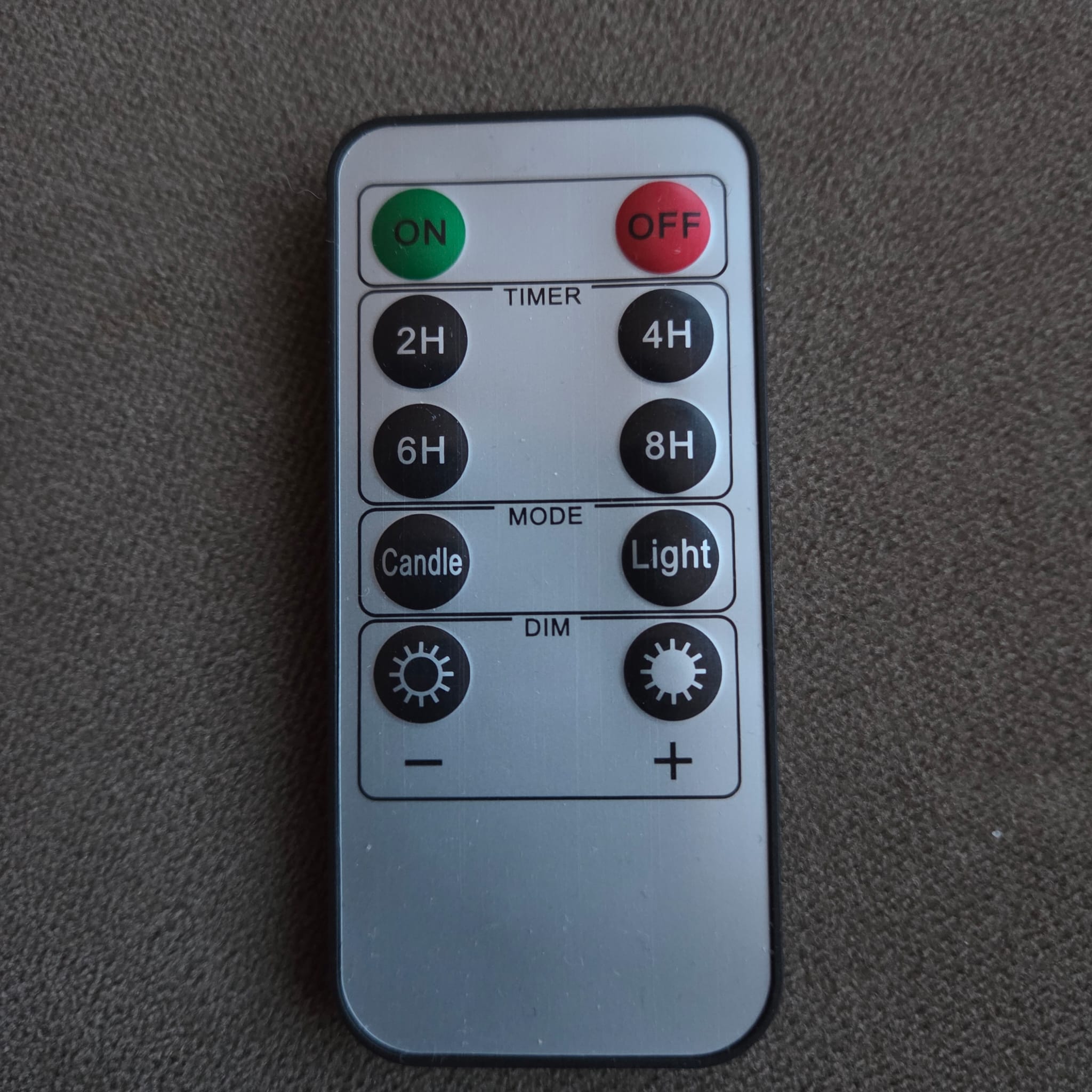
This app uses infrared (IR) signals to control the LED candles.
Requests and contributions welcome! Please share IR codes if available.
This app uses infrared (IR) signals to control the LED candles.
Requests and contributions welcome! Please share IR codes if available.
Hi Stephan thanks for building this app! Couple days ago i stumbled across your post and thought i’d give it a try with my 5 hema led candles (non-rechargeable) and they are working fine with this app too. Only thing i noticed is that tapping the tealight via devices pane only sends a power on signal, and doesnt toggle power on/off. Would be great if the app can toggle availability of the device and on/off command of the candle as if you have hidden the physical remote. But hey i can work around that myself too 
Hi Famod, thanks for trying the app and for the feedback — really appreciate it!
I actually made the app intentionally stateless for now. I noticed that the candle status can sometimes be out of sync with reality, which could make things confusing in Homey (app says “on” while the candle is actually off, or the other way around). Since the app and the candles can easily drift out of sync, this felt like the safest option at the moment.
Because this is my very first Homey app, I’m still figuring out what’s the smartest and most “Homey-way” to handle things like this — so feedback is super helpful.
I’m also very curious which exact HEMA candles you tested. Were these the non-rechargeable ones with model number 25510040 by any chance? If so, I can add them as officially supported as well.
Hi Stephan, thanks for getting back. I’m new to homey too, so can’t guide on ‘the homey way’ lol. I have led candles (all are working) with the following hema artikel nummers:
Haha, that’s an impressive candle collection — you must be a very gezellig person.
I just pushed an update (0.1.2) that fixes the toggle issue. It’s live as a test version and already under review (usually pretty quick). Small warning though: you might need to remove and re-add your candles — I skipped the migration part.
Thanks again for the feedback and the article numbers! Let me know how it goes.
Hi. I have tryed your app with Deluxe lights. Is it possible to change on and off? When i push off they turn on. But the timers works correctly.
Hi Anders,
Thanks for testing the app and reporting this. That is surprising, as I copied the commands from another app.
I have now swapped the on and off commands and released a new test version. Could you try it and let me know if it works correctly now?
Also, does the remote control image in the app match the one you are using?
Thanks again for your feedback.
It works perfect now
And yes i have the black remote
Hi Anders,
Great to hear it works perfectly now. Thanks for confirming.
Just to be sure: are you running the 0.1.3 test version right? If so, I’ll make that version final.
Thanks also for confirming you have the black remote.
Yes i´m running 0.1.3
Hi Stephan,
This morning I came across your app in the store and decided to download it to take a closer look. To my surprise, the “Hema part” also works with one of the Action candle sets. That’s a perfect solution for me—thank you for that!
At the moment I have three different candle sets, all using different remote controls. Only one of them is currently working with the app. Do you expect to add support for more variants in the future? It would be great if I could also control the other two Action candle sets with your app.
Thanks again for your reply and for developing such a great app!
Hoi Stephan,
In navolging op mijn vorige bericht:
Ben ik met behulp van Ai (Claude) wat verder gaan onderzoeken, dat bracht me op het idee om de IR codes voor één van mijn andere twee Action (online) sets te achterhalen.
Getest op Homey Pro 2023 - Alle 10 IR commando’s werken!
 Power ON, OFF
Candle Mode, Light Mode
Dim +, Dim -
Timer 2H, 4H, 6H, 8H
POWER_ON: 0000 006D 0022 0002 0157 00AC 0015 0016 0015 0016 0015 0016 0015 0016 0015 0016 0015 0016 0015 0016 0015 0016 0015 0041 0015 0041 0015 0041 0015 0041 0015 0041 0015 0041 0015 0041 0015 0041 0015 0016 0015 0016 0015 0016 0015 0016 0015 0016 0015 0016 0015 0016 0015 0016 0015 0041 0015 0041 0015 0041 0015 0041 0015 0041 0015 0041 0015 0041 0015 0041 0015 0689
POWER_OFF: 0000 006D 0022 0002 0157 00AC 0015 0016 0015 0016 0015 0016 0015 0016 0015 0016 0015 0016 0015 0016 0015 0016 0015 0041 0015 0041 0015 0041 0015 0041 0015 0041 0015 0041 0015 0041 0015 0041 0015 0016 0015 0041 0015 0016 0015 0016 0015 0016 0015 0016 0015 0016 0015 0016 0015 0041 0015 0016 0015 0041 0015 0041 0015 0041 0015 0041 0015 0041 0015 0041 0015 0689
MODE_CANDLE: 0000 006D 0022 0002 0157 00AC 0015 0016 0015 0016 0015 0016 0015 0016 0015 0016 0015 0016 0015 0016 0015 0016 0015 0041 0015 0041 0015 0041 0015 0041 0015 0041 0015 0041 0015 0041 0015 0041 0015 0016 0015 0016 0015 0041 0015 0041 0015 0016 0015 0016 0015 0016 0015 0016 0015 0041 0015 0041 0015 0016 0015 0016 0015 0041 0015 0041 0015 0041 0015 0041 0015 0689
MODE_LIGHT: 0000 006D 0022 0002 0157 00AC 0015 0016 0015 0016 0015 0016 0015 0016 0015 0016 0015 0016 0015 0016 0015 0016 0015 0041 0015 0041 0015 0041 0015 0041 0015 0041 0015 0041 0015 0041 0015 0041 0015 0016 0015 0041 0015 0041 0015 0041 0015 0016 0015 0016 0015 0016 0015 0016 0015 0041 0015 0016 0015 0016 0015 0016 0015 0041 0015 0041 0015 0041 0015 0041 0015 0689
DIM_DOWN: 0000 006D 0022 0002 0157 00AC 0015 0016 0015 0016 0015 0016 0015 0016 0015 0016 0015 0016 0015 0016 0015 0016 0015 0041 0015 0041 0015 0041 0015 0041 0015 0041 0015 0041 0015 0041 0015 0041 0015 0016 0015 0016 0015 0016 0015 0016 0015 0041 0015 0016 0015 0016 0015 0016 0015 0041 0015 0041 0015 0041 0015 0041 0015 0016 0015 0041 0015 0041 0015 0041 0015 0689
DIM_UP: 0000 006D 0022 0002 0157 00AC 0015 0016 0015 0016 0015 0016 0015 0016 0015 0016 0015 0016 0015 0016 0015 0016 0015 0041 0015 0041 0015 0041 0015 0041 0015 0041 0015 0041 0015 0041 0015 0041 0015 0016 0015 0041 0015 0016 0015 0016 0015 0041 0015 0016 0015 0016 0015 0016 0015 0041 0015 0016 0015 0041 0015 0041 0015 0016 0015 0041 0015 0041 0015 0041 0015 0689
TIMER_2H: 0000 006D 0022 0002 0157 00AC 0015 0016 0015 0016 0015 0016 0015 0016 0015 0016 0015 0016 0015 0016 0015 0016 0015 0041 0015 0041 0015 0041 0015 0041 0015 0041 0015 0041 0015 0041 0015 0041 0015 0016 0015 0016 0015 0041 0015 0016 0015 0016 0015 0016 0015 0016 0015 0016 0015 0041 0015 0041 0015 0016 0015 0041 0015 0041 0015 0041 0015 0041 0015 0041 0015 0689
TIMER_4H: 0000 006D 0022 0002 0157 00AC 0015 0016 0015 0016 0015 0016 0015 0016 0015 0016 0015 0016 0015 0016 0015 0016 0015 0041 0015 0041 0015 0041 0015 0041 0015 0041 0015 0041 0015 0041 0015 0041 0015 0016 0015 0041 0015 0041 0015 0016 0015 0016 0015 0016 0015 0016 0015 0016 0015 0041 0015 0016 0015 0016 0015 0041 0015 0041 0015 0041 0015 0041 0015 0041 0015 0689
TIMER_6H: 0000 006D 0022 0002 0157 00AC 0015 0016 0015 0016 0015 0016 0015 0016 0015 0016 0015 0016 0015 0016 0015 0016 0015 0041 0015 0041 0015 0041 0015 0041 0015 0041 0015 0041 0015 0041 0015 0041 0015 0016 0015 0016 0015 0016 0015 0041 0015 0016 0015 0016 0015 0016 0015 0016 0015 0041 0015 0041 0015 0041 0015 0016 0015 0041 0015 0041 0015 0041 0015 0041 0015 0689
TIMER_8H: 0000 006D 0022 0002 0157 00AC 0015 0016 0015 0016 0015 0016 0015 0016 0015 0016 0015 0016 0015 0016 0015 0016 0015 0041 0015 0041 0015 0041 0015 0041 0015 0041 0015 0041 0015 0041 0015 0041 0015 0016 0015 0041 0015 0016 0015 0041 0015 0016 0015 0016 0015 0016 0015 0016 0015 0041 0015 0016 0015 0041 0015 0016 0015 0041 0015 0041 0015 0041 0015 0041 0015 0689
Zou je deze driver willen toevoegen aan de Kaarslicht app? Ik help graag met testen!
De codes zijn afkomstig van het LEAP#625 project en door mij volledig gevalideerd.
Met vriendelijke groet,
René
Hi René,
Thanks for your messages, and fun to hear that the HEMA profile also works with your Action candle set.
Could you let me know which exact product works with the HEMA driver (item number, product URL, or EAN)? Or if you happen to know which remotes your Action candle use — or if you can share photos or model details — that would help a lot.
I definitely plan to add support for more variants in the future. The main challenge is that different candle sets often use different IR codes and remote controls. Thanks to the great groundwork you already did, it was easy for me to create an update. Looking at the images you shared this is probably this item on the Action website: https://shop.action.com/nl-nl/p/8721184890585/luxe-set-ledkaarsen-7-delig-taupe
I’ve just released a test update, which is available here:
Could you please check if this works as expected?
Thanks again for the investigation, all the details you shared, and the kind words — and of course for trying out the app!
Hi Stephan,
Thank you for your quick response and for adding the Action candle set to the test app!
Product: The set from your link (https://shop.action.com/nl-nl/p/8721184890585) is 100% the set I have at home.
Test results: I have extensively tested the app with the following results:
Conclusion: All tested functions work completely correctly. In my opinion, you can fully include this driver in the production version of your app.
I need to slightly clarify my earlier message. In my first message, I mentioned that one of my Action sets works with the HEMA driver. Since I practically only use the ON/OFF function, I hadn’t tested all features.
For my personal use, the HEMA driver works fine with this set (I only use on/off), but I can imagine you want to guarantee 100% compatibility. I will do further research on this set and its remote control (which differs from the HEMA remote) to check if all functions indeed work with the HEMA driver.
I have a third Action candle set for which I would also like to find the IR codes. I will try to gather more information about this set this weekend and message you.
You can proudly add the new 7-piece Action LED Candle Set (taupe) to your app - it works excellently!
Thank you again for your quick work and enthusiasm!
Best regards,
René
Hi Stephan,
Great news regarding the Action 3-button candle set!
Product Information:
EAN: 8721037743549 (tested model)
Probable match: EAN 8721037234962 (likely the same white-label model under a different barcode)
Remote Model: AX6-200105 (3 buttons: ON, OFF, 6H Timer)
Protocol: NEC IR, Address 0x00
Technical Discovery: Interestingly, these candles ignore generic Pronto Hex codes sent via Homey Developer Tools. However, they respond with 100% stability to the existing J-Tech Digital JTECH-8X8-H20 driver in Homey. This suggests the candles require a specific NEC timing/pulse duration that is natively present in the J-Tech dataset.
Verified Mapping (Tested & Confirmed):
ON → J-Tech “Key W” (NEC Command 0x12)
OFF → J-Tech “Output 8” (NEC Command 0x0F)
TIMER 6H → J-Tech “Input All” (NEC Command 0x15)
By referencing this existing IR profile, you should be able to implement a working driver immediately.
Additional findings regarding your existing HEMA driver:
I discovered that another Action candle set (Article no. 3206761, model 67IZJ2407-00X — model number is slightly illegible) partially responds to your current HEMA driver:
Test Results:
ON/OFF: Works perfectly (100% reliable).
 Other functions (Timer 4H/8H, Mode Candle/Light, Dim +/-): The candle flickers (indicating signal reception), but the actual commands are not executed correctly.
Status: This specific set might no longer be available at Action. I’ve searched for other white-label variants but haven’t found a definitive match yet.
Recommendation: Since ON/OFF already works via your HEMA driver, you might want to add a note that this Action set (3206761) is partially compatible.
If you need any more information (photos of remotes/packaging, or additional tests for the 3-button set or the Action 3206761), please let me know!
Best regards, René
Hi Stephan, you’re really moving fast — great to see!
I’m currently using the test version of the app and would like to share some feedback with you:
Action 3-button remote:
– The On button does not work
– The Off button does not work
– The 6-hour timer button does switch the candles off
Action 8-button remote:
– The On button works perfectly
– The Off button works perfectly
– The other 6 buttons are currently missing
This information is of course meant as positive feedback and certainly not as criticism.
Thank you for your efforts!
Kind regards,
René
Hi René,
Thanks for the swift testing and your reply.
Action 3-button remote
It looks like there was a mix-up in the command codes, while I kept the address at 0x00. To verify this, I installed the JTECH-8X8-H20 driver and performed a read-back using a Flipper. I found the following mappings:
For the next (test) version, I’ll try to add a dedicated test remote driver with the action flow cards so all NEC options can be send.
Action 8-button remote
Since I don’t yet know the IR codes for the other commands, I wasn’t able to add those. However, I think this is still less confusing than reusing the HEMA driver for these remotes.
Thanks again for the feedback — definitely constructive and not taken as criticism in any way.
By the way, did you run into any issues when adding flow cards? Another user mentioned this, but I can’t reproduce it on my end.
Regards,
Stephan
Hi Stephan,
The “Action 3-button remote control” is now working exactly as it should — great job!
Regarding the “Action 8-button” variant, you’re absolutely right: this option is clearer than using the “Hema variant” (although it might raise some questions from users). If you’d like to test more remotes buttons in the future, just let me know!
To be honest, I don’t use many Flow cards from the app, but the ones I do use are working perfectly here.
Best regards,
René
Hi René,
Regarding flow cards:
Since you’re using multiple remotes and mainly the ON and OFF functions, I’ve added an extra general flow card that can switch all devices on or off at once.
For testing purposes, I’ve also added a test remote device driver with a single action card that allows you to send all addresses and commands (using the NEC protocol).
Regards,
Stephan