I can’t confirm that from my sight, sorry. Both in case of a restart of Homey itself and the app: all the user settings are still kept in memory, instead of being resetted to default values.
Did you verify to use the “Save”-Button below the settings before touching the “Done”-Button on the upper right side?
Hi @AlbertGaertner , I confirm that i “saved” my setting and then click on Done.
all the values are saved, however, when i click “Restart the App” or when homey is restarted, the delay between reading values is reset to the default value ‘15’.
the Verification settings are not reset (they remain as i saved them).
I can also share the respective screen shots or I can create a diagnostic report if that helps to identify the problem.
Thanks again for the support and the great application!!
Hey @Themis_Mantis,
that’s somehow both tricky and strange at my point of view.
As you can see according the following screenshot, my individual settings are saved solid - an hasn’t been resetted to default values after a restart of Homey, what I can confirm for sure after a one more test this afternoon:

Which version of Homey do you use? A Homey Pro 2023 or 2019? In my case it’s a HP 2019.
Hi @AlbertGaertner,
Thanks for the additional feedback.
You helped me to identify when the issue is happening.
here is my additional description:
The value “The delay between reading sensor values in seconds.”
If it is set equal or greater to the default value (15) then when homey restart or Beacon app is reset, then the value is kept.
However, if the value is below the default value, then when homey restarts or Beacon app is reset, then the value is reset to the default (15).
I am using Homey Pro 2023
please check the above scenarios and let me know your findings.
Hey @Themis_Mantis ,
thank you for your reply regarding the saving issue on your Homey Pro 2023 in the Beacon-App.
It wasn’t forgotten, but I was a little bit in a hurry and didn’t find enough time to give you an earlier feedback.
But however, I’m not able to reconstruct and comprehend your case. Either above or below the default setting, the input is always saved properly:

It must have been to do with your individual setting - or with Homey Pro 2023?
As already mentioned, I’m a owner of HP 2019.
Hello,
Tonight after automatic upgrade to v12.4.4 version, my beacons don’t work good like before. They continue to alternate in range and out of range after some minutes.
Does anybody has the same problem?
Hello Gian_Luca,
thank you for this interesting comment on the stability of this app and the bluetooth protocol of Homey respectively. That’s somehow a coincidence - or not. Let’s see…
On Thursday night (around 11 p.m.), I got one single false negative (beacon outside range), which was promptly corrected/ re-detected within approx. 30-40 seconds. But I’ve also to admit, that I not even installed the latest firmware update. My actual firmware version (of Homey Pro 2019) is 12.4.2
Independently from this incident, I’m really satisfied with the reliability of this present detection via a bluetooth beacon: Actually, it was the very first one false negative after at least 4 weeks!
Even though a verification amount of only 8 outside range (instead of recommended 10).
I’ll have a detailled look on the detection during the following days, especially after the latest firmware update has been installed.
Hello Albert,
thank you for your reply. I was very satisfied of this app. The beacons were the only system we used to determine the presence at home, and never had false negative or positive. Since the last firmware upgrade it doesn’t work anymore. I think they changed something about blutooth update time. I write to athom support but they said this app is old and not updated since last 2 years.
I tried to change the update time and the verification amount without success.
Oh wow
Homey 2023 Ble has been a mess since the start.
And now they start pointing fingers to the app dev? Zero points for Athom here…
Hey Gian_Luca, hey Peter,
thanks for your replies and further notices. Somehow sad to read the excuse of Athom. 
 I just can only admit Peter’s words…
It’s already more than two years ago, that I reported the BLE issues the first time in February 2023 to Athom.
So on HP23, correct ?
So on HP19 - there hasn’t been any chances recently related to the BLE on HP19
Koktail can maybe have a look if you share a log with him - just by any chance, do you use also Homey Bridge as satelitte? If not, actually recent BLE modifications quite significantly improved the BLE stack, so I’m suprised you see the oppositte.
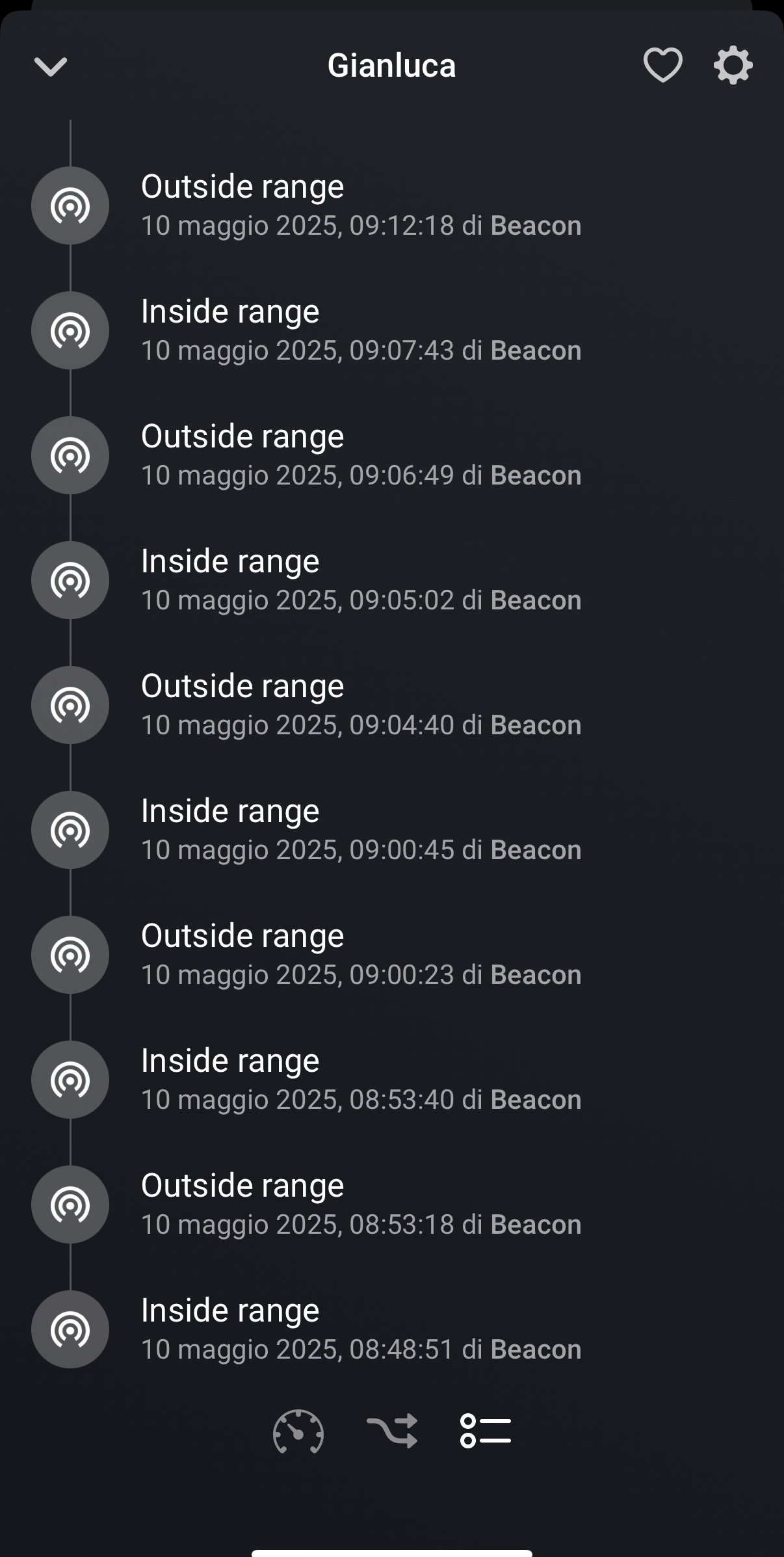
I mean diag. log from the app itself.
You may want to add (in the debug log description) which type of beacon you are using and if all exhibit the same problem or not.
This is the log:
2d653402-a116-4044-9546-6a744ec24cc3
We use Tile Mate and Gigaset Keeper and both have the same problem after firmware upgrade.
