Ask Athom to add aircondition and heat pumps to the climate widget
Because there are already some widget like Enhanced Device Widget App voor Homey | Homey
I have now got my heat pump installed, but how do I get the power readings from it?
edit: the insight showed up after some time, but @Mickel_Luiten : I have a request.
Could you add the power meter readings as a tag aswell, and a “then card” “when power meter changes”
I really want to be able to use this unit together with the “power utility app” in homey
Wich model,
Only AC models gave the power reading now.
Altherma comes later…
And yes there will be a changed card
I have the Daikin Synergi (FTXTM)
Energy usage shows in the Daikin iOS app
The ability to turn on/off features like “intelligent eye” and “Streamer” would also be just fantastic to get in the homey app 
Use the test version
With the AIr-2-Air driver
That is not possible in the Daikin API
I thought you said everything in the daikin onecta app was possible to do in the homey app(API) aswell?
I got energy usage now I was so sure I installed the test version of your app a week ago, so when I got the heat pump today I was sure it should work straight away, but I actually had the 4.x version. Showed up instantly in 5.x, so very nice
edit: Do you know if Daikin usually updates they’re API often? Is there a place we can request features to be exposed?
Getting a lot of reqeust and suggestion for features in the app.
Most of these request are not supported by the daikin API.
To make it a clear for everyone see below list for the current feature list.
| Altherma Space Heating | Altherma Domestic Hot Water Tank | Air-to-air Heat Pump | |
|---|---|---|---|
| Cloud connection status |  |
|
|
| On/Off | |
|
|
| Temperature setpoint | |
|
|
| Operation mode | |
 |
|
| Air purification mode | |
|
|
| Humidity mode | |
|
|
| Notifications | |
|
|
| Sensory data | |
|
|
| Energy consumption data | |
|
|
| Setpoint mode | |
|
|
| Domestic hot water heat up mode | |
|
|
| Holiday mode | |
|
|
| Fan speed & silent | |
|
|
| Fan direction | |
|
|
| Powerful mode | |
|
|
| Current schedule | |
|
|
| Schedule configuration | |
|
|
| Control mode | |
|
|
| Network gateway info | |
|
|
| Indoor unit info | |
|
|
| Outdoor unit info | |
|
|
| User interface info | |
|
|
Thanks for this insight @Mickel_Luiten!
If you need testers when you start implementing the heatpump/hot water tank, just send me a PM, I’m happy to help.
Im shocked to see now after using my 14 Year old Mitsubishi (controlled by sensibo) and being able to control both horisontal and vertical airflow in detail (middel top, top, right, left, middle left etc) with daikin in not able to set the airflow to top and left to direct the airflow at the door going to my second floor
Feature fandirection is split in horizontal and vertical just like in the ONECTA app(android/iphone)
Same for fanspeed, these have fan (manual) speed and fan mode.
Not very clear in the feature list of Daikin…sorry
Yes I didn’t mean your app was bad at this. The daikin app for iOS is the same. I’m just shocked I can’t do this on a brand new pump compared to my old Mitsubishi. If i had known this I would not have gone for daikin
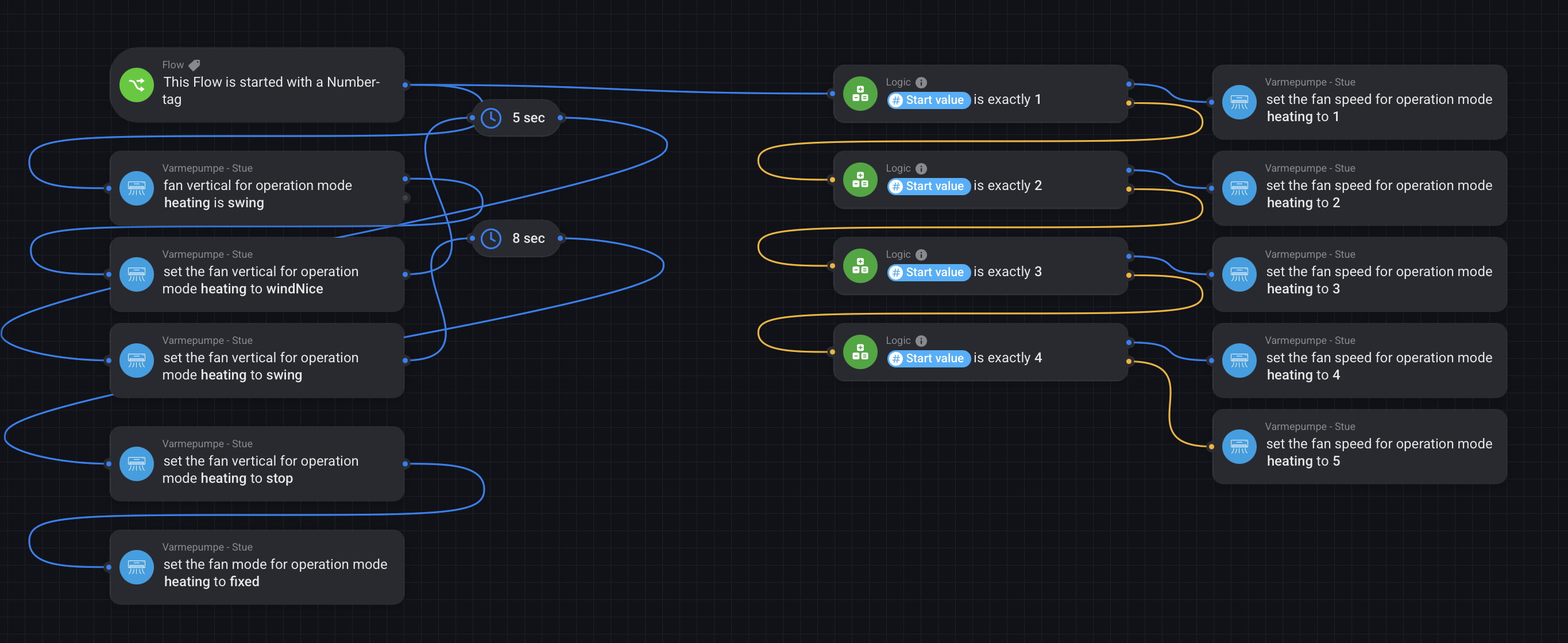
Unless you did plan to change the direction etc all the time, its just a simple setup with the remote.


Thats clever indeed… copying that idea 
yes, it was good to find out about but regarding the horizontal flow I haven’t found a solution. it will stay at whatever position it was when you changed from horizontal swing the last time 
another thing, @Mickel_Luiten : is it possible to make the fan speed card accept tags/variables?
No, all values are “synced” from the Daikin (cloud) so fixed. But there are tags on the capabilties with the current status and with some logic cards maybe you can do your magic?
Some.models have only 1-3 others 1-5 so with the sync from cloud this is always correct for the model