I did already this : Through Library Manager

What does it say on the chip on your boards?
The picture above is not high enough resolution for me to read it.


That is definitely the S3 and not an S2, so it should work with the binary I created.
I will need to check when I get home to see what version of the library I have used as it was a long time ago when I setup this project and I have updated some bits, but some updates were not compatible with each other, so I had to keep the older version.
I just downloaded the entire zip file of ESPAsyncWIFIMANAGER AND ADDED THE LIBRARY AS/from zip.
It was successfully added.
It went through the moment the (previous) error occurred at compilation but now this error pops up :
C:\Users\SirAp\AppData\Local\Temp.arduinoIDE-unsaved202622-28596-xg5m53.dx8r\sketch_mar2b\sketch_mar2b.ino:29:10: fatal error: BLE_Device.h: No such file or directory
29 | #include “BLE_Device.h”
| ^~~~~~~~~~~~~~
compilation terminated.
exit status 1
Compilation error: BLE_Device.h: No such file or directory

How to include everything I downloaded and unpacked from yout zip-file.
I just double clicked the *.ino file. 
By the way, are therse parameters set right(was playing around with them yesterday.


@Adrian_Rockall No stress/rush at all. Don’t think my flood of information is a sign that I think you should hurry up. It’s just my way to communicate and give at most information (that may most would be un-necessary/-useful/-important to you and the problem at hand). I just want to make sure “no stones has been unturned” to solve this.
Thank you for the effort and help again. 
Provided you did unzip the files to a new folder and didn’t double click the .ino file from within the zip, it should find the other files.
I thought: Let’s start from scratch and I chose new scetch and open from the menu a fresh /2nd time extracted ino file when this message appeared:

So I clicked OK started the compile again and still got that file missing error like above.
So I extracted the zip file again and renamed the directory containing all the extracted file from “SwitchBotBLEHub-master” to “SwitchBotBLEHub”.
Start the Arduino IDE with a new scetch” opend the .ino file in the new renamed folder “SwitchBotBLEHub”. (=C:\Downloads\SwitchBotBLEHub\”
Now I got suddenly I got more tabs/files above here :
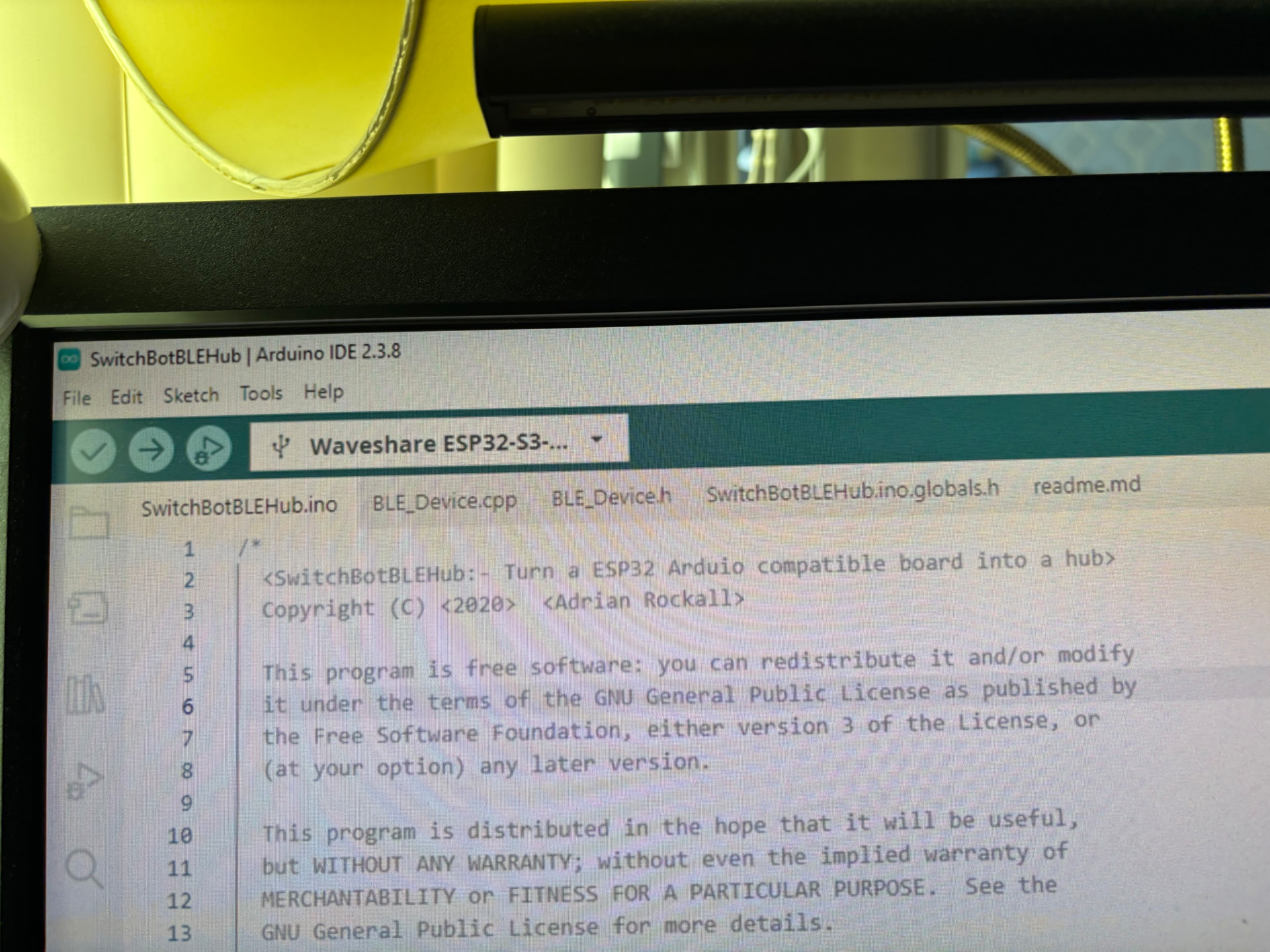
So I started the Upload/compilation and it took about 90 seconds until this Error:
c:\Users\SirAp\Documents\Arduino\libraries\ESPAsyncWebServer\src\WebAuthentication.cpp: In function ‘bool getMD5(uint8_t*, uint16_t, char*)’:
c:\Users\SirAp\Documents\Arduino\libraries\ESPAsyncWebServer\src\WebAuthentication.cpp:74:3: error: ‘mbedtls_md5_starts_ret’ was not declared in this scope; did you mean ‘mbedtls_md5_starts’?
74 | mbedtls_md5_starts_ret(&_ctx);
| ^~~~~~~~~~~~~~~~~~~~~~
| mbedtls_md5_starts
c:\Users\SirAp\Documents\Arduino\libraries\ESPAsyncWebServer\src\WebAuthentication.cpp:75:3: error: ‘mbedtls_md5_update_ret’ was not declared in this scope; did you mean ‘mbedtls_md5_update’?
75 | mbedtls_md5_update_ret(&_ctx, data, len);
| ^~~~~~~~~~~~~~~~~~~~~~
| mbedtls_md5_update
c:\Users\SirAp\Documents\Arduino\libraries\ESPAsyncWebServer\src\WebAuthentication.cpp:76:3: error: ‘mbedtls_md5_finish_ret’ was not declared in this scope; did you mean ‘mbedtls_md5_finish’?
76 | mbedtls_md5_finish_ret(&_ctx, _buf);
| ^~~~~~~~~~~~~~~~~~~~~~
| mbedtls_md5_finish
Multiple libraries were found for “AsyncTCP.h”
Used: C:\Users\SirAp\Documents\Arduino\libraries\AsyncTCP
Not used: C:\Users\SirAp\Documents\Arduino\libraries\Async_TCP
Multiple libraries were found for “ESPAsyncWebServer.h”
Used: C:\Users\SirAp\Documents\Arduino\libraries\ESPAsyncWebServer
Not used: C:\Users\SirAp\Documents\Arduino\libraries\ESP_Async_WebServer
exit status 1
Compilation error: exit status 1
I removed all libraries of “AsyncTCP”and installed only the version 3.4.0 again . Now the erro seems gone and now this :
c:\Users\SirAp\Documents\Arduino\libraries\ESPAsyncWebServer\src\WebAuthentication.cpp: In function ‘bool getMD5(uint8_t*, uint16_t, char*)’:
c:\Users\SirAp\Documents\Arduino\libraries\ESPAsyncWebServer\src\WebAuthentication.cpp:74:3: error: ‘mbedtls_md5_starts_ret’ was not declared in this scope; did you mean ‘mbedtls_md5_starts’?
74 | mbedtls_md5_starts_ret(&_ctx);
| ^~~~~~~~~~~~~~~~~~~~~~
| mbedtls_md5_starts
c:\Users\SirAp\Documents\Arduino\libraries\ESPAsyncWebServer\src\WebAuthentication.cpp:75:3: error: ‘mbedtls_md5_update_ret’ was not declared in this scope; did you mean ‘mbedtls_md5_update’?
75 | mbedtls_md5_update_ret(&_ctx, data, len);
| ^~~~~~~~~~~~~~~~~~~~~~
| mbedtls_md5_update
c:\Users\SirAp\Documents\Arduino\libraries\ESPAsyncWebServer\src\WebAuthentication.cpp:76:3: error: ‘mbedtls_md5_finish_ret’ was not declared in this scope; did you mean ‘mbedtls_md5_finish’?
76 | mbedtls_md5_finish_ret(&_ctx, _buf);
| ^~~~~~~~~~~~~~~~~~~~~~
| mbedtls_md5_finish
Multiple libraries were found for “ESPAsyncWebServer.h”
Used: C:\Users\SirAp\Documents\Arduino\libraries\ESPAsyncWebServer
Not used: C:\Users\SirAp\Documents\Arduino\libraries\ESP_Async_WebServer
exit status 1
Compilation error: exit status 1
When you install the libraries, make sure you install the version listed in the readme.
-
ArduinoJson by Benoit Blanchon version 7.4.2
NimBLE-Arduino by h2zero version 2.3.7
ESPAsyncHTTPUpdateServer 2.0.0
ESP Async WebServer 3.9.4
AsyncTCP version 3.4.10
Some of the libraries have newer version that are not compatible with the other libraries.
After removing any library that looks like similar to the “ESP Async Webserver” and installing the real library from zip file again I started the upload/compilation and after about 3 - 4 minutes I think it worked:

Is this the final/finish message of do I still have to wait for something ?
Can I disconnect it now from my laptop??
Is there any specific procedure to disconnect instead if just pulling the cable out of my usb plug ??
I’m just to cautious now not to ruin anything at this point
Yes, it’s finished flashing now.
Just pull the cable, it doesn’t need a graceful shutdown or anything.
Excellent, well done.
If it were me, I would open the serial communications tab from the Tools menu and monitor the output. You might need to cycle the power or press the reset button on the board once it is open, but you should see message coming in that let you know that it working OK.
It think it might have worked.


The “SwitchBot_ESP32” has disappeared from my Wifi list.
Now lest see how it does its work.
Should I setup/install anything on my Homey Pro.
And if not : How I can test/check that it is working ?
I have a USB LAN adapter and a Wifi connection from my Homey PRO. Either of them connected to a different IP-Subnet of my internal network.
I gave the ESP32 the Wifi credentials to connect to the same subnet as my USB Lan connection if my Homey Pro.
You can download the mobile app Fing and check if you see it on your network.
Ok.thanks.
That’s for the network/Wifi.
I even got a Fing box/“puck” here.
But I meant the Homey Pro / Bluetooth part.

All mine.
Thanks. Will check them out. Planning to disable the access points in the future step by step to ensure nothing is dependent to one of them
If all devices show up on your main network, there’s no need to keep the AP enabled. The AP is only meant for standalone use (without a router/network).
I need(ed) to update their firmware from file directly because somehow the OTA from the internet/shelle (web)servers doesn’t work on my Unifi Network. Have the same problems with serveral OTA updates from different manufacturers or countries/regions.
I always ask the support for a real file to flash directly.
