Hi!
I have updated to the TEST version and run the Webhook log again. It said „already registered”. I sent you this log.
Hi!
I have updated to the TEST version and run the Webhook log again. It said „already registered”. I sent you this log.
That message is OK as it just means the Homey webhook is already registered in your SwitchBot account. In fact it is good as it confirms that part is working.
I will certainly do my best to find out why they are not working for you, but they are working for me, so I will need some logs from you. Could you open the app settings page and select the log tab, then set the level to Wehooks:
Next, lock and unlock the lock and check if the relevant messages are appearing in the log. If that looks OK, then set the level to Full Information and repeat the lock and unlock. Then send the log for me to examine.
You can go back to the stable version until I submit the test version for release.
I don’t understand the statement as the image you posted clearly shows the padlock in the device tile.

Are you saying this is not changing between an open and closed padlock?
Hello,
No data is displayed in Webhook Information.
As a temporary workaround, I had to change my Flows to use the Device Capabilities application.
It is slower, but the information is correctly received.
I would also like to clarify that I can lock and unlock the door using the lock / unlock cards,
but it is no longer possible to retrieve the lock status (locked or unlocked) through these two cards, as it worked before.
I have this information in the general log, in case it helps.
Hi Adrian, I have two locks:
Regarding the BLE presence sensor, I’m testing the beta app, but it doesn’t activate when someone passes by. How does this sensor work? It only detects whether someone is standing within its range, not when someone passes by.
Hi Adrian,
I installed an Switchbot camera, but it isn’t supported in your app yet. Maybe you can add it easily, because it’s the “Pan&Tilt” (without Plus, which is already supported). This is from the “get hub-devices” in the app configuration:
{
  “deviceId”: “xxxxxxxx”,
  “deviceName”: “Kamera”,
  “deviceType”: “Pan/Tilt Cam”,
  “enableCloudService”: true,
  “hubDeviceId”: “FFFFFFFFFFFF”
}
If you need more information I can share it.
Greetings,
David
It’s supported by the Camera Motion Sensor (HUB) driver. All it can do is act as a motion sensor and doesn’t support video or image capture.
Too bad this camera can only be used as motion sensor. Found it and it’s working, but I would like to start/stop privacy mode and use the video capture. But it seems, SwitchBot won’t open this to other home automation systems 
Could you please remove K10 vacuum from the list of supported devices? It’s confusing for people who bought SwitchBot just because they thought it’s compatible with Homey.
This application doesn’t work with K10/K10+/K10+ Pro Combo Vacuum. When adding, it just says “no new devices have been found”, although that it can be seen that such device exists in the settings device list (below).
“deviceName”: “Robot Vacuum K10+ Pro Combo”,
“deviceType”: “Robot Vacuum Cleaner K10+ Pro Combo”,
“enableCloudService”: true,
So it’s quite clear that K10+ is not supported currently.
I can see the confusion. SwitchBot have added the Combo to the range, so the app is compatible with the stated devices, including the K10+ Pro, but you have a K10+ Pro Combo.
The Combo has different command formats, so I will probably have to add that as a separate driver, but I will take a look ASAP.
Yep, that’s what I was trying (I actually tried all of the vacuum there). I even tried to reinstall the application several times, it doesn’t work. Under all driver types, when I try to add it, it just says “no new devices have been found”. It shows under devicesList when I click on “Get HUB devices” in the settings though.
“deviceName”: “Robot Vacuum K10+ Pro Combo”,
“deviceType”: “Robot Vacuum Cleaner K10+ Pro Combo”,
“enableCloudService”: true,
“hubDeviceId”: “”
It displays “Error: No OAuth2 Client Found” when I copy the device ID into the “Get Status” debug, but I’m not sure whether this should not work only after you successfully add the device into Homey - which is not possible currently.
Oops, my bad, I didn’t see that the device type had been updated from “K10+ Pro Combo” to “Robot Vacuum Cleaner K10+ Pro Combo”, so I have published a new test version with the updated name.
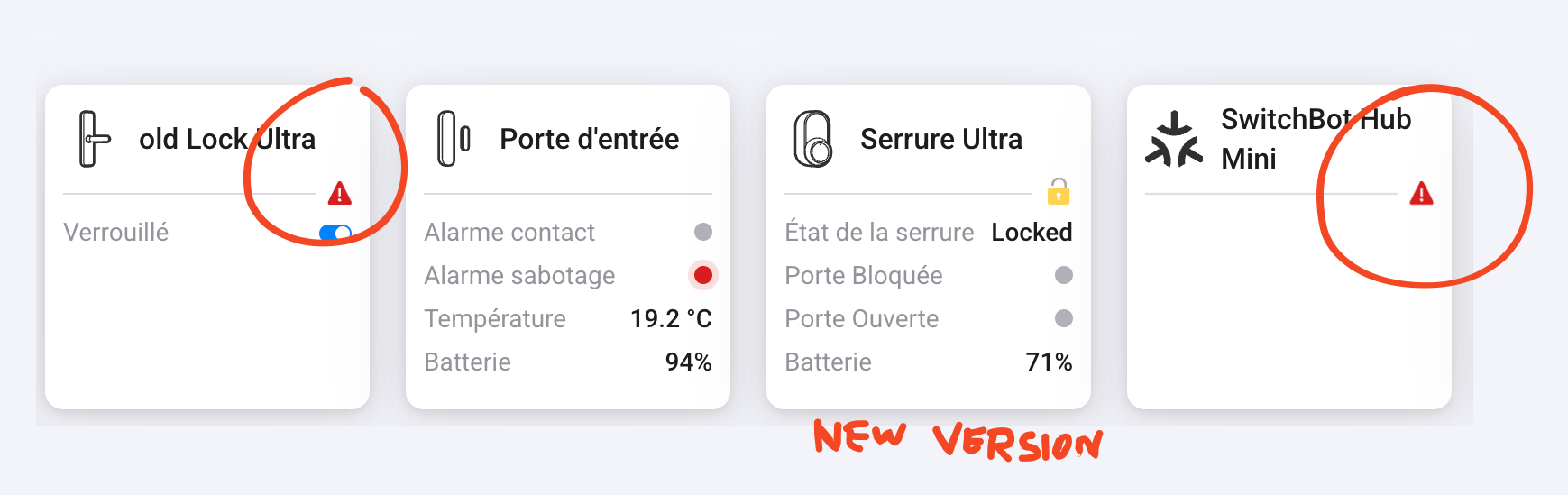
Hmm, the hub is using the Matter icon, so how have you added the locks?
Matter is supported natively by Homey and doesn’t use the app.
Same issue: the modules installed via Matter were originally installed through Homey’s Matter integration and worked for many months.
From one day to the next, a red icon appeared.
So I installed the beta version and reinstalled my lock via the SwitchBot app for Homey, but the two cards no longer work to send the information when the lock is closed or open, as they did before.
To work around the issue, I now have to use Device Capabilities.
Could you restore, in the beta version, the information feedback on the two cards?
Thanks! I tried the new version 2.0.60 and it’s working with K10+ Pro Combo now.
It looks like either SwitchBot or Athom are having issues with webhooks. My bet is it’s SwitchBot as webhook from my other apps are working well.
I have now witnessed for myself webhook messages taking up to 5 minutes to come through and sometime being missed altogether. So for my Lock Ultra, the unlocked messages are missed completely, possibly because by the time they are registered the lock has locked again.
My old Lock Pro gets the webhook updates pretty much immediately.
I have reported this to SwitchBot and I will update here if I hear anything.