Log is send. 
I’m not see the discovery being logged and no sign of that MAC address.
Could you make sure the log level is set to ‘Full Information’ and clear the log. Then try to add the device again and as soon as it stops searching, send the log.
Ok, i cleared the log and tried to add new device twice. Log is send out.
I see that the MAC adress is mentioned in the log. But according to the app it did not find a new device.
Yep I can see the entries in there and it has the expected device type ID of ‘4’, so it should work with the new test version. There must be something else I am missing, so I will keep looking and if I can’t find the problem I will purchase a Meter Pro to test for myself.
ok. Thank you for your fast support.
You have no issue with connecting your meter pro CO2? I would assume that the devices behave similar. But perhaps there are more differences then the CO2 measure feature.
Correct, I can connect my meter pro co2 OK. The device type ID of that is ‘5’ and the format of the manufacture data contains the co2 data, so it is different.
OK, another test version. Fingers crossed this one works.
1 Like
Yes! Meter Pro was found and values are updated.
Thank you very much! 
1 Like
Hi,
I have a feature request, made this a while ago, hope this can be added also.
Is it possible to add the following card for curtains (hub+BLE)
IF card:
when position becomes belower then X
&
when position becomes greater then X
I know I can use the option when position changes and use a logic card to check the position, but this keeps triggering the flow beyond the value , I only need 1 trigger and stop triggering is has been triggered.
In theorie this request card should do this, it would only trigger 1 time when the value is reached and stops triggering further, also when the value changes more below the set trigger value…
Hope this can be added in a feature update.
So, you just want a trigger when the value crosses the target like this:
if old value >= target and new value < target then trigger ‘becomes less than’.

if old value <= target and new value > target then trigger ‘becomes greater than’.
What is the use case?
Hi,
I just want a trigger card when value < target and reverse: when value > target
Use case:
When curtain motor moves (open/closes) and it get to the target I can trigger just once an other flow.
So curtain opens and position get below position 0.2 it should trigger only once.
At the moment I use the logic card when value position changes and position is < 0.2 THEN xx
But this triggers the flow a lot, it triggers at 0.19 0.18 0.17 etc
It changes very quickly it is almost impossible to make checks in the flow to run it only once.
Energy of brightness cards have the trigge which I needed WHEN value X < SET TARGET then …

Translated first one: Power get less then 5Watt second one: Power get more then 780Watt
This does exactly what I was looking for, it triggers the flow only one time when it goes below the target and then not anymore.
So trigger cards as in the example but then for position of curtain motors
Hope this info helps.
Happy Chistmas!!!
Robert
This is already possible with the available cards, right?

SwitchBots ‘The position changed’ flowcard in combination with a Logic card that tests the current position.
Keep in mind that if you use the BLE version of the curtains, in order to actually act on small position changes when the curtain is moving, you’ll need to use @Adrian_Rockall ‘s ESP32 BLE hub. That hub updates the position in Homey approx every 10 percent points.
If Homey’s own BLE antenna controls the BLE curtains then the updates are less frequent. In any case the updates won’t be granular enough to act on percent point changes.
no this is not the same..
This keeps triggering on each position change, you can try to filter it out via the AND card but the curtain motors trigger that quick that you sometimes get 10 triggers before the AND card stops..
I used exactly your example in my flows but the flow ran 10~20 times instead of once which I expected, the AND did not work as expected.
The card I requested should only trigger once (without AND), only when it drops the first time when it goes below set set value….
Ok. An alternative is to use this flowcard from the Device Capabilities app:
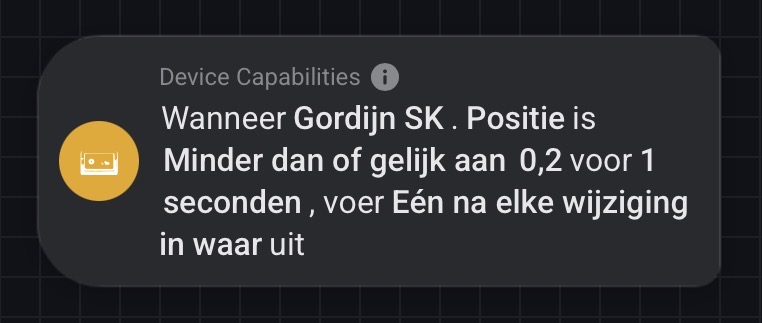
The example config results in one trigger when the curtain’s position becomes 0.2 (20%) or less.
1 Like
this is not a card of switchbot… I was looking for a solution from the app itself
I know. I was suggesting an alternative, since the SwitchBot app currently does not have the card you want. Just offering a solution that is available now.
Of course, it is up to you whether you want to use it our wait for the requested card is added to the app (if at all).
Hi everyone,
I’m experiencing an annoying issue: every time I open the Homey app, the SwitchBot app shows as “error”.
Even if everything was working before, on the next Homey app launch the SwitchBot integration is again in an error state and I have to restart it manually.

I have published a new test version with the greater than and less than Flow Trigger cards.
Could you install the test version to see if that fixes the issue.


