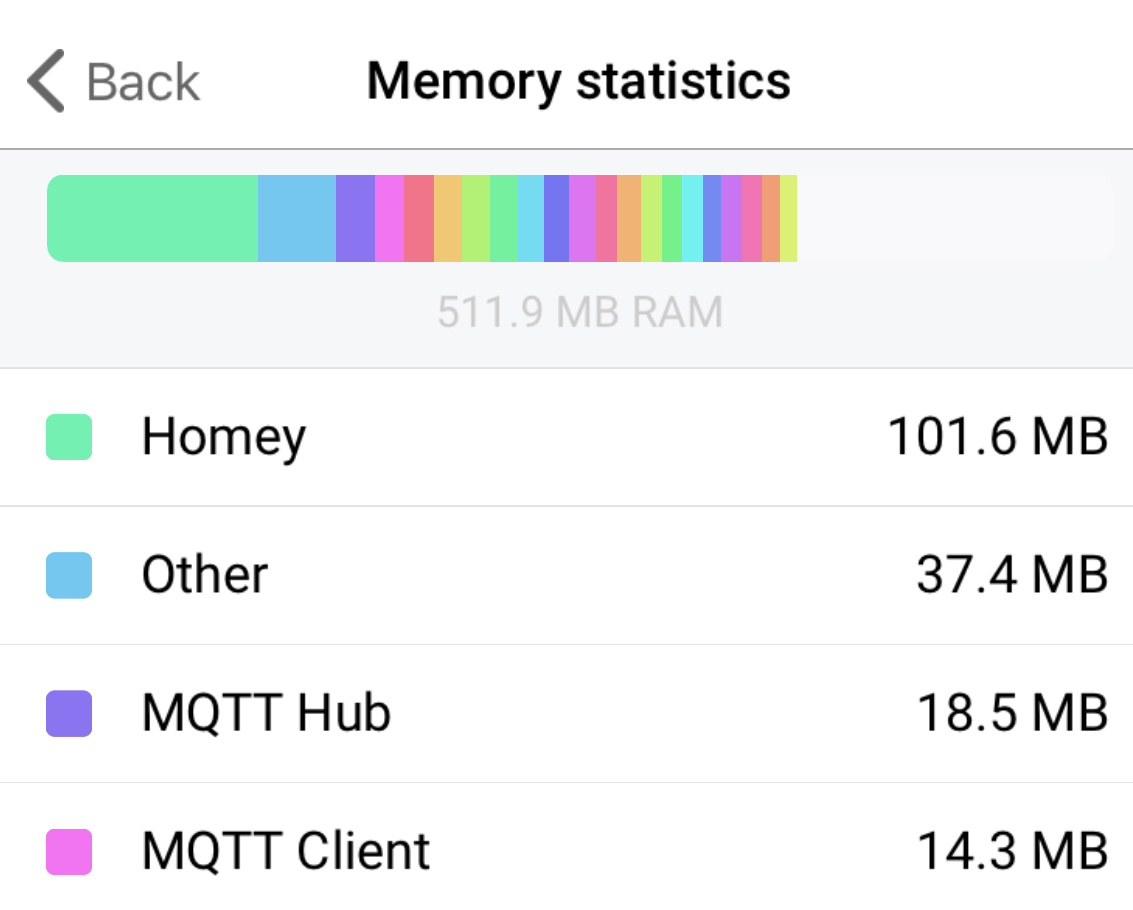
Well as mentioned I will report to Athom but am not the first nor the only one. Seems to be a serious memory leak in v4.x.
https://athomcommunity.slack.com/archives/C04E9KJAD/p1583409531388200
Well as mentioned I will report to Athom but am not the first nor the only one. Seems to be a serious memory leak in v4.x.
https://athomcommunity.slack.com/archives/C04E9KJAD/p1583409531388200
@TedTolboom
Im very sorry to say, it only looks like its the Aqara that dosen`t initialize correctly, all are with a red exclamation mark and not sends data back to Homey.
Sometimes motionsensors work, sometimes not, door/window sensors the same, temp sensors does not work at all.
Fun thing, problem occured after update to ver. 4, all other works fine.
No memory leak either:
Only 19 apps installed
Hue works, but through Hue bridge
Ikea also works, directly with Homey
How many Zigbee devices do you have? Sounds like you might be reaching the hardware limit.
@robertklep only 17 Aqara, rest is acting as routers, 3 Hue and 5 Ikea.
Should`nt be a problem, and has not been problem before, nothing changed the last 6 months.
But, very good idea 
Did you do anything special? My got fixed somehow too, but when I reset homey the problem got back. Try it 
Lets see tomorrow when it restarts, i`m not confident
Since a few days, i think the update to v0.80 (can also be homey v4.0) my aquara sensors don’t work anymore. After a reset it works for a little bit and then drops out again. before the update this was not the case please check .
sensors used:
aqara temperature and hummidity sensor
door window sensor 2X
I also got problem, night between thursday and friday, one and a half week ago. Suddenly many of my Xiaomi-devices stopped workning (motion, temp, wallbuttons). Came suddenly with no config-changes. What I could see, no updates of FW, no update of app in the near time. Looking at developer-web, i could see that they were present but had no connection with “0” (Homey). Just hanging loose. All devices that worked were directly connected to Homey, none via routers, as they were before. Pushed button on device, restarted Homey many times, restarted app, power down Homey and pull the plug for an hour, started again. No change. Waited some days, tested again.
Then I tried to add them as “new” device. Started add procedure, took some really long time during adding, and the got message “status.duplicate_device”. After this, they worked again! Now, they had connected via router. Everything intact, all flows worked again. Have been working since then.
So my conclution was ZigBee, and to maný direct connected devices. I have 38 ZigBee-devices in total, but all IKEA via IKEA GW, and all Hue via Hue Bridge, so left directly connected to Homey 19 (mostly Xiaomi). I have earlier had problems when passing 14 direct connected, and that was how many that worked this time aswell. Some people talk about 20 as max directly connected, but for mee it seems to be 14.
So, now, after “re-adding” them, still 14 direct connected, and 5 via routers (and IKEA and Hue in separate ZigBee-networks).
All is working fine now, but I will not add any mor for a while. Hopefully ZigBee rewrite is coming…
Still confused why suddenly over a night 5 units decided not to go via routers anymore, and resulted in “hanging loose”, not working…
@TedTolboom
Thanks (again) for adding all those devices in v0.8.0.
Now hoping the new Aqara Smart Plugs EU are soon ready to order somewhere.
I just saw that you might have forgotten to update the first post here with those devices?
Since you seem to be one of the lucky few to both have the Xiaomi and Aqara EU smart plugs; which one do you prefer?
The Aqara seems a bit smaller?
And in terms of reliability and functions? Are they, apart from the form factor, mostly the same?
Thanks again for your great work!
The light sensor still updates every couple of seconds or so. Wondering if you have been able to repro or if this is on your radar still. I don’t think a “luminance changed” card will bring joy to any of our Homeys with the current way it is behaving and I doubt the flow will stay enabled for longer than a minute or two.
For visualization I created a flow that acts on a luminance change from the Aqara light sensor. The result is a log entry;
This worked once, but every time after I have to remove and re add it.
But now I can’t even remove it. The three blue blinks appear, but it never removes it from Homey.
At the moment this is only happening to one temperature sensor, 9/10 times it is this sensor.
Sounds like a faulty sensor…
I tried with a new battery, and worked immediately this time. The blue LED was super bright when updating instead of being dim.
Strange. My battery tester stated that the battery was “good”, still at 2.8V. It’s higher than other temp. sensors which works fine…
Battery alarm says “OK”, and monitor is just grey (same with new battery).

I had the same issue: a humidity of more than 600%
Experienced the same some two weeks ago. No alarm, battery indicator via Homey on somewhere around 70 percent and the same odd sensor values. Replaced battery and everything was okay again.
Same experience on the sensor report humidity more than 100%. Think I also had temp reported too high once but can’t remember if it did. Changed the batteries and it was back to normal. The battery indication doesn’t report either. It stays at 100% for me…
@viix you are right. I could get battery report from xiaomi devices only linking and reporting them to homey via their xiaomi controller. Since then no more issues.