I have the following flow setup. It is supposed to work as follows:
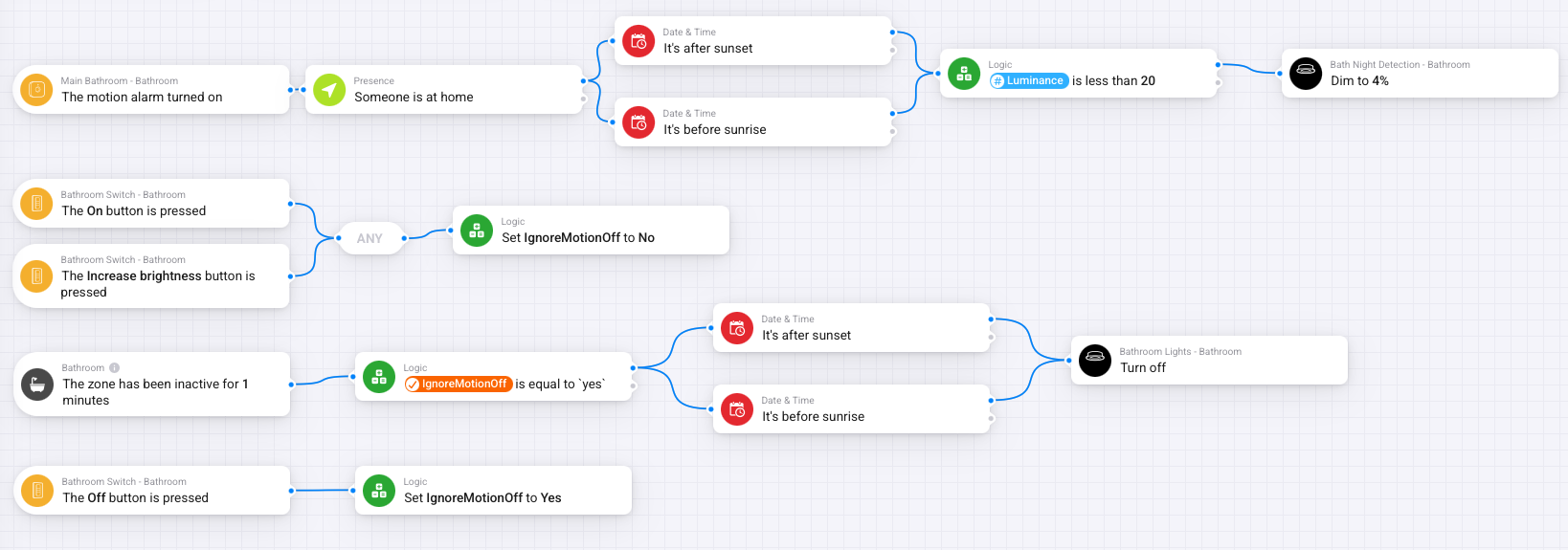
After sunset & before sunrise if the motion sensor detects movement the lights come on at 4% (so the kids don’t turn the lights on full well going the toilet in the middle of the night)
If one button on a hue smart switch is pressed then the lights come on at 35%
If the second button is pressed on the hue switch then the lights come on at 100%
Either of those 2 buttons being pressed should override the sensor action.
If the third button is pressed all lights turn off and they go back to working on the sensor. Or if no motion is detected after 1 minute then the lights turn off and revert back to sensor operation or button press.
What is happening is when the button is pressed the lights come on at 35 or 100%. But after a minute or so they dim to 4%. It’s as if it’s ignoring the instruction to ignore the sensor if the button is pressed. But I can’t fathom out why, especially when I use the same setup in the kitchen and that works as expected?
Clearly I am doing something wrong, but can’t fathom what it is.
I think you need to add an “ignoreMotionOff” in the first flow. if the buttons are pressed, you don’t want it to trigger the motion flow. you DO want it to trigger the zone is inactive.
In my view where you have ignoremotionoff is set to no, it should be yes, on the ignoremotionoff is set to yes, it should be no, and the logic card in the zone active should move to the motion alarm turned on flow, and only trigger if ignoremotionoff is set to yes
The variable-name ‘ignoreMotionOff’ Is confusing. It implies IMHO that only the motionalarm turning off should be ignored. But when the light is turned by buttons the sensor should be ignored all together.
Therefore I would rename the variable to ‘Bathroom lights turned on manually’ and set this to YES when one of the on-buttons is pressed.
Then the top row should read:
WHEN
motion detected
AND
‘variable Bathroom lights turned on manually’ is NO
and …
and …
THEN
dim light to 4%
Edit after 20 minutes
I now realize that topicstarter is using the luminance of the motion sensor. Which is higher then 20 when the bathroom light is dimmed to 35 or 100%. (Probably also when dimmed to 4%)
Topicstarter should realize that the luminance of a motionsensor is not reported to Homey instantly.
hi @Carl
Maybe I’m a bit late to the party, as you already mentioned the flow is doing what you want now. But I wrote a tutorial about how to implement motion sensors whilst still gain full control over when to enable/disable motion sensing, etc. Maybe it could serve you as well as your motion based flows will become more elaborate.

 But when I manually test it then it runs as I want it too, i.e it turns the lights on at 5%


