Hi!
Just install the application from the Homey App store.

Hi!
Just install the application from the Homey App store.
Hi!
Did you flashed the sensors with the custom firmware?
The sensor needs to be modded with custom ‘ATC’ firmware using ATC441 advertising format.
For that please visit GitHub - pvvx/ATC_MiThermometer: Custom firmware for the Xiaomi Thermometers and Telink Flasher and you can use the Telink Flasher to flash the firmware.
After flashing, don’t forget to set the ATC441 advertising format.
The app will filter the dicovered devices by their UUID (0x181A) and will list the devices by their name.
Kindest Regards,
Zsolt
Hey again
Any idea @ZsR ?
Hi Clement_F,
Sorry for the delay. Please set the advertising format of the firmware to ATC1441. That should solve the problem.
Thanks that’s works !
FWI here is the atc1441 flasher: Telink Flasher
Download the firmware there: Releases · atc1441/ATC_MiThermometer · GitHub
Hello, how did you actually change the advertising format to ATC1441? I managed to flash the meter using the latest version of ATC_thermometer.bin (https://github.com/atc1441/ATC_MiThermometer/releases/download/81/ATC_Thermometer.bin), I can see that it now shows its MAC on reboot and that it cycles through battery level and humidity. But I forgot to change the advertising format and cannot figure out how to do that, now that the meter is already flashed to ATC. Any tips?
AFAIK you can change it from the firmware flasher page.
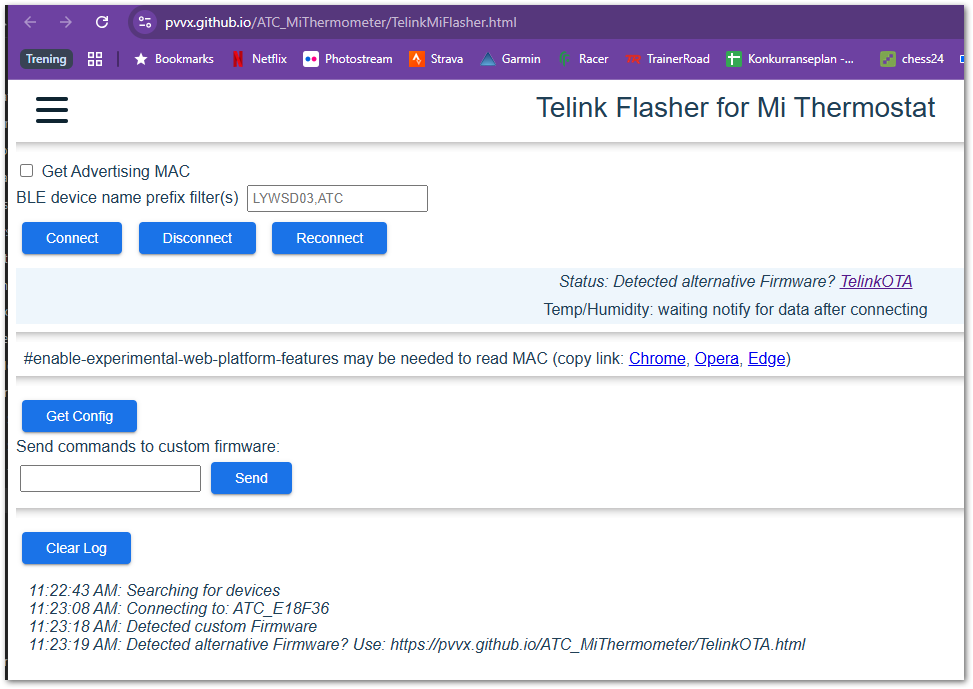
Yes, that is correct if you remember to set various settings the first time you flash the device. However, when I now connect to it, I only get what you see in the screenshot. As you can see from the log, I could connect to the sensor at e1:8f:36, but I don’t now which code to use in the “Send commands” field to set the ATC1441 advertising format. Any tips?
I don’t know why it’s saying “Detected alternative firmware” but it suggests that the page cannot deal with that.
I used this flasher: Telink Flasher