[APP][Pro] Lay-Z — Control your Bestway Spa & Pool Filter from Homey

What does this app do?

This app connects your Bestway Lay-Z-Spa and Bestway Pool Filter Pump to Homey. Monitor water temperature, control heating, jets and the filter pump, and automate everything with Homey Flow — including push notifications when the target temperature is reached or an error occurs.

:mobile_phone_with_arrow: Install

Supported devices

Driver How it connects
Lay-Z Bestway Lay-Z-Spa Airjet & Hydrojet Pro — via Bestway/Gizwits cloud account
Lay-Z-Spa (Share Code) Any Lay-Z-Spa — via share code
Bestway Pool Filter Pump Bestway pool filter pumps — via Bestway/Gizwits cloud account

The login automatically tries the US, EU and global Gizwits servers — no manual region selection needed.


Features

:thermometer: Lay-Z-Spa (Airjet & Hydrojet Pro)

Live water temperature Real-time °C display
Target temperature Set your desired temperature
Temperature reached Notification when it’s ready
Power on/off Turn the spa on or off
Heating on/off Control the heater independently
Filter pump Control the filter independently
Bubble massage (Airjet) Toggle bubble/wave function
AirJet Low / High Two-level massage intensity (Hydrojet Pro)
HydroJet Massage Toggle HydroJet massage (Hydrojet Pro)
Child lock Panel lock indicator
Error alarm Active error indicator + plain-text description
Power (W) / Energy (kWh) Estimated power consumption & energy meter

:droplet: Bestway Pool Filter Pump

Power on/off Turn the pump on or off
Timer Set the auto-off timer (0–24 h)
Filter change Indicator when the cartridge needs replacing
Error alarm Active error indicator + error code description

Flow Cards

Lay-Z-Spa triggers

  • :bell: Target temperature reached (token: temperature)
  • :bell: Spa error occurred (token: error message)
  • :bell: Filtering turned on / turned off / changed

Lay-Z-Spa conditions

  • Is the water temperature above / below [x] °C?
  • Has the target temperature been reached?
  • Is the AirJet active?
  • Is the spa locked?
  • Is there an active error?
  • Is filtering on / off?

Lay-Z-Spa actions

  • Turn heating on / off
  • Turn filter on / off
  • Turn AirJet Low on / off
  • Turn AirJet High on / off
  • Turn HydroJet on / off
  • Turn filter pump on / off / toggle

Pool Filter Pump triggers

  • :bell: Filter pump turned on / turned off / changed
  • :bell: Filter change required
  • :bell: Pool filter error occurred (token: error message)

Pool Filter Pump conditions

  • Is the filter pump on / off?
  • Is a filter change required?
  • Is there an active error?

How to add your device

Via account (Lay-Z driver):

  1. Homey app → Devices → + → search Lay-Z
  2. Select Lay-Z
  3. Enter your Bestway app credentials (email + password)
  4. Pick your spa from the list → Add

Via share code (no account needed):

  1. Open the Bestway app on your phone
  2. Go to your spa → Share → copy the share code
  3. In Homey: Devices → + → search Lay-Z → select Lay-Z-Spa (Share Code)
  4. Enter the share code → Add

Forgot your password / changed credentials?
Long-press the device card → Settings → Repair — re-enters credentials without losing your flows.


Languages

:united_kingdom: English · :germany: German · :norway: Norwegian · :czechia: Czech · :netherlands: Dutch · :denmark: Danish · :sweden: Swedish · :italy: Italian · :france: French · :russia: Russian · :poland: Polish


Example automations

“Notify me when the spa is ready”

When → Target temperature reached → Then → Send push notification: “Your spa is ready! :bathtub: [temperature]°C”

“Auto-start heating in the morning”

When → Time is 07:00 → Then → Turn heating on

“Save energy — stop heating when nobody’s home”

When → Everyone left home → Then → Turn heating off, Turn filter off

“Alert on error”

When → Spa error occurred → Then → Send push notification: “Spa error: [error_message]”


Known limitations

  • Requires Homey Pro with firmware ≥ 12.0 (cloud platform not supported)
  • Power consumption is estimated based on active components — no current sensor in the spa
  • Share code pairing requires the Bestway app to generate a code first

Credits

Originally created by rtorkelsen · Extended by einarand and andiwirz

The Share Code (SmartHub V02) driver is based on the excellent reverse-engineering work done in the Home Assistant integration ha-bestway by cdpuk — a huge help in understanding the Bestway cloud API.


:beer_mug: Support the development

If you find the app useful and want to say thanks, donations are always appreciated:

:backhand_index_pointing_right: paypal.me/rtorkelsen

:backhand_index_pointing_right: paypal.me/andiwirz


Questions, feature requests and bug reports welcome below! :backhand_index_pointing_down:

What’s the difference from your app and this existing app?

AFAIK Athom only approves 1 app per device, and both your app and the existing app appear to control the same device?

That rule-of-thumb seems to be loosened up some time ago.
A few examples:


(in fact all Lidl app supported devices are also supported by the Tuya Zigbee app)

The app is not additional - still the same app maintained by @rtorkelsen and my contribution with additional drivers which are currently only available in the TEST version.

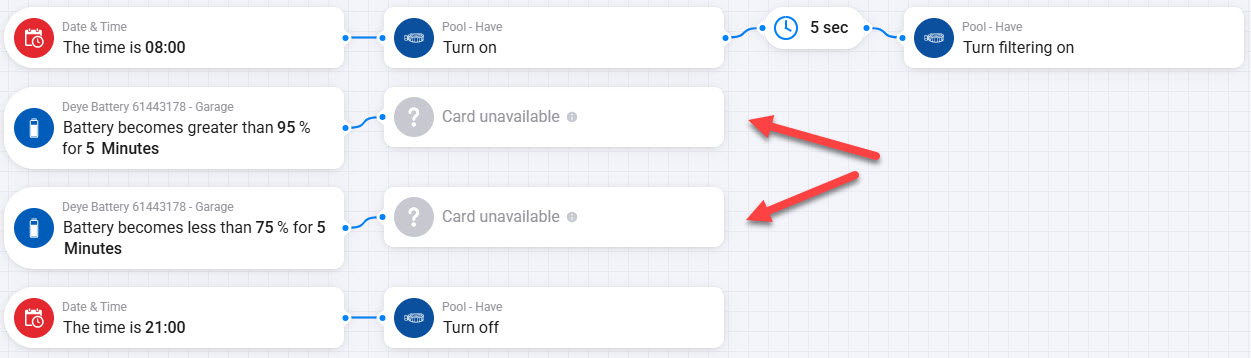
Update: The new version is now LIVE

After the latest update, turn heater on/off is no longer available :-/

Hi Frank - Are you able to create new Cards?

Hi Andi

Yes, but heater on/off are no longer avalible

The App specifications also doesn’t mention any heater on/off - it matches what i experience - same cards:

For me it looks like this:

Strange…

I tried to un-install the app and then re-installed it - didn’t solve the problem…

Please send the raw data of the device under device settins (as text)

Thank you

OK, this is strange…

I tried to make a simple flow on my phone, and the heating on/off was available :face_with_raised_eyebrow:

Then i tried making a simple flow in the HomeyApp in my computer, and now heating on/off was strangely available. Then returned to my original advanced flow and created a new then/card and now heating on/off is available…!! :heart_eyes:

It’s like it triggered the HomeyApp that i did the simple flow on my phone.

Anyway, i works now - thanks for pushing me to keep trying to get it to work.

Hi all, using this app is great. there is however an error reported in the homey app and not on the pump or in the iphone bestway app. it complains about E01: Flow sensor error.
I wonder if the error is a misinterpretation or if i need to call someone because the pump has an error…
i wanted to copy the raw data but cant select or copy the text in the homey app.
I have the Baracay 4 spa.
thanks for the help!!

You can use the WebApp https://my.homey.app/ to copy the raw data. Please send it to me or post it here.

Thank you

wifivertion: 121 | otastatus: 0 | mcuversion: “(null)” | trdversion: “0.0.6” | ConnectType: “online” | power_state: 1 | heater_state: 4 | wave_state: 0 | filter_state: 2 | temperature_setting: 25 | temperature_unit: 1 | water_temperature: 28 | local_timer_rest: 0 | hydrojet_state: 0 | local_reservation: 0 | B1: 30 | B2: 30 | B3: 50 | B8: 0 | B9: 40 | P0: 901111 | P1: 60420109 | P2: 62420409 | warning: “1” | error_code: “” | W0: 56 | is_online: true

that E01 error is a false label from a bug in the app, not a real flow sensor problem. Your pump is fine.

Here’s what your raw data actually shows:

  • warning: "1" — the device has a generic warning flag set (boolean: yes/no)
  • error_code: ""no specific error code from the pump
  • heater_state: 4 — heater reached target temperature, normal idle state

The app was incorrectly grabbing the warning field (which just means “some warning flag is active”), parsing the number 1 as error code 1, zero-padding it to E01, and looking up “Flow sensor error”. The Bestway app shows nothing because it correctly reads the empty error_code field.

The next update (1.3.9) fixes this: warning is now treated as a pure boolean flag and the error description only comes from error_code / fault_code. With your data, it would correctly show “Device warning (no error code)” — or nothing at all once the warning flag clears.

the app updated to 1.3.9 and now it complains with :
device unavailable
rawError is not defined
trying to repair gives: unknown_error_getting_file

wifivertion: 121 | otastatus: 0 | mcuversion: “(null)” | trdversion: “0.0.6” | ConnectType: “online” | power_state: 1 | heater_state: 4 | wave_state: 0 | filter_state: 2 | temperature_setting: 25 | temperature_unit: 1 | water_temperature: 28 | local_timer_rest: 0 | hydrojet_state: 0 | local_reservation: 0 | B1: 26 | B2: 25 | B3: 50 | B8: 0 | B9: 40 | P0: 901111 | P1: 60420109 | P2: 62420409 | warning: “1” | error_code: “” | W0: 95 | is_online: true

Updates are waiting: Update 1.3.10 by andiwirz · Pull Request #9 · rtorkelsen/homey-layz

@rtorkelsen Could you please update the TEST version?

Test version 1.3.10 has now been published.

There still seem to be some issues with the Flow card texts.

Looks like some cards still show [[device]] as plain text ?

Hi Andi,

Sorry, I replied too quickly before reading your full explanation.

Thank you for checking this properly against the Homey docs and the publish-level validator. I understand now that [[device]] is required in titleFormatted, and that removing it would cause a publish-level validation error.

So please ignore my previous comment about removing [[device]] from the remaining Flow cards. If the validator passes cleanly and Homey expects this pattern, then it makes sense to keep it as it is.

Ruben