Not sure what you mean…
If you mean how often it updates then it’s rather frequently but not sure of how often exactly…


In some way it seems to be reconized differently, indeed.
In Homey or in flows, you can indeed adjust the temperature by clicking the sensor. Not ideal, but it works.
The real problem (for me) is that it’s also reconized differently outside Homey.
I’ve integrated my Homey in Google Home. My Tado TRV’s can be adjusted in Google Home, but as the Sonoff TRV is reconized as a switch, it doesn’t work.
So no possibility to adjust temperature by voice, and smarthome discussions with my wife (I integrated everything in Google Home, so she doesn’t have to use ‘a million different apps’  )
)
There are two temperatures that can be set in the TRVZB - one is under ‘Manual’ and the other under ‘Auto’. Having used the eWeLink App the desired weekly temperatures can be set and then delivered on the Auto side of the device. Should the occupant find the temperature uncomfortable they can turn the big button and the Auto Set-Temp will become illuminated but will not change. Then a single press of that button will switch to the Manual side and now the temperature can be changed as desired. Another press of the button will toggle back to the Auto side. I believe the Manual setting will remain indefinitely if the button is not pressed - I would prefer that it resets to Auto after a time. I would like to emulate the above behaviour on my shiny new Homey Pro but the Sonoff app provides no access to the ‘Auto’ side. It needs another card (set of cards) relating to the Auto side. I am currently using it with an external temp sensor and setting the manual temp high (35C) - when the external sensor reaches 21C I turn OFF. Then when the team falls to 20C I turn ON. Less than elegant and leaves no room for manual intervention.
Hi All in this Chat. I have been involved last year since my Sonoff TRVZB did not work as required (no current/ room temperature was shown). Now someone wrote, Firmware 1.6.4 has fixed that issue. I checked, but nothing is written there. (only: Dec 31, 2024: Add vector image for SNZB-05P).
So my questions and can anybody really confirm that this is now all working with the following (I think normal) prerequisites I have:
- I use the “official” (Sonoff Brings Your Home To Life StyraHem Sweden) app !!
- I do not have any Sonoff Bridge. I use only the Zigbee network from my Homey (early 2019).
Can I then expect the following:
- Does the Thermostat has an internal temperature measurement and shows the actual temperature which is in the room?
- Does that temperature gets updated regularly? No matter if immediately or slow. It just must update (also in the Homey App)?
- Can I use this actual temperature of the Valve in the homey flows to stop heating or to trigger heating?
- Could I also use an external temperature (also from a different brand) to set the desired target temperature?
- Is there a way to Update the Firmware without the Sonoff Bridge?
I hope I did not forget anything. But can anybody confirm that this would then work? Do not want to order again and find out same problem as last year.
Thank you so much for your help community !!!
Hello Ringler,
I just started to gather experiences with the Sonoff TRVZB. I have 4 TRV working since one week. They all run on firmware 1.3.0, with my Homey’23. Connection is perfect via Zigbee.
To your questions:
I really hope that the TRV support in the Sonoff App will be developed further.
For the moment Homey sees the TRV as a sensor with the possibility of setting a target temperature, not as a thermostat - therefore you can not set it up on a dashboard for example
Dear Fabian
Thank you so much. I have received also feedback from the app developer and he meant that it should all work as asked. Firmware Update does not work w/o Sonoff Gateway.
Best regards
Christian
Hey Fabian - I am pretty much where you are with the TRVZB. I had 2 running with the eWeLink hub this time last year. Then I went for Homey. The eWeLink control integrates the Sonoff Temperature sensors (SNZB-02D in my case) and makes a good job of the control. However in this old house the eWeLink hub was unreliable on signal range or interference so I swapped over to Homey control. Yes - you can set the thermostat to a temperature and it will slowly regulate. You can set an offset in the setup but I need a big offset with cold weather and then it’s too hot in milder conditions. I want to use the temperature sensors located away from the rads as the controlling element. In principle I would like to set the thermostat very high to heat quickly but when the temperature reaches say 21C turn the thermostat off. Then when it falls to 20C turn it on again. I am having difficulty finding a FLOW to do that. I have tried having a master FLOW that triggers other FLOWs with different settings with different temperature settings - within these flows I try to trigger on “any temperature change” from either the sensor or the thermostat but it doesn’t work. For instance, I want to hold 17C through the day - raise it to 19C at 18:00 and the raise it to 21C only if a presence sensor triggers within the room. I am looking for way to make make this work?
Hi Robin,
today I am using the “Heating Scheduler App” (Homey Heizungsplaner | Homey) to manage my TRVs. Unfortunately, there’s no way to integrate external thermometers into the app. This is only possible via Flow. The app works very well, you just have the disadvantage you have to work with the TRV internal thermometer. For me I simply adjusted target temperature - and you have to know that the TRV only acts of the actual temperature is >1.0°C away from target: If you want 22°C, you have to set target 23°C (I read that is was changed to a higher accuracy, but for me it seems to work like that).
Further you have to know if you try out Heating Scheduler: If you change the heating plan you setted up via “Climate” in Homey (as your Plan is visible in Climate as thermostate) the plan switches modus to “Fully manual” or “Manuel until midnight” - be aware you have to switch back to “Automatic” via flow for example after a period of time or when leaving home or whatever).
Maybe you have to setup a mixture: Using the Heating Scheduler App to manage the master temperature - but push heating via flow when you are at home (Home/Away detection –> If home, them set to…). You could also install a simple button to “Boost heating” for 5 minutes (Flow).
Hi, the pairing of my TRVZB valves has stopped working. When I get to the Zigbee pairing page, it freezes. I restarted my Homey system and reinstalled the Sonoff app, but nothing works. And since I uninstalled the app, all my old valves were deleted. Have you encountered the same problem? Thanks for your help.
Hi,
I’m using the official application form StyraHem. I have several TRVZB (thermostat) and the SNZB-02WD. I’m pretty happy with this app but…
When the thermostat is heating, the TRVZB icon on the dashboard doesn’t display the orange color that the Eve Home thermostat does. This graphical information is quite useful.

Inside the properties of the device, the orange appears well when eating.
On my iPad, I can’t select my TRVZB from the dashboard to use the thermostat widget. Instead, I can only select the Eve Home or Netatmo (my main thermostat).
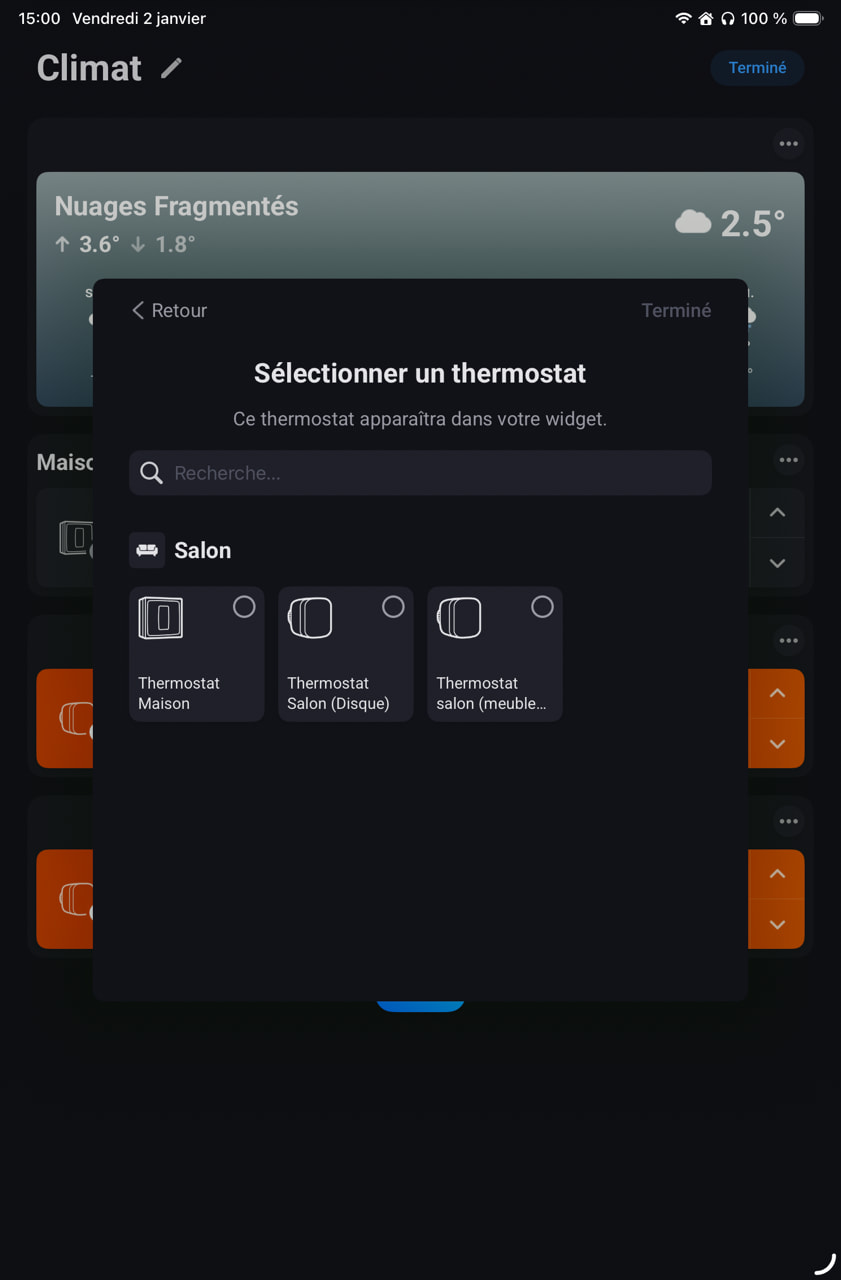
Please let me know if I overlooked any parameters that are necessary for this two to work 
I have a couple of Sonoff TRVZB with firmware 1.2.1 and I see there are imported in Homey with class “sensor” instead of “thermostat” , this produce some issues … in my case the main issue is that VThermo cannot control the valves.
Is this issue solved with firmware 1.3.0 ? (I cannot update because I don’t have a Sonoff zigbee hub)
The other issue is the internal temperature sensor which is very slow to adapt to the current temperature (about 5 hour to go from 20° to 14° seems a lot to me), don’t know if this issue is related to Homey or to the TRVZB hardware/software.
Anyone can confirm this issue also, and if is solved with the new firmware)
Same issue with TRVZB’s with firmware 1.3.0. I have several of those and all are like “sensors“. I think issue is in Homey app…
Update them to the latest firmware ie 1.4, they work fine with the heating apps in Homey
Ok, updated two of thermostats to fw 1.4.1, but no change, thermostats are still detected as an “sensor”.
Otherwise those are working just fine… It just would be nice if TRV’ s would be detected correctly.
So the issue currently is not solved 
I’m going to ask Sonoff app dev to fix it.
In the meantime i made a script to allow VTherm → TRVZB sync … but this is not a clean approach to solve this issue.
I’m using official Homey Pro app “Sonoff by StyraHem Sweden“ and in this app TRVZB’s are detected as sensors.
Then, I tried app “Sonoff by Johan Bendz” and in this app TRV’s are detected correctly as thermostat, only issue is that battery percentage value is not reported.
There is two good apps but both of those should be fixed
@Timo_K I did not try the Sonoff community app … does it support flow card like temperature changes or set temperature?

I’ve updated my TRVZB to 1.4.1 firmware, but the issue is not solved.
Also with the Sonoff Zibee app (test version) by Johan Bendz we have issues, because the valve has the correct thermostat class, but the TRVZB doesn’t respond the changes in Homey target temperature.
So currently the best approach to use an external temperature sensor seems to use the Sonoff official app + VTherm app + custom script to sync both
