A couple of times now I have woken up with some random Zigbee lights turn on in my home. At first I thought this was an issue with the Schneider Wiser app, but tonight I also noticed some Philips Hue Zigbee lights turn on.
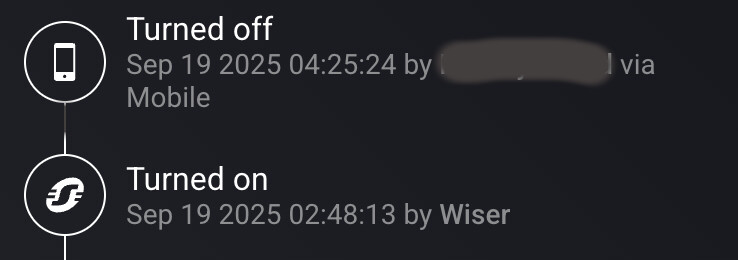
The lamps are seemingly random (the combination does not match anything from any flow or groupings in any sense), some top floor some bottom floor. Common is that they all activate at the same time and in the device logs they are activated by the “app”. Like for the Wiser lamps they show up as if I turned them on with the physical button, same for the Hue lamps (the logs show they where activated by “Philips hue”. See shots below (or shot, sorry as new user I can only embed one). If this was from a flow the flow name always appear, and of course manual control from apps or so shows who did it.
I don’t even know where to begin. Anybody has any ideas?
Install the Audit app, this app logs “everything”. And no need for creating flows.
See
.
Unfortunately this can also mean a flow changed the dim level.
Or, in case you use f.i. a Hue hub, something on the hub commanded the light;
Very annoying because it doesn’t reveal the “guilty” flow.
One of the reasons I add log cards to many of my flows.
But the Audit app does a great job as well.
Install the Audit app, this app logs “everything”. And no need for creating flows.
Good tip, I will do this to gain some insight. I am however confident this is not caused by any flow regardless if it would be shown or not. Both as I do not have any flow that would trigger in the middle of the night and as the lights affected differ from time to time and the combination of affected devices would not make sense in my house. TBH it feels more like a buffer replay of leftover Zigbee commands or so in the Homey.
Audit app installed and the “self activation” captured. From the logs this is what I got:
[2025-09-21 01:59:03.593] notice: Svarta golvlampan i hörnet Turned on [2025-09-21 01:59:03.628] notice: Taklampa Turned on [2025-09-21 01:59:03.639] notice: Trappan Turned on [2025-09-21 01:59:03.993] notice: Takspottar Turned on [2025-09-21 01:59:05.798] notice: Uttag handfat Turned on [2025-09-21 01:59:06.643] notice: Takspottar balkong Turned on [2025-09-21 01:59:06.706] notice: Spegelbelysning Turned on [2025-09-21 01:59:06.727] notice: Spegelbelysning Dim level increased from 47% to 50% [2025-09-21 01:59:06.777] notice: Takspottar Dim level decreased from 64% to 50% [2025-09-21 01:59:06.814] notice: Takspottar balkong Dim level decreased from 10% to 9%
Nothing more, no flow or other indication or mention as to why it happened. Details whas not more enlightening:
 , maybe the cats? hmm…)
