I think this won’t work anymore from today on.
Ring now forces 2FA.
See the announcement on:
https://blog.ring.com/2020/02/18/extra-layers-of-security-and-control/
For the dutch:
Peter
I think this won’t work anymore from today on.
Ring now forces 2FA.
See the announcement on:
https://blog.ring.com/2020/02/18/extra-layers-of-security-and-control/
For the dutch:
Peter
I have added a comment on that blog but I bet it doesn’t get published.
Time to look for an alternative I think.
Respect to the app dev for trying to keep up with Rings efforts to break it.
I can’t seem to get the flow below to work.
It does not grab the image when motion is detected by my Ring pro. When I press the test button in Homey Flow the flow works (I can see a picture/snapshot in Homey Developer - images). When there is motion, it doesn’t… 
I have the same flow for when some presses the doorbel, that works and delivers a snapshot picture which I push via pushover to my cell phone. I reinstalled the ring app with 2FA.
Have you tried to enable the motion via a flow?

It seems it becomes disabled so I run this every morning
Have you tried putting a timeline notification in your first flow to see if it is the motion alert or the snapshot that is failing?
Thnx for the suggestion.
I have added the heimdall action card below. When I test the flow with the test button it adds a notification to the timeline, so the flow itself works. I expect that it does not do so when I jump in front of the doorbell tonight when I come home… more later tonight 
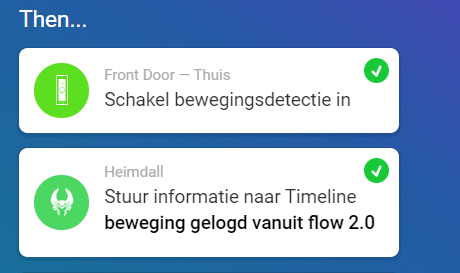
There was sooner than expected a testresult. The flow below started at 12.30 as planned

It is difficult to find out why it works for some but not others.
Are you able to run it from the CLI to see more diagnostic information?
It is unclear how (let troubleshooting aside since we went on a holiday last Friday), but since two days I am receiving notifications via Pushover when movement is detected by Ring - so it is working! Did not change anything, but it is working as expected…
P.S. the flow to enable movement detection (in the ‘Then’ column) is disabled
@Adrian_Rockall - thnx for your help in trouble shooting!
Hello, I have the latest Homey Ring App V 2.3 supporting MFA. I have the Ring Doorbell 2. Is this one supported by the Homey App? When trying to grab a snapshot, I am getting this error: “invalid_content_type” is there a workaround
Be sure you have enabled MFA on the Ring account and added the doorbell with the MFA tokens. That did it for me.
Doorbell 2?
Does not work here for Ring V2
I am using ring v2. I had to enable “modes” and set to “away mode” to make it work.
Did the same, still reuse the same images, can you share your settings in the device and also the flow? 
Same problem here. Invalid content type with Ring Peephole Doorbell


