You can also go to the app store, edit url and add test at the end. Will work for most/all apps that have test verions
Installed it this morning and now I’m getting motion alerts again, so for me it seems solved.
Thanks for all the work you’re putting into this! 
New version published
Version 2.10.26
- Repaired receiving of notifications after Ring API change.
Having not received any reports of problems nor any errors in the Developer Tools from version 2.10.25 I’ve decided to no longer wait until the final version of the new ring-client-api with the fix for not receiving notifications is published and let everyone benefit from the fixes in version 2.10.25.
This new version is exactly the same as the previous test version, I’ve just removed some additional logging I had put in place for easier troubleshooting in case the test version contained some bug.
To get, and keep notifications coming in all users that previously weren’t using the test version 2.10.25 need to perform the steps below:
- In the official Ring App, go to the
Control Center. This can be reached from the main menu, under the Account section. See this article if you are having trouble finding it - Click on
Authorized Client Devices - You will now see a list of authorized devices on your account. The devices created by this App will be listed as
androiddevices, with names like:HomeyDevice name not foundorHomey-Auth-token
- Remove all devices with names like above (
Device name not foundmay be in your own language!) - After removing the devices please stop and start the Ring Doorbell and Cameras app on your Homey
- Now open any of your Ring devices in the Homey app and click the Try to Repair button to loggin at Ring.
- Now you’ll have to wait a bit, while everything is setup right now there’s a delay before notifications actually start working again, wait at least a minute or 5. If after that time notifications are still not received, restart the Ring Doorbell and Cameras app once more.
Fantastic. Thanks Danee, looks good so far. For some reason I never got the option to Repair so I had to uninstall the App and reinstall. It then took a Homey restart to make the Ring App visible as an option when adding devices, even though I could see it in the installed Apps list. Maybe I had got my system in some weird state. Still, all worked out in the end.
Thanks for the feedback, and donation, much appreciated!
Glad you got it working!
Could you add support to Ring Mailbox Sensor please?
It is using Ring Plug-In Adapter (2nd generation).
Thanks,
LK
https://www.amazon.com/gp/product/B08C9NFVS1/ref=ppx_yo_dt_b_search_asin_title?ie=UTF8&psc=1
Hi LK,
No, the focus of this app is for the Ring Doorbell and Cameras devices. Next to that, it is very hard to add a device to the app which I have no acces too and that particular device is not available in the Netherlands, so that’s another requirement for me to add a device to the app, next to having an incentive to do so.
I had hoped to receive some donations for this app to at least be able to cover the cost of the devices I’ve bought to write support for but until now the balance is still very negative so I’m a bit reluctant of promising support for new devices.
You made me feel bad about myself  Have a beer on me
I have a small problem: When there is a person in the picture, it does not take a snap picture (it creates a blank image).
When I stand in front of the camera and reload the image in the app, it generates a blank image.
When I leave the zone and relod again, it takes a snapshot of the surroundings.
Could it be a privacy setting I can’t find?
What type of Doorbell do you have?
Because it may be a limitation of your doorbell, one of the things that Ring does not include in their advertising is the snapshot limitations of their battery cameras. These cameras (even when plugged in to a power source) are unable to take a snapshot while video is being recorded.
This one: Video Doorbell Wired – Ring
It works in the official ring app
Two weeks now without a problem!
Danee, thanks a lot for your work 
Well worth a little donation!
Can you please show a screenshot of your flow?
Do you get a new image when you execute the flow? (do this during different times on a day to see a clear difference due to the movement of the sun)

While that flow will produce a message with a snapshot you can never be sure what snapshot is grabbed.
To make sure you get an image from the exact moment you want you will need to specifically grab a snapshot at your trigger.
Next you will have to let the function that creates the screenshot trigger a flow to do something with the snapshot that was just grabbed.
Sounds complicated perhaps, but in reality it isn’t, just start with this example and extend it to your needs:
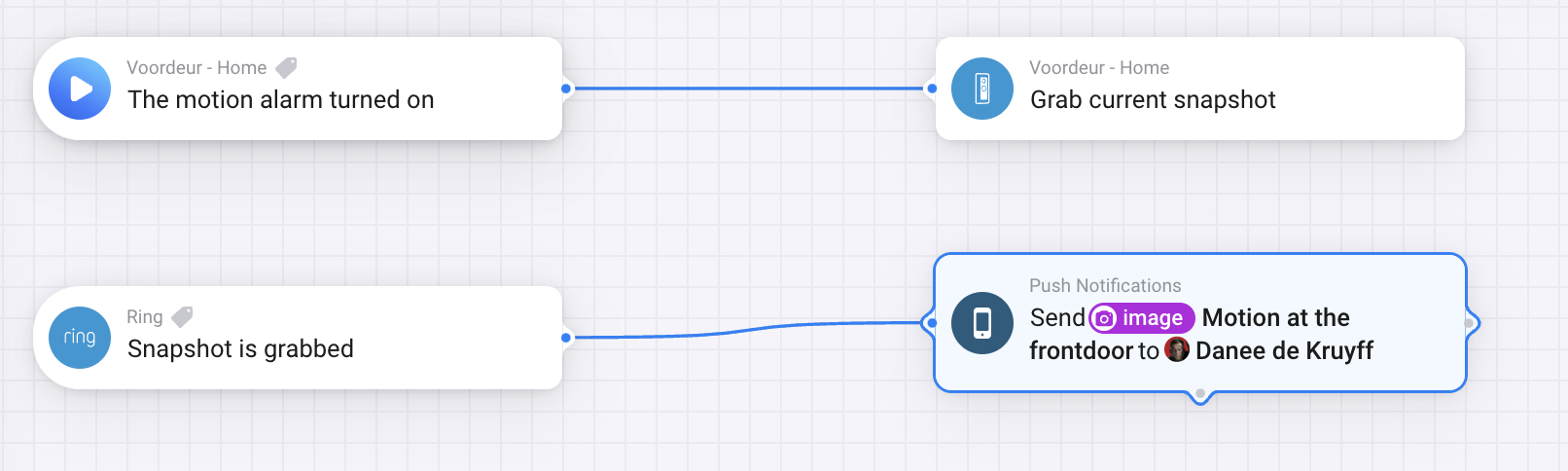
Hey Danee, great work. I’m using your Ring app quite a time. Unfortunately I have tried all your steps includig removing the app and reinstalling all camera’s but stil no action on motion detection. It will not registrar a motion. For the rest it is working great.
Is there a solution to get motion detection back on the HP23?
Hi Rogier,
I would have greatly appreciated it when you would have posted your problem here and let me try to help you before you leave a rating in the App Store stating something isn’t working for you.
The app has several thousands of users, if the app really isn’t working for camera’s it isn’t to crazy to assume there would have been more reports about them not working. Please don’t state the problem you are experiencing as a problem of the app if it hasn’t been properly troubleshooted and tried to be fixed.
That was not the intention. As you can See I have corrected it. Not all the newy’s know the official routes
Thanks, now let’s find out what’s going wrong.
I have some questions for you:
- Which (type of) camera do you use?
- Are the Motion Detection and Motion Alerts settings both enabled in the Camera settings in the Official Ring App
- Is the Use Motion Detection setting in the Camera’s Advanced Settings in the Homey app enabled?
- Do you also have a Doorbell, if so, does that receive alerts
Hello Danee,
-
I have 6 spotlight cam’s that worked before bij selecting a stickup cam. I have also a wired doorbell pro. No allert by motion of all camera’s and No allert by pressing the doorbell.
-
Motion detection and Motion allerts are Both set in the official Ring app.
-
Motion detection is enabled in the Advanced settings in the Homey app.
