It’s totally worth it to upgrade CM module to 8GB version since the “box with antennas” is already there. SHS is great first choice for those not willing to buy “out of the box” Homey. The price is essentially the same ~€150 for either option.
Ive split mine, moved much over to SHS (which ive found has made response times much snappier - routines are bloody fast!)
Homey link is good but needs work. Matter bridges devices duplicating, time out requests. But its early days.
I was on the verge of buying the HO2026. Im glad i didnt. Yes the 2023 is now an expensive antenna but i hope they smash out the updates. Personally if i had the 2026 now id be gutted.
Now is the time for them to really improve homey link surely. Make the whole system amazing
Additionally, the direct MQTT possibilities (with the MQTT Hub app for example) for zigbee and or especially for any other antenna SML|SMH has / can be extended with, might be interesting as well.
Since yesterday,between 16 and 17 hours, I installed on my upgraded Homey Pro 2023 (8GB, 32GB Emmc) on 29th of November also a small fan (wired / fed by a FAN↔ USB power cable adapter) and my temperatures dropped again from around 45 degree Celsius (with open Cap/ Open Homey case) to around 32 degree Celsius now. Before the upgrade and a closed case I was battling around 65 degrees Celsius (now in winter *average room temperature 19 degrees Celsius and in summer peak around 78 (with an average room Temperature of 25.5 degrees Celsius)).
I


I know it’s not pretty or could be better fit/installed but it does the job and its yet testing only the last 24 hours. Later I might try to fit/mout it better on the original heatsink.


Just sharing my temperatures (Celsius) before the upgrade and before the top/cap was removed from my Homey Pro 2023) 


By The way : Since I upgraded my Homey and “jail breaked“ it to increse my partition I updated my Homey Pro 23 firmware at least twice from 12.90 → 12.91 →12.10 without any problems or need to do the “partition resizing”(ever again).
that’s good news 


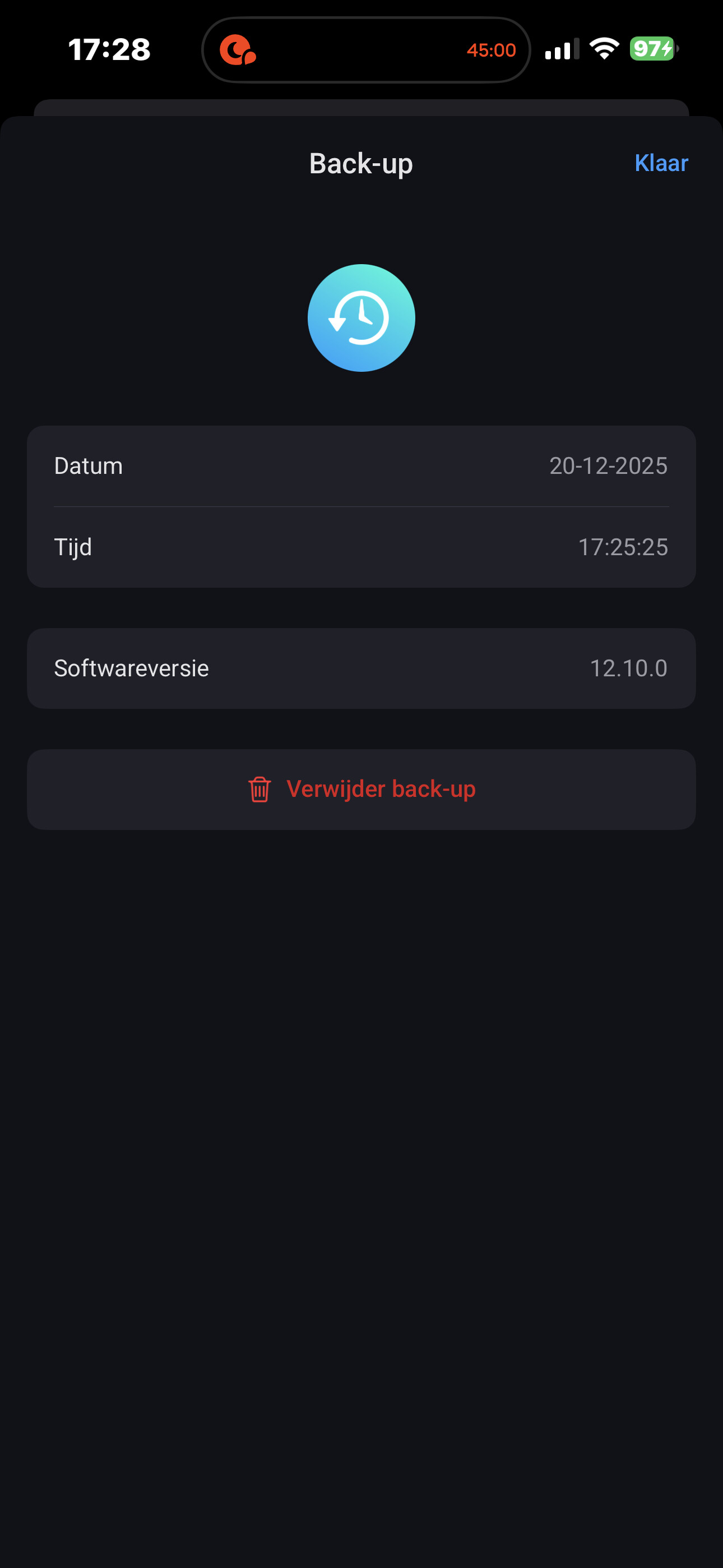

After modding CM410832 can you stil use online backup
Please use Search… Moved.
[Modding] Various Homey Pro (Early 2023) Modification suggestions - #208 by DoctorBazinga
Of course. See my post/message above.
That’s my proof of an online backup with my upgraded Homey Pro 2023 to 8GB memory and 32 Emmc storage.
I once bought a 10-year Homey Cloud Backup subscription for a Black Friday Subscription.
And I intend to use it to the fullest since my Homey Pro 2023 doesn’t crash at a cloud backup anymore after I’ve done the Homey Pro 2023 CM4 upgrade.
Today my CM module arrived and I decided do the quick swap….
Backup and removing old CM went without issues, placing new CM and then restoring the backup went wrong..
I could not get Homey reqonized anymore by my PC, tried a laptop and the same.
It was not detected when booting into recovery (yellow light).
I decided to place back the original CM module and then I noticed the CM module did not ‘click on the mother board…
So i looked again to the new CM module and push harder and heard the click, tried again booting into recovery mode. This time the device was reqonized and started to restore the backup.
This failed twice…
I decided to try a restore on my laptop instead and this restore went fine, it booted up and everything was online again with 8gb of ram…


 and a happy new year
  everyone!
It is back in the case.
Running now for almost 2 days, temperature is constant at 60 degrees and everything works fine.
My issues which I had due to memory shortage seem to be gone, it is using constantly round 2.5GB of ram, so I had a shortage of over 500mb ram….
Did my replacement last Friday, all went smooth except for the damn heatsink fins being a pain in the ass. But after that smooth sailing.
The thermal pad on my original board was more or less done with. So as I was without one I decided to just go with it. Yeah I know perhaps not the best choice but just to make sure that was not an error I made a flow to take action at 75 degrees. (And if that happens more then once, ill be adding a thermal pad). PS: it has not happened at all yet.
I also decided to turn of the LED Ring (which should save some degrees) I also added small non-solid riser which makes it so it can better get air / clear its heat. I could even mount it to the wall if needed as the wall is always kinda cold, but meh for now it’s fine as is.
So temp-wise ; my Homey with it’s top on etc is always between 60-65 degrees. Which seems just fine for me. This has always been the working temp it seems for mine
Online backups seem to work just fine, and yes I also did the repartition etc.
Current standings;
--------------- Homey Pro Overview v1.19 --------------
Homey name: Homey Pro 2023
Homey version: 12.10.0
Homey model: Homey Pro (Early 2023) (4 core(s))
Storage: 24.80 GB (23.16 GB free)
Memory: 8.24 GB (5.7 GB free)
Memory wise it seems to always be at 5.7GB free or 2.5GB-ish in use.
Before the upgrade I only had 130-180MB memory free most of the time. So it was lacking a bit in Memory with the amount of apps etc I am using;
------------------ Main ---------------------
2 Users (1 Owner, 0 Manager, 0 User, 1 Guest)
38 Apps (36 Stable, 2 Test, 0 Development/Community Appstore, 0 SDKv2, 38 SDKv3, 0 Updateable, 0 Disabled/Crashed)
22 Zones
250 Notifications (Timeline)
706 Insight entries (112 Boolean (Yes/No), 594 Number)
16 Logic Variables (13 Boolean (Yes/No), 0 Number, 3 String (Text))
86 Flows (0 Broken, 0 Disabled)
59 Advanced flows (0 Broken, 1 Disabled)
31 Images
0 Moods
0 Alarms (0 Enabled)
7 HomeyScript scripts (0 Token/Tag)
----------------- Devices -------------------
12 Unavailable devices
0 Group devices
0 Devices in a group
4 Virtual devices
0 Infrared (database) devices
0 Z-Wave devices (0 Unsecure, 0 Secure (S0), 0 Secure (S2 Authenticated), 0 Secure (S2 Unauthenticated), 0 Router, 0 Battery, 0 Unreachable, 0 Unknown)
8 Zigbee devices (0 Router, 7 End device)
0 Homey bridges
138 Other devices
150 Total devices
In short;
The board cost me 109 euros through Raspberyp.dk;
Which arrived in a week.
The work to mod it yourself; if you have the needed tools (i had most (Ifixit toolset)… but would advice a very tiny wrench set) should take you an hour (including all the precaution backups etc)
All very very manageable.
Didn’t you get new (4 or 5 pink) cooling pads with your new CM4 module (including also a @ same heatsink like it was already on it). ?
My Amazon.nl ordered CM410832 was with everything including new pink pads (with clear/see-through stickers/plastic on both sides of each pad, so be careful not to forget to remove them when applying on the CM4!), heatsink and mounting screws in the package.
I have put all the available/supplied pink heatsink pads on my new CM4 module with the original heatsink.
Black Iphonitis rigorosa : level 15+
Does it feel much quicker in use? I’m unsure on whether to go down the route of modding my current pro ‘23 or go with SHS/Proxmox.
I have a self hosted server running now on a mini pc and it runs really well. It’s just getting my zigbee/wave devices over without using a bridge. I Have HA running on a mini pc so the other option is add all my zigbee/wave devices to that are bring them over to homey with the community app.
My opinion/experience is that its really faster and more responsive than before.
I would make the comparison to: its like “Clark Kent” and after the upgrade its finally “Superman”.
Do you see any difference in the speed/responsiveness (in the Homey phone app) between your Homey Pro 2023 not upgraded yet and the Homey Self hosted server ??
If so. You got already your answer that an upgrade will improve the Homey Pro 2023 too. (Maybe not sooooo quick but really a big difference (at least for me).
By the way: Anyone who is considering to upgrade his Homey Pro 2023 with a new CM4 Module AND HAS NOT yet a usb LAN/Ethernet adapter connected to it should order this as first step of upgrading/modding.
This will improve the responsiveness of your Homey Pro 2023 already a lot.
Changing the CM4 module without having a Homey usb Lan/ethernet adapter connected is like replacing your Dacia motor engine with an Porsche engine bot still keeping the old narrow tyres with minimal grip.
Some weird/intriguing thoughts: If the Homey software of Self Hosted server runs also on a raspberry Pi 5 wouldn’t it also run on an CM5 ??
And if so. Could maybe the old/original CM4 module of the Homey Pro 2023 be replaced by a CM5 module with 8Gb ram and 32 Gb storage?? 
Your thoughts / comments/ opinions on this (logically thoughts) are very welcome  .
.
Of course with an open case of Homey Pro 2023 because the CM5 module is emitting much more heat.
A Danish bloke on YT tried that for you, it didn’t work out for him, he didn’t have the needed linux experience.
Idk if anyone succeeded in the meantime

