I know, I’m having luxury problems again.
Is there a way to connect two Homeys to HA at the same time? As soon as I log in to Homey 1, Homey 2 gets kicked out and vice versa.
Thanks for the extensive explanation. I will dig into it. Many thanks!
Yes, it’s theoretically possible. Should already work actually.
To connect two Homey hubs at the same time, you must create a separate Homey API key on each Homey and add the integration twice in Home Assistant - one entry per Homey (different host/IP + token).
If you reuse the same token/session, one Homey will kick the other out.
I have tried several times with different IP addresses and tokens. I even changed Homey’s name. As soon as I register another Homey, the first Homey I registered is kicked out.
Please don’t stress. There’s no rush to solve the problem. It would just be nice if I could also switch off Homey 2 MQTT when I get the chance.
Do you get any debug messages when you get kicked out? Good to know, and I’ll keep this in mind for troubleshooting later.
Also, make sure that the Homeys do not report the same internal ID. The name does not matter.
No, unfortunately not. I’ll sit down again at the weekend and test it. Perhaps the error is also in front of the screen.
What I meant was that not all sensors are being detected. Anything related to the heat pump compressor is not being detected. I already ran a troubleshooting step in my original post.
You are welcome to try the latest dev release [v1.1.6-dev.1]. Please let me know if that solved your issues. Should be visible in HACS as you go to “Redownload” and select version.
I added compressor counters (compressor_hours, compressor_starts) as sensors for heat pumps, and fixed lights to expose color temperature mode even when saturation isn’t present (so color + temp lights show both modes).
FYI (Everyone)
Earlier today I released v1.1.6
This includes the real-time update over Socket.io. So no more polling. You will now get updates INSTANTLY (milliseconds).
I’ve also added a huge amount of changes, fixes and additions.
Please let me know if anything doesn’t work. And if you can, please create an issue on the GitHub. This helps me keep track of what is working and not. Always specify what version you are using before posting.
I will continue to update. And things will update in dev constantly until I’m happy. Things will crash. Things will be broken. But things will eventually be right.
For the future:
I would love to get your feedback on things that could improve, things that are missing etc.
My biggest issue right now is to get all devices and capabilities in order. Since there is no “big list of all existing devices” this requires me to google everything or get feedback from the community.
Not really sure about the best approach here. Would be awesome if I could automate this somehow…
Lastly…
Thank you all for downloading and trying/testing this integration. I made this for myself initially, because I needed it. But I have come to realize that I was not the only one.
I am not a company, I’m not doing this for any kind of profit. I’m just “one guy with too much time on his hands” - but I love it. So thank you for your patience and I hope that this integration helps in your future smart home projects - just as it has helped me!
I’v been a Homey user since the first launch of the “white orb”  , and to be honest, the biggest reason I’m still sticking with Homey is the ease of use even though I’m “somewhat technical”
  . What really made me continue to stick with this ecosystem was when they launched “Advanced Flow”. A UX game-changer - and every product should start and end with UX design involved.
All the love from Sweden,
Mike
Hi Mike,
I installed the latest dev.
The following strings are missing for the heat pump.
string"compressor_active"
string"Heizkreispumpe"
string"Kompressor-Status"
string"Kompressor beginnt"
string"Einmalige Warmwasserbereitung"
The button for the temperature is now available for the lamps, but the control is reversed. By that I mean that when I set the temperature to warm, it is actually set to cold.
What is the brand of the lights? Hue, Govee etc etc.. Does this happen for ALL different lights?
I anyone else experiencing this? I can’t seem to replicate this issue. Asking everyone that reads this.
What I think is happening:
Homey devices probably don’t all expose color temperature the same way. Some drivers use a normalized 0–1 scale, others use Kelvin, and at least a few drivers interpret the normalized value in the opposite direction (0=cold, 1=warm vs 0=warm, 1=cold). Home Assistant assumes 0=warm → 1=cold, so when a device uses the opposite convention the slider feels “reversed.” That’s why it only affects some users/devices.
What I’ve done in the latest dev release - 1.1.6-dev.2
Add an option so users can invert normalized color‑temperature values:
Settings → Devices & Services → Homey → Configure → Connection & Polling
Toggle for:
“Invert normalized light temperature (fixes warm/cold reversal)”
This should then only affect normalized light_temperature (0–1 range), not Kelvin devices.
I’ve changed the default inversion, so install the new dev and test before you toggle anything.
There was an indentation bug in binary_sensor.py that prevented generic boolean capabilities from being created at all. That’s why compressor_active, circulation_pump, hot_water, etc. never showed up. (#Google Translate as I don’t speak German) 
Fixes applied in v1.1.6-dev.2
-
Fixed the indentation so generic boolean capabilities are created.
-
Added explicit mappings for:
- compressor_active
- circulation_pump
- hot_water
This should make those heat‑pump entities appear.
New dev release to try (can be downloaded from HACS by “Redownload”:
Changelog:
Added:
- Capability reporting notification with prefilled GitHub issue link (auto-labeled enhancement)

- Option to invert normalized light temperature for warm/cold reversal fixes
- Generic sensors for getable numeric/string capabilities beyond measure_/meter_
Fixed:
- Heat pump boolean entities restored (compressor_active, circulation_pump, hot_water)
- Curtain stop error (UnboundLocalError) on enum-based covers
- Service setup error caused by vol import scoping
- Light temperature normalized inversion enabled by default
If the integration detects a new Homey capability it doesn’t recognize, Home Assistant will show a notification with a one‑click link that opens a GitHub issue already filled in and tagged as “enhancement,” so you can report it without writing everything manually. I think this can improve future situations and improvements quite a lot.
True, I grabbed a random Tuya RGBW light: the light’s temperature responds inverted to the temperature slider.
Version 1.1.6-dev.2
Hmm, even in the dev.2, that’s weird. I changed the default and for me everything is as it should.
Just to be 100%, after installing dev.2 (please redownload again as you might have caught the dev.2 release that I messed up for 5 minutes) - can you restart and reload the integration and test again when you have the time.
And if it does not work, then try the toggle in the settings and tell me which case is correct. (On/Off)
I wonder if this is for all brands or if just some has it inverted in Homey.
It affects all my lights, regardless of whether they’re Hue, Govee, etc. My lights are also grouped together in Homey. I’m installing the new dev version and testing it.
After updating to version 2, the lights are now working for me. Thanks, Mike.
Glad to hear it! I’ll bring that fix into the stable version when I have the time!
I missed the update about the toggle, Mike 
It’s a Kelvin 6500-2000 operated light.
Enabling the inverse toggle (turned on) solved the issue, even before redownloading v1.1.6-dev.2 (and after ).
Observation: once enabled, the inverse toggle can’t be disabled anymore. It toggles off when operating it, but it’s back on again when opening the settings again.
Reload and H.A. restart doesn’t make a difference.
First of all I agree this issue has no priority, as long as the integration is being tested & improved.
But I also tested with a second Homey with it’s own API key, and can confirm a similar phenomenon, but:
-
It doesn’t get kicked out, only the devices disappear, the flows don’t
-
When I enable Homey1 devices again, the situation reverses
.
-
When I don’t enable Homey2, after a H.A. restart Homey1 has dissappeared devices (except for flows) as well.
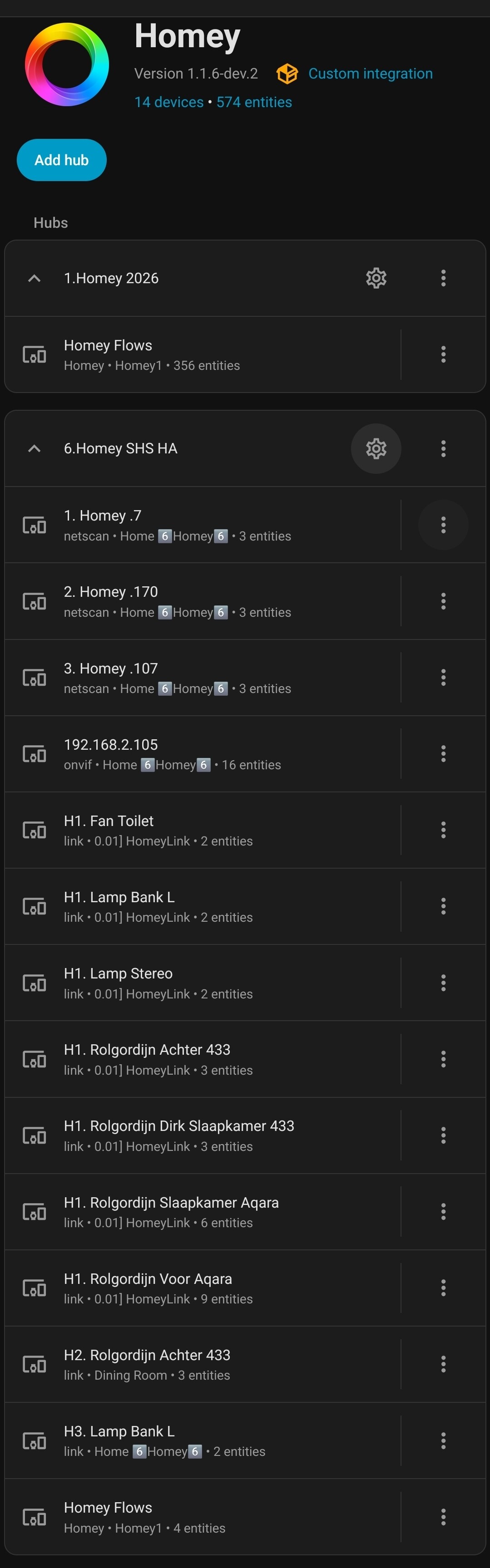


Reconfigure solves it, but it’s peculiar
I think I got this figured out now based on your additional feedback. I’ve created a new dev version.
Use v1.1.6-dev.3 to test!
What was happening
-
When two Homey hubs were added, devices could disappear or get “kicked out.”
-
Root cause: the integration used the same device registry ID for both hubs, so Home Assistant treated devices from different Homeys as the same device and removed the “other” one during cleanup.
What I changed
- Device IDs are now scoped per Homey hub, so each Homey keeps its own devices and they no longer collide or get removed.
Result
- Two Homeys can run side‑by‑side without devices vanishing.
If you run into duplicates after updating, it’s just HA seeing the new IDs; you can remove the old device entries once and it should settle.
Also:
- The invert light temperature toggle now persists correctly in options (was reverting because the value wasn’t stored consistently). So the light temperature inversion setting stays as you set it. But the default config value should now be enough to fix it.
