@Doekse
Will we ever get the Homey app (and therefore the Dashboards) available on the Amazon app store, so that it works on Echo Show 15 and 21?
I have a problem with this.
It works fine when I add it as a camera but then it get stuck when updating next days prices.
Is there anything I can change in the setup to get it to work?
Or is there a better widget to show prices.
So Window users have to be warned by Athom if they want to buy this dashboard separately or a Homey Pro.
Sorry, I can’t help you with this.
On my setup this solution just works fine. Did you try to un- and re-install the app?
Currently I don’t know any other app/widget for energy prices.
So, you mean the prices never get updated over days, Daniel?
There’s several “dashboard-widget-not-auto-refreshing” issues I read about, the app isn’t faulty:
The app dev didn’t have to update anything for this to be functional 
What did you do to compare?
Do other apps with graphs update as expected? Or is it a general dashboard issue?
Im oriënting on using a dashboard. So i’ve got a few questions:
-
is it possible to have the dashboard always on (and realtime refreshing). Or do I have to refresh the tablet now and then?
-
is it possible to have multiple dashboard at 1 device. Like in the morning a dashboard with information about the day (traffic and trains). And when im back home more information about home devices?
But the app start screen is a dashboard right? you can customize it now with all the widgets and remove the standard ones.
True, but it has limitations as I recall it right
Kaoh :
- the home page / start screen layout is limited to the device, so when you install the app somewhere else, you’ll have to re-create the whole start screen again.
- the dashboard tab layout is recalled wherever you install the Homey app
In addition: it might be an idea to be able to change the dashboard page with a flow.
@Harwin when is there an app update about the refreshing issue of some widgets ?
Someone told you will fix this asap with an update
And on some android devices the dashboard is slow after a while
Is it possible to hide the top bar where you can select other dashboards and edit or close dashboard. Maybe just hide it and when click show it or when scrolltop then show it. It takes too much space on a 8 inch tablet
Also an option can be, when scrolling on a dashboard show the “normal” bottombar instead of the cross for closing the dashboard.
To much cklicking now to go to the energy page (or other pages)
I really like the fact that you can use HTML code in the Enhanced Device Widget of Adrian Rockall, to display basically every parameter that you would like, and include graphics and layouts the way that you want. Like my example under here:

The logo’s change based on a simple boolean, updating the enhanced flow card.
With this in mind, the possibility’s for customization in dashboards are endless. You basically can go nuts with graphical designs.
For the graphics we have the gallery app of which Homey is the developer/owner. But after the first time I restarted the app, I realized it is kind of useless right now.
Every time the gallery app gets a restart, the storage location of the image is changed.
@Homey, can you please fix this issue?
You’d report to homey.app/support
Tagging @homey or @athom doesn’t work.

Am I the only one with a wall-mounted tablet (Android/Samsung Galaxy Tab) where Dashboards is closed down randomly, and the app shows the home screen instead? I thought it was fully related to my scheduled restarts of Homey, but it’s not.
Mega annoying.
Would appreciate if you can comment. I am logged in with my regular (and only) user on my tablet, i.e. I have not created a new/dedicated user for the tablet.
Apps returning to the initial view (all the time) seems to be an OS ‘feature’.
But you can postpone it:
You can ‘Lock’ one app, so lock the Homey app.
In the running apps view, hit the logo and select ‘Lock’:
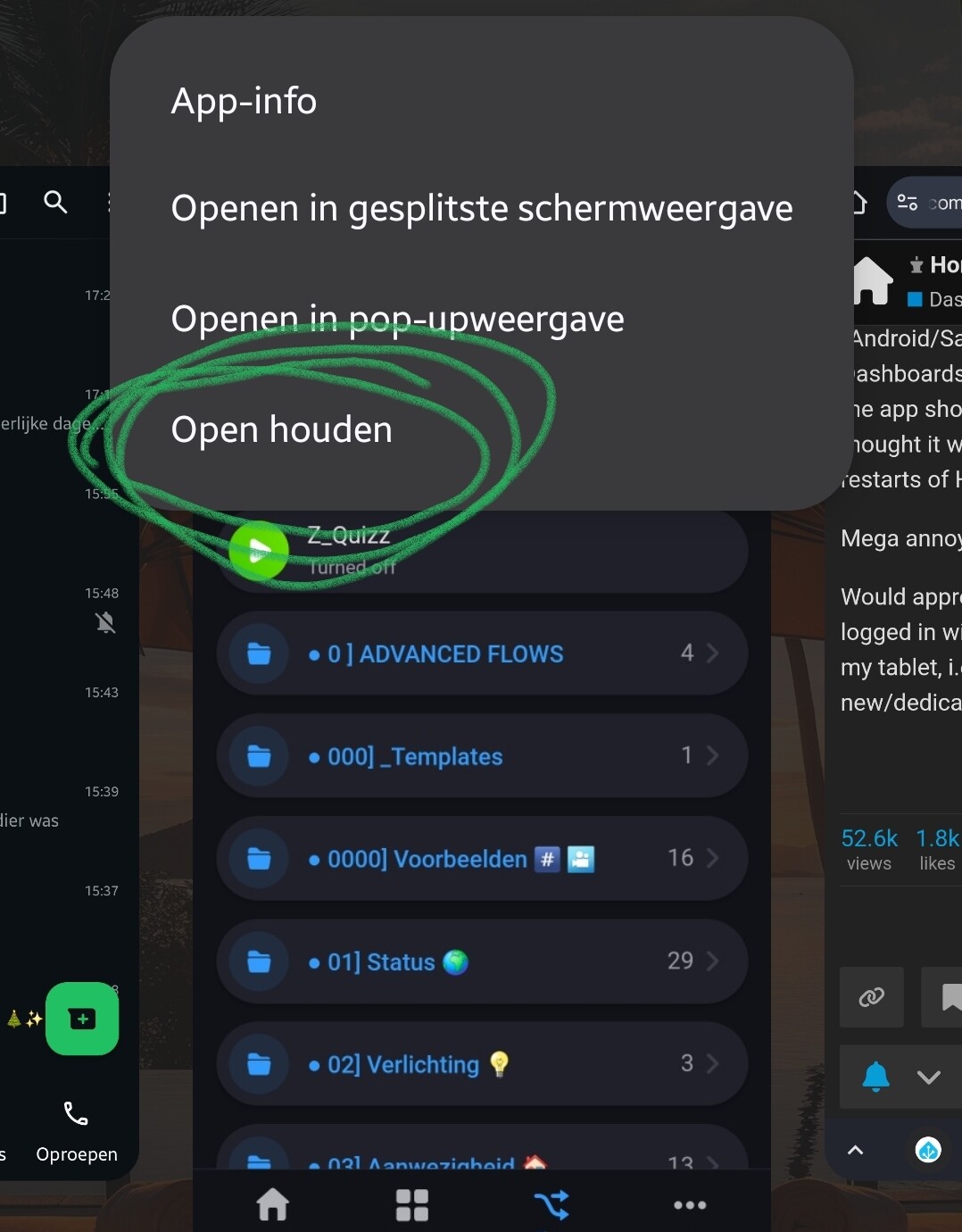
It keeps the dashboard in view much longer, but eventually the app seems to re-initialize, and shows the start screen again.
Make sure to disable any (damn) energy saving option for Homey app.
Only fix imho:
Athom has to provide for an app start screen toggle:
Start app by default with home screen view,
or start app by default with Dashboard view.
Thanks a lot @Peter_Kawa - I will try that 
And with “start screen” - we both refer to Homeys start page - right? I do, at least
I share your opinion on possible solution. I mean, having a wall-mounted tablet, it should never ever show anything other than the Dashboard. When it “reverts” to Homeys start screen (after a while), everyone in the family are confused, and they will not even bother to click on “Dashboard” and then start the dashboard again, which I fully understand.
Yes 
No you can’t put them up with procedures, and you don’t want them to say “see? it doesn’t work”.
And when one just want to read some info, they shouldn’t have to press a button.
