Did you create a flow to write to the timeline when changing the Surveillance Mode?
That was also my first guess, so I checked my flows first, but found nothing. But I will check all the flows again today. Then I’ll get back to you.
I think I found the cause, can that be the reason?
I have a flow that automatically disables the burglar alarm system when a certain person comes home > Image Flow 1
Then I have another flow that automatically deactivated the burglar alarm system when the first person comes home > Image Flow 2
However, I didn’t have had an entry into the timeline at any flow. Does the Heimdall so that automatically?
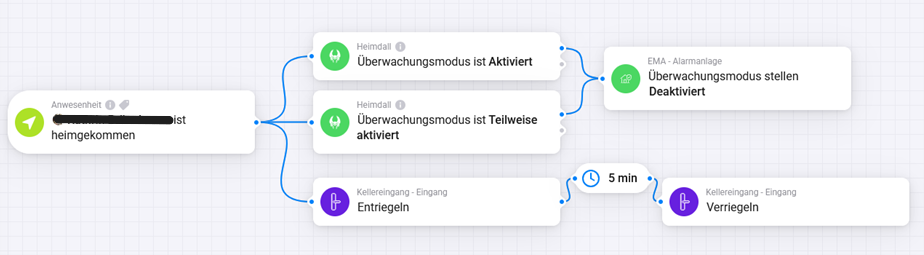


Ahh ok, so i will change my flows or the settings👍🏼
Thank you
I install the app and when I open it I can install the tiles Alarm and Surveillance but when I open then the app again I do not get the configure possebillity.
I see only the two tiles I installed and the information that there are no flows already.
Hi John,
Welcome here and thanks for using Heimdall. Please read the first post of this topic, it has a full explanation of how Heimdall works and can be configured.
Start with the easy stuff first and move to the more advanced possibilities when you’re comfortable with the basic stuff.
First of all, welcome to the Homey Community!
To make sure you are aware of the forum rules, please read the Welcome to the forum! post here.
Hi @DaneedeKruyff there is a possibility to configure an emergency user to deactivate the alarm that triggers an additional notification to the heimdall administrators in case of use or via flow is it interceptable?
Hi Simone,
I’m not really sure what you’re asking, could you explain what the trigger should be, what the condition would be and what action you want to take depending on different outcome of the condition?
I also think it’s more related to what’s possible with flows than what Heimdall offers, but we can try to solve it for you here.
traditional alarms have an anti-coercion code that is configured to be used when a criminal forces you to deactivate the alarm. It usually deactivates the alarm but informs pre-established contacts or the police. I would like to set something similar to manage an emergency code in case a family member needs to enter but does not have the badge or the code with him or for the case mentioned above
You can do that yourself with a Flow.
If the normal code is e.g. 223366, you can make a code with 223369 (+3), this then turns off the burglar alarm system and informs the administrator via push message or Whattsapp that a forced shutdown of the burglar alarm system was made.
But honestly, without getting too close to you and without knowing your place of residence, if you really expect it, then you should probably buy a real burglar alarm system and not solve it via Homey.
How do you realise that they used code X rather than code Y? I could not find that information among the flows, maybe it depends on the device used, I use the keypad of the Frient
It doesn’t matter which devices you use, you realize that via a flow.
If the forced code is entered, not only is the burglar alarm system unfocused, but it also makes a notification to administrator or user XY. But as you probably know, no calls can be made with Homey and I do not assume that you are constantly looking at your smartphone to see if such a notification has now been triggered.
If I were you and had these fears, then I would buy a real burglar alarm system and run the alarm via a professional alarm receiver.
Ah, ok, now I see what you mean.
I actually added code that to intercept an extra number after the PIN code when I wrote the code to integrate 3rd party keypads in Heimdall. However, I never attached it to a flowcard as there was no interest for it at that time.
I must say I’ve only tested this with a Ring keypad as that was what I wrote the 3rd party integration for in the first place, could you try disarming with your PIN and just add a random single digit to it? It should disarm as if you just entered your PIN on its own.
I found some time  I’ve cooked op a test version and published it to the App Store: https://homey.app/en-gb/app/com.uc.heimdall/Heimdall/test/
Unfortunately I wasn’t able to actually test it as I have no Keypad currently available for testing, but I expect it to work as I have tested the actual code that establish the Silent Code earlier, now I just added a flow card to it.
You can use it like this:

Since you can add one digit you can make 10 (0-9) different flows to do whatever you like.
@Simone_Erle have you been able to try this? I’m curious about the result.
I tried and in fact if I put one more number it still accepts the code to change the status if I put two instead it gives an error. But the usefulness? It is not written anywhere that one too many codes have been put, are you assuming to trigger something?
Did you read this post: Heimdall - Let Homey watch over your home - #1642 by DaneedeKruyff
Sorry, I had not seen the trial version.
I tried now but I don’t see anything in the timeline and I didn’t get the notification with the typed value. Does something need to be changed in the heimdall settings? i also tried restarting the homey pro, but nothing. i sent the diagnostic.
ac7d225a-368f-46b6-9f3d-ab54e4388e07
