Maybe, maybe not. I guess it depends on their PM for the energy features and how they are testing their software. I have been a professional software developer and PM (product manager) for +20 years, and if we had released unfinished software like this where all the pieces just don’t fit together with standard user stories, I would loose my job.
This is my reply from Athom:
Hi Henrik,
Thanks for reaching out to our support and thinking along with us!
I have taken the liberty to add your request to our internal list for feature requests, as this functionality has been suggested before. The more people that want a specific feature the more important it will become for us to realize it. (A little inside scoop: Development is working on a Energy feature that will hopefully allow you to do so).
Please keep in mind that we cannot give any guarantees on if and when we will implement your suggestions, as there is already quite the development roadmap laid out. That being said, your request is definitely noted and will be discussed.
Thanks again for your input, we appreciate it!
I wish you a great day and lots of fun with Homey!
Best Regards,
Megan
Athom Support
Over half a year since the last reply here, I am getting the same response from support
Hi Rudi,
Bedankt dat je contact hebt opgenomen met onze support en voor het meedenken!
Ik heb jouw suggestie intern toegevoegd aan onze lijst met functieverzoeken, zodat we deze kunnen overleggen met het ontwikkelteam.
Ik wil wel graag alvast aangeven dat we geen garanties kunnen geven of en wanneer je suggestie eventueel geïmplementeerd kan worden, omdat er op dit moment ook al een aardige routekaart aan ontwikkeling ligt. Maar weet in ieder geval dat jouw suggestie genoteerd staat en dat we er zeker naar kijken.
Nogmaals bedankt voor je input, het wordt gewaardeerd!
Ik wens je een fijne dag en veel plezier met Homey!
Best Regards,
Megan
Athom Support
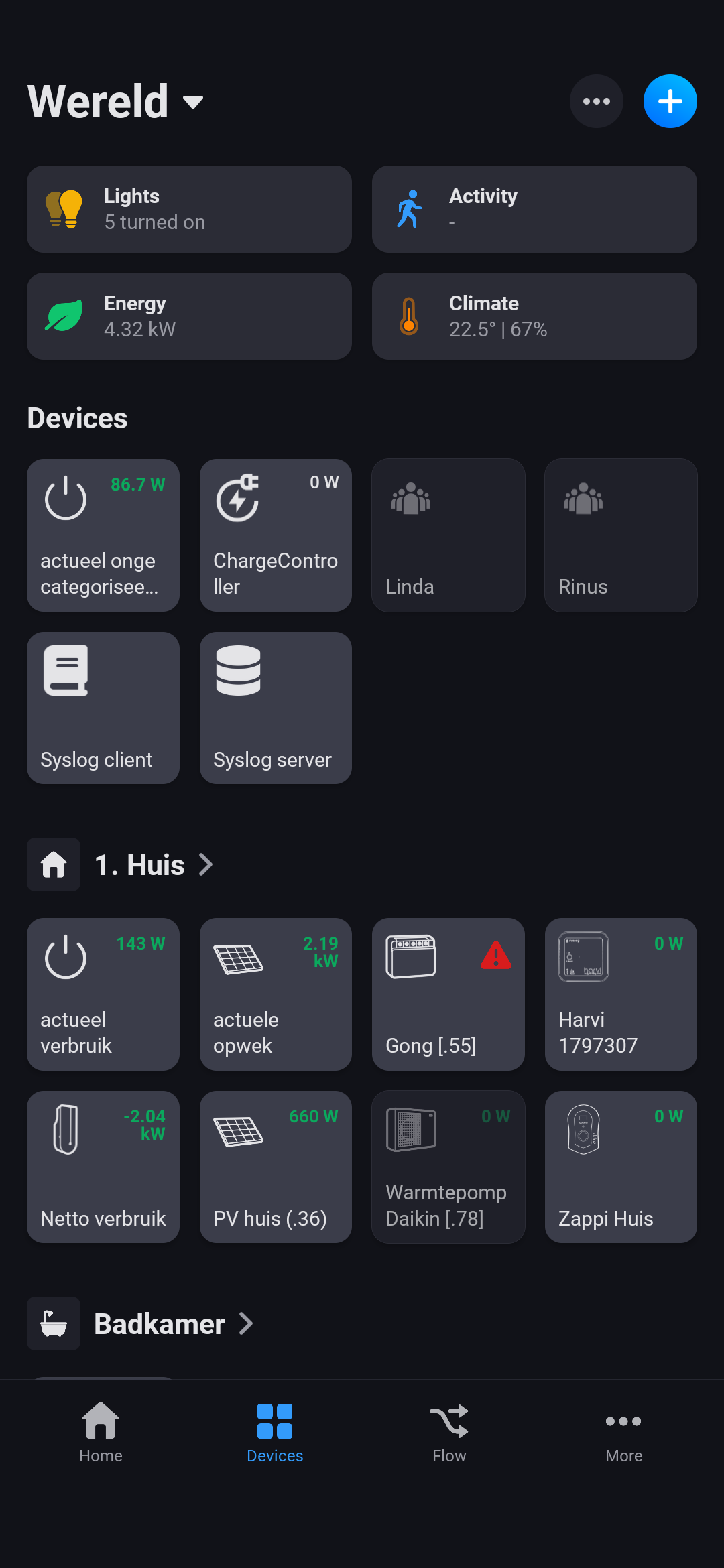
In Norway all houses have a AMS device (power meter) that you can fetch data from. I have done so and have two devices in Homey. One showing realtime power usage for my whole house and one showing 60 minute average.
In Homey’s energy features they both count so my house values are all power devices homey has data from summed. So that function is basically useless.
Allow me to exclude my power meter from the energy functionality
Even better, use my power meter to get accurate energy functionality instead of summing the other devices. There are always power usage in the house that Homey does not know about.
If you open the Enery tile, tap on the power meter that you want to exclude and then tap on the settings icon (cog wheel), isn’t there a toggle to exclude that device from counting towards the total energy usage of the house/exclude it from the Energy tile?
Still a useless feature the Energy Tab, since it is still not possible to practically check and uncheck devices to be added. Lot’s of double measurements this way. Support page also incorrect: it states that (regardless of device, not specified) one can exclude it in it’s settingspage. Only few devices have that selector. Funny since why are devices without the selector included in the Energy Tab in the first place. Two teams working parallel to eachtother and refusing to communicate? Really funny they do not talk for over two years now.
Please tell me what I’m doing wrong then or I don’t understand you. It looks to me that NOT every device has the exclude option. To name a few apps with devices not having that option (ones that are very energy related): Shelly app (powersockets, smartbulbs), SolarEdge + Growatt TCP Modbus app (solarinverter), virtual devices (app ‘Virtual Device’ . used for own summing up and (working) variable display of energy), Zappi EV charger, SMA Energy app (inverter).
Because all of these devices cannot be in/exlcuded at will and some devices are behind collective metering Homey’s calculation is just a big mess because it counts consumption twice.
EDIT: updating homey (again).
EDIT2: waste of effort still the same: a lot of devices still don’t have the exclude option.
I also don’t understand why Homey doesn’t implement some sort of tickbox system into their energy tab instead of relying on the advanced settings screen of any individual device. What’s making them to decide creating such difficulties?
May it be related to the way the smart socket was registered in the homey app? I register it using the built in wizard guiding me to registering it as an ‘any Shelly device’:
Or may be it is related to the generation of the device although I have (had) gen2 and gen3 devices and still never came across the option up until today although I can really use the option. Or maybe generation of my Homey Pro (early 2019)… so much options.
My devices (gen 2 and 3) are also connected via the ‘Any Shelly WiFi Device’ driver.
The only thing I can think of is that either the option to exclude from Energy is only available on the latest Homey models, or the option becomes available only after removing and re-pairing the Shelly device. Not sure whether the latter is something you would want to try, as that also means that you have to update every flow the device is used in (replace flowcards related to the removed Shelly-device with the same related to the re-paired device).
I did note something else: based on this Homey knowledge base article, the new Energy tab is supposed to be only available on the latest Homey Pro 2023 / Mini models, not on the 2019 or earlier models. Do I understand you correctly that you have a 2019 model, yet also have the Energy tab available ?
It’s confusing, as Athom named both ‘Energy’. This is the ‘old’ Energy zone tile. The new function is commonly referred to as the Energy tab, as it is a tab in the bottom row with main section icons.
But the ‘Exclude from Energy’ toggle also applies to the items in the Energy zone tile.
You only encounter this issue with Shelly devices? If so you may want to contact the developer. For contact details refer to the first post in the Shelly app section on this forum: [APP][Pro&Cloud] Shelly .
Inwas wondering for the energy consumption feature how I have to read it or how it works. I suppose the total consumption is based on my p1 homewizard dongle.
I want to add energy sockets in between devices to track consumption etc. Yet will the consumption measured and these devices then be added to the total consumption, giving incorrect values in the energy overview?
Also the same for devices I have if I add a fixed consumption in it will it just take a part of the pie chart of the unknown. Or Will it also add on top of the total consumption?


 .
. ?
?