Maybe start by being kind? I speak French, and I haven’t found anything else besides this :
for which I couldn’t understand if there was an answer.
I am using a translator to write this.
Maybe start by being kind? I speak French, and I haven’t found anything else besides this :
for which I couldn’t understand if there was an answer.
I am using a translator to write this.
I am not being unkind here. But let me save you a lot of trouble!
The app doesn’t work. Perhaps it will in the future, but it is all uncertain.
Thanks,
Sorry, I may have misunderstood, thanks for your help.
I don’t understand, Homey has announced compatibility with Tuya. Does that mean that no Tuya device works with Homey?
Not at the moment, to summarize it a bit: tuya revoked api access for homey.
Okay, thank you. But is this temporary, or should I return this new device for another one? Or is it enough to wait?
To ensure compatibility with Homey, I recommend considering an alternative for now, as it’s still uncertain whether API access will be reinstated.
Agreed with @Doekse : if you can return it, that is a good option.
There are other options out there as well, you just have to look a little bit harder and spend a little bit more money
Okay, thank you very much to everyone for your answers. Homey also has a great community.
Do you recommend a device under 100 euros for an outdoor siren, with solar power and a flashlight?
Nicolas, I understand Rudi’s tone of writing. This thread is now more than 800 posts, of which most of them are about the former official Tuya app now not working anymore because of Tuya having another idea about contracts. Every now and then someone writes like you, and after 800 posts the regulars are a bit tired of everytime telling the same story, which can be read in this thread multiple times. That’s why they tell you to read the thread.
For the regulars: maybe we should just quote the following text every time:
The Tuya official app was active for a few months. Sadly, changing circumstances within the Tuya company have made them decide to stop coöperating with Homey, and consider the contract the company’s concluded as non-void. The result is that the app is not working anymore, and there is a strong probability that it will never work again. Homey will keep us informed here when something changes. In the meantime there are some other options and workarounds:
Please change or correct this message, and quote it to new users asking the same question.
Or maybe the first post of this thread should be more clear about the status of this app. Then people can just refer to that post.
Good point, I’ll adjust the first post to reflect the current status of the app
Thanks, then in future we can just refer to the first post 
I think that’s a great idea.
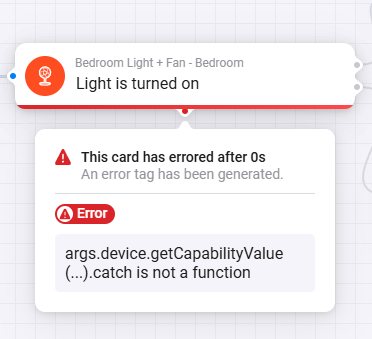
There is a problem with “Light is turned on” card for a long time now.
Not a big deal but pretty annoying, and I’m sure super easy to fix if you know about it.
This problem means that I can can’t turn on and off with a single click.
I had to set up double click to turn off as a workaround, but I hope it’s only temporary.
It seems that the error is here:
File: HomeyPro\com.tuya\drivers\fan\driver.ts
Lines: 35-37
Maybe just remove the “.catch()”
I guess the getCapabilityValue function is not returning a Promise.
this.homey.flow.getConditionCard('fan_light_is_on').registerRunListener((args: StandardDeviceFlowArgs) => {
      return args.device.getCapabilityValue('onoff.light').catch(args.device.error);
    });
Please read the first post
I have read it and that’s why I’m not fixing it myself, as I don’t want to mess with a broken App.
But while someone is working on it, it’s good to know about this tiny bug that can big fixed in a second. So I’m not expecting it to be fixed right now, but it’s good to be aware and document the problem.
BTW: this problem was there since the beginning, I don’t think it’s related to the API changes and to the current state of the App.
FWIW, that card works fine for me, but my bulbs have an onoff capability. I suspect that your device has two onoff (or similar) capabilities: one for the fan and one for the light. You can check the capability values in the developer tools. If that’s right, you can create a flow from one of the device’s ‘when status xxx gets a new value’ cards (where xxx is the capability name) to set a Homey variable when the light goes on or off. You can then test the variable instead of using the ‘and light is on’ card.
Andy
Thank you very much, I’ll try that 
I have Alexa connected to my Tuya devices and it works well. How can I bring that over to Homey? I’m a bit concerned about connecting Alexa and Homey as I have about ten Aqara switches that are connected to Alexa and also connected to Homey and I’m afraid that if I connect Alexa and Homey, I’ll have lots of duplicate devices on both platforms.
I can alternatively spin up a Home Assistant VM but would ideally prefer not add another layer to my smarthome.

 fetch failed