Apologies for the delayed response. I still plan to support the app, but I’ve been tied up with personal matters and haven’t had the chance to actively review reported issues or crashes. I expect to have more time later this month once some home renovations are completed, and I’ll make sure to look into it then. Thanks for your patience!
Hi @Erikvl87,
I’m using your app too. With Homey 12.4.3 and app version 2.0.0 I found a high memory consumption for your app:

I defined only 4 virtual devices with your app. But the app ist a top consumer for memory in Homey. Maybe you have an idea, why this happen.
Greetings,
David
Hi @dferch, the amount of (virtual) devices will probably not impact memory consumption significantly.
The main culprit is probably (I need to verify this) the build-in cache of all zones (and its metadata). This is used to increase performance, with unfortunately a (maybe to significant) memory penalty. The app condition cards need to be able to quickly get zone information, hence this is all cached into memory.
I’ll test some ideas that I have to bring down the memory footprint.
@Erikvl87
I created an extensive tutorial on how to use your app together with actual PIR Motion sensor to get full control over Zone Activity in the Flow section of the Forum. I hope you and many others will find it useful.
That’s a really extensive tutorial! Great that you’ve discovered the potential of the app’s virtual device capabilities! I should’ve put more effort into this app (and its documentation) but I’m glad it still turned out to be useful. In a next update I’ll do my best to put some documentation online and refer to your tutorial as well.
 Released version 2.1.0
I’ve fixed an issue with the AND-card that checks a zone’s active state. Previously, when a zone had multiple devices contributing to the zone’s active state, the card could incorrectly report that the zone wasn’t active for the required number of minutes because it used the most recent activation timestamp instead of the oldest one. This is now resolved, and zone active checks should be accurate.
Hi!
First of all, I want to say that this is a fantastic and much-needed app – thank you for creating it. I rely on it heavily, and it plays a key role in many of my Homey automations.
Since the latest update, the card “The zone XY is inactive for at least X minutes” no longer seems to work correctly.
Problem description:
The card becomes true even if the zone was active just a few seconds ago.
Example:
• Zone: Living Room
• Condition: inactive for at least 3 minutes
Even when the zone had activity a few seconds earlier, the condition still evaluates to true, as if the inactivity timer was not respected.
Because of this issue, many of my automations no longer work as intended. This is unfortunate, as I really love the app and use it extensively.
Could you please look into this?
Thanks again for this great and very useful app! 
Hi Rasket!
Great to hear you like the app! And with that said, unfortunate that it doesn’t seem to work as intended anymore since the latest update.
Could you, directly after this issue of a wrong trigger happens, send me a diagnostics report?
And I would be interested to learn if your zones affected by this bug have subzones.
You can create a diagnostics report as follows: In the Homey app → More → Apps → Zone Activity →  -> Make diagnostic report. Make sure to copy the report ID and please share with me the report ID, the zone name and the time when the issue occurred.
You can share this via a private message if you’d like.
Thanks!
Released version 2.1.1
I’ve fixed an issue with the AND-card when specifically checking for a zone’s inactive state, which always returned true.
@Rasket787 This should fix the issue you reported.
Thank you very much for the quick fix.
I’ve tested it, and everything works perfectly now — the zone inactivity is handled correctly.
Thanks again for this excellent app!
Since 21 Januari “zone activity” is not working properly anymore.
- Homey at 12.10 (updated long before issues started)
- Zone activity v2.1.1 (updated after the issues started)
- Flows are created about a year ago (unchanged) and have worked flawless until a few days ago.
Since 21 January the flows fail every time they run.. (multiple times a day)
I hoped the new version would fix it as it looked like the issue reported by @Rasket787 although my issues just started a few days ago…
Another thing I noticed is that “flowchecker” report a lot of “fixed flow” on the specific flow since 21 January too… (see screenshot at the end)
my setup is a “man down scenario”
Only way to enter room B is via room A, person should not be in room B for more than 50min.
Alarm is triggered when person has not left the room after 50min.
FLOW

ISSUE
person walks to zone B crossing zone A.
Alarm goes off right away
i can see zone A is active longer then zone B (I cannot see the “inactivel time) so when zone B becomes active, A was active. But the difference is only a few seconds.
Also when I check the status of the zones, they are active less than 50min ago. But when I testrun the flow, it ticks green on “incrive for more than 50min”
- Is the “zone inactive” a seperate status/attribute? and no longer reset when zone becomes active?? But only reset when it becomes inactive ??
What I tried:
- reboot homey (several times)
- Reboot app
- Recreate the same flow

Update: looks like the zone itself became corrupted (dont know how that can happen)
- created a new zone
- Moved all devices to the new zone
- Updated my flow “zone activity” cards to the new zone
Now I do not get incorrect warnings anymore.
So does not seem to be related to this app?? (Or can a connection in the app to one specific zone become corrupted??)
Hey @FKey, glad to hear the issue is resolved with a new zone. If it happens again, please create a diagnostic report and share the identifier along with the rooms you expected to be inactive or active. The logs might give some insight into what was going on in your case.
The app itself does not maintain an active connection. It simply observes the state of a specific zone. I did see other posts where people had zones stuck in an active state, which turned out to be Homey related. It’s possible you were affected by something similar.
When checking whether a zone is inactive for a given period, the app looks at two things: the current zone state and the timestamp of the last reported change to the active state. The time difference between now and that timestamp is used to determine how long the zone has been inactive.
When checking whether a zone is active for a given period, the app looks at the zone state, the timestamp of the last reported change to the active state, and the oldest timestamp from any device that is contributing to that active state. That oldest timestamp is then used to determine how long the zone has been active.
It’s a bit unfortunate that Homey does not keep a timestamp of just the moment a zone’s active state changes, as that would make these active state checks far more reliable. This means the active state check could theoretically be prone to edge cases. For example, if two alarm devices in the same zone report activity at very different times, and one becomes inactive again while the other stays active, this could result in the app calculating a shorter active duration than expected. This is something I may revisit later, although properly tracking all state changes would likely be more CPU and RAM intensive.
That said, this only applies to active state checks. Your issue was related to checking the inactive state, which does not have this limitation.
Hi
@FKey: you wrote “Update: looks like the zone itself became corrupted“. - May I ask, what you mean by “corrupted”? - Invalid/garbage JSON? - Or just non plausible values?
In the case of invalid/garbage JSON it could mean, that two threads/flows/events tried to concurrently save this state.
@Erikvl87: Is writing/saving the state JSONs implemented treadsafe? - Had a similar problem once, when two events were concurrently writing to the same JSON variable. Happens rarely and randomly, but if it happens its a real head scratcher and almost impossible to reproduce and debug…
Well, its mainly my way of saying: creating a new zone solved the issue, so looks like the old zone had an issue.
unfortunately the new zone has triggerree incorrectly today again.
Just once stramge enough, while there were more moments before and after that triggered the flow and were hamdled correctly…
So keeping an eye on it…
The app does not write or persist state related to zone activity. When a card is triggered, it only reads the current zone state from Homey and calculates whether the zone has been active or inactive for the configured duration.
There is some internal state used for structural zone information like metadata and hierarchy, but that is maintained independently as a background task and is not involved in activity checks. That part also has async safety guards in place, so there are no concurrent write issues there either.
Hi, as mentioned before, if you can create a diagnostic report right after the occurrence and share the identifier along with the zone name you expected to be active or inactive and the timestamp of occurence, I may be able to see from the logs why it reported what it did.
Found out I had missed one flow when changing to a new zone. So the flow checking “no activity” in a zone that did not have devices…
so it look like creating a new zone and moving all devices solved the issue.
Just dicovered your widget “zones activity list”, I love it!
Great addition to my “man down” flows
Thanks Erik
Hi! I Love your app ! Thank you very much ! And I’m just testing your dashboards.
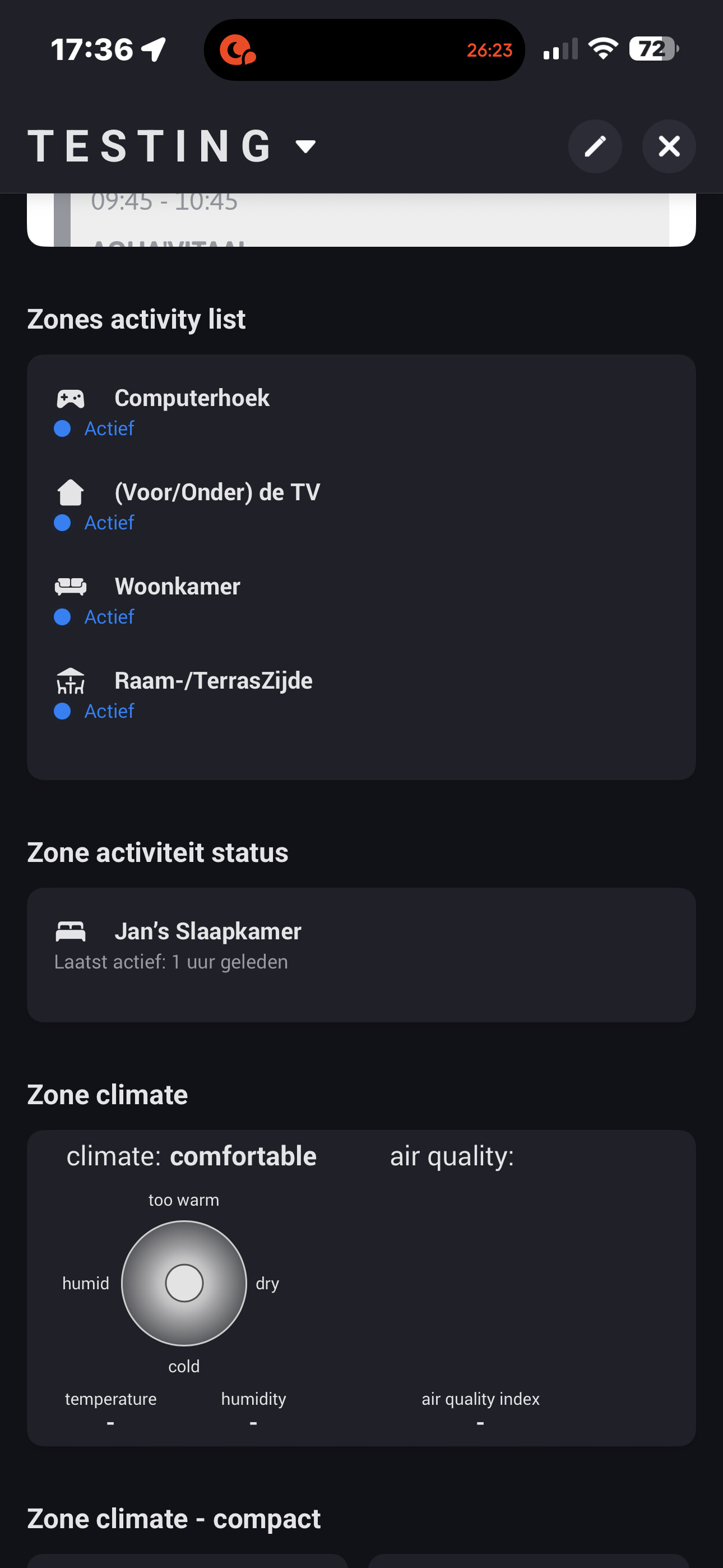
Would it be possible to add a feature/option to only show the main zone or subzone and not both in the activity list ? Because I have a Main Zone “woonkamer”with a subzone “Computerhoek”and within that subzone also the 2 subzones “Raam-Terraszijde” and “Patchkasten”. Now at least 3 of them are shown in the activity list when for example I move, (an I’m detect by the motion sensor in my gaming chair on the “Raamzijde” of my “ComputerHoek” in my “woonkamer”. Please. (I set my (top) zone setting im this activity list on Home = “Thuis”as the zone to watch by/in the list.
Second : Would it be possible to ad a list of (sub)zones to exclude from the activity list please.

3 of the 4 zones in my activity lists in the following screenshot are from me sitting in my gaming chair an my shelly Bluetooth motion sensor in the “woonkamer→ComputerHoek→Raam-Terraszijde”
Can this be somehow avoided and just shown one of these 3 zones instead of all of them ??