Thanks very much for your work on this App, it’s great.
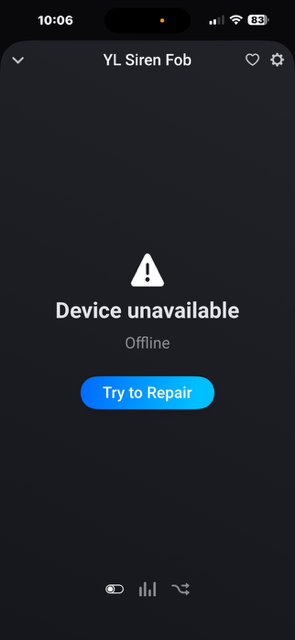
I do have a couple devices that are showing as unresponsive in Homey, a Siren Fob (YS3607-UC) and Flex Fob (YS3604-UC). Both devices added fine but show as unresponsive in Homey. They are fine in the YoLink App.
Could you tap on the device tile to open it and send a screenshot.
Also, go to the app settings page and select the Log tab. If there are any messages in the log, could you add a reference to this topic in the description and then tap on Send Log.
I wouldn’t worry too much about fixing this, at least for me. I never really used the device much and decided to remove it from the YoLink Hub.
Thanks,
I have got the log but, unfortunately, it only has the first part of the start up process where it gets the device lists and is missing the parts where it get the device states, which is where the issue probably lies.
FYI, when the fobs are used in Homey they can be used to trigger Flows as they give an, almost, immediate response via MQTT. This is a real bonus as most other manufactures don’t integrate well.
Please add the Garage Door Sensor (different from Garage Door Controller) to the devices to add support for. Living in an apartment, my garage door is too far for any other kind of sensor to work. Thank you so much for making this all happen @Adrian_Rockall
Please accept my apologies for posting here and on GitHub. Should have posted here first.
When I click on configure, I don’t see where I can enter the UAID or Secret. All I see is the screenshot below. If I click on Get Devices, I get only two brackets [ ]
Ah, probably an oversight in the Get Devices function. Normally you are asked for the credentials when you add a device and the Get Devices uses those. If you haven’t added a device there are no credentials to use.
Any ETA / information of the support of the outdoor sensors : Outdoor motion and outdoor contact sensor.
I want to secure my storage box/compartment in the cellar, garage and mailbox(bin) (ground floor) which are all about 25 meters away from my apartment on the 2nd floor. (though some though rebarr walls and ceilings).
Any chance (at all) it will work/ have enough/fine connectivity ??
At the moment I haven’t been able to get the new local hub as the EU / UK version is in short supply. Once I get one I will implement the local access. So ATM it is cloud based.
Both the outdoor motion and contact sensors are already in the test version of the app.
Sometimes triggers from the doorsensor in my mailbox don’t show (and trigger flows) in Homey.
At the same time, the YoLink Android app does show the trigger. See below (Android split screen with both apps at the same time):
YoLink says it was triggered 7 minutes ago, but Homey says that 2 days ago was the last trigger.
I also have the same sensor in Homey via Home Assistant (since before you developed the app). Triggers are correctly shown in Homey for that (HA) device…
Any idea what to do?
I sent you a log and report with the number below. Perhaps that helps?
ea39ca9b-7307-486c-8a41-8295c69402f3
I replied to the Diagnostics report, did you get that?
Also, the Yolink MQTT broker has a limited number of connections per user account. I have taken steps in the Homey app to ensure only one connection is made and shared between the devices. Do you know if HA does the same?
I have just got your logs. Did you enabled the Log and then restart the app as it only seems to be showing the error and not the workings that get there?
 Please add the Garage Door Sensor (different from Garage Door Controller) to the devices to add support for. Living in an apartment, my garage door is too far for any other kind of sensor to work. Thank you so much for making this all happen


