@martijnpoppen any idea how to avoid this? It crashed my Homey and after sending it to Homey support, they pointed to the fact that the Homey Whatsapp app consumed an increased CPU (Screenshot below) b19d87e5-815d-4e0a-ba01-699789dcc884 Screenshot is 3 days old, diagnose is just shared…
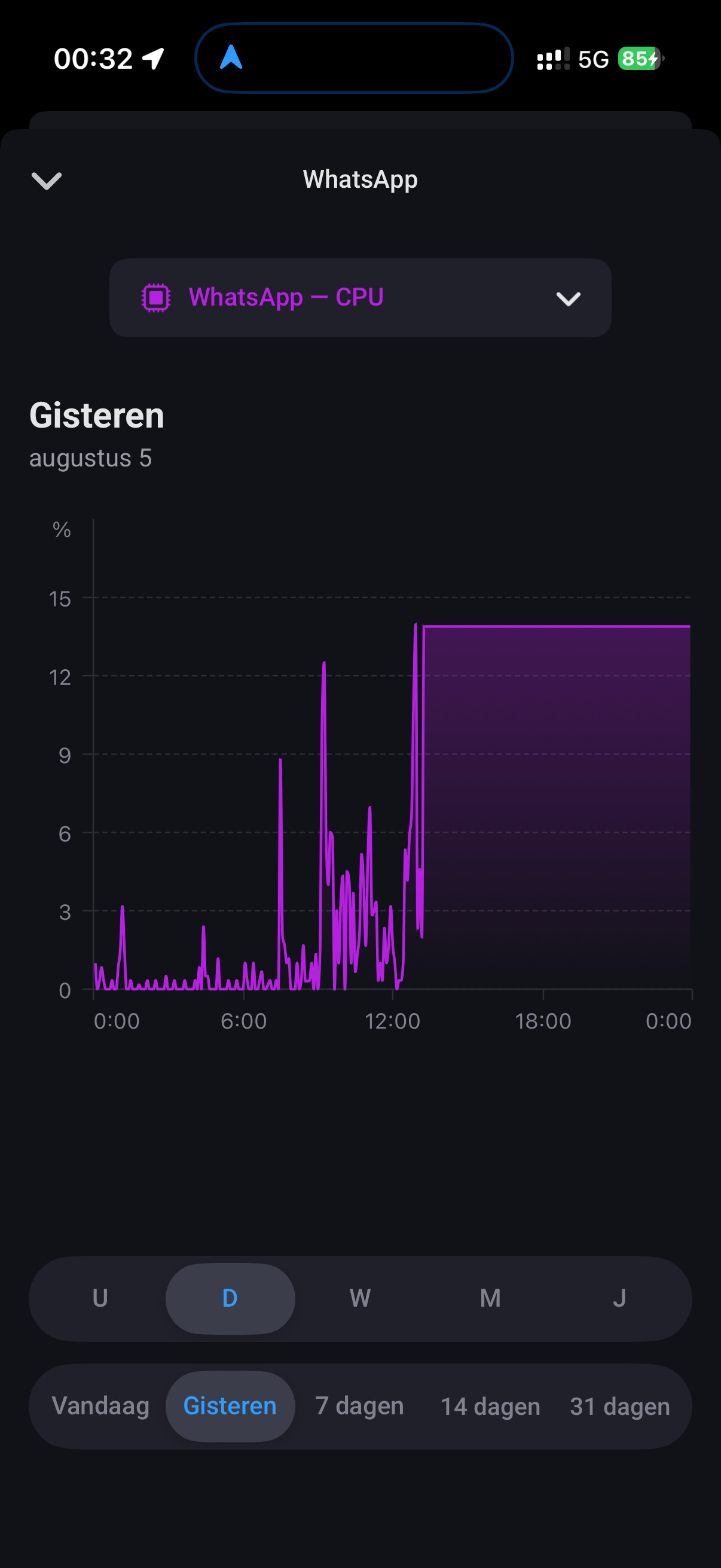
@Wout_van_den_Dool I already replied to your report.
But try to click the clear chats button in the whatsapp device, that will fix memory/cpu issues.
PS: please edit your post to english 
cool, never thought this could impact it 
@Wout_van_den_Dool did it fix it?
For the dashboard widgets some chats are store in the app cache to show the conversations. Maybe I can get it working one day to get them from the cloud
I think it did, the Homey is still crashing (asked help to support) but at least not because of high CPU Load of Whatsapp from now onwards…
@martijnpoppen
Thanks for the tool. I ran it successfully before and after uninstalling Whatsapp and it saved much time!
Not sure what the underlying cause is for Whatsapp needing a new repair code.
Trying to Repair caused it to crash (I have just 300MB free in Homey memory) so I had to uninstall WhatsApp on Homey and reinstall after which I used the tool.
FYI I switched phones and while doing that I had to relink whatsapp to the whatsapp web app (of course) and I temporarily disabled end-to-end encrypted backup under Whatsapp/Chat backup. Not sure it is related, as I did not check Homey before the switch.
It’s worth adding the tool to the OP 
@Rrrr youre welcome
Yeah until today I have no clue why WhatsApp fails sometimes
For me it’s always running and never have the issue
I do restart my homey nightly though, not sure if that affects it
Will add the tool to the top post
Sent you a diagnostic report:
7db678ae-ac73-4503-9f89-d721cf2f7a6c
Some reason it didn’t sent a WhatsApp (18:28:27)
Maybe you can see something 

@Seinuh no sorry nothing to see af that timestamp:/
No problem, the number that wasn’t triggered is a WhatsApp business number. If I search my memory, I’ve had this before when my laptop was also open with WhatsApp. That might sometimes lead to a conflict. Now I’m logged out of WhatsApp on my laptop. Let’s see what happens. 


Hi guys, I have problems thinking of a good way to do the following:
I want to sent texts on a specific time to someone, a text that I already wrote somewhere. Could be notes, could be an agenda item, could be anything, I don’t care as long as I don’t have to create a flow for every message.
So my question is: what would you do? I prefer to do the writing on my iPhone/MacBook. An app like Slack would also be good.
@TheBigFella I made a app exactly for that purpose
More info: [APP][Pro] Schedule Message


There seems to be a bug in fixing it by the repair option.
You could delete the old one (write down the ID before removing or find it in the broken flowcard afterwards) and add it again.
The flows can be fixed by using the this script.
The only thing you need to change is the ID of the old and new device and change softrun from true jaar false.
@HvN no idea but sending a diagnostic report is the best you can do so I can have a look
Good evening Martijn,
Please find attached the diagnostics report id: ‘d7c589ff-4c12-40c4-b783-7cdc2de9180f’.
Thank you!
Best Regards, Hugo
@HvN I can’t find your report
Which app version are you using?


@HvN the comment from @Glenn_Dijkstra is the solution in this case [APP][Pro] WhatsApp - Simple. Reliable. Private - #1605 by Glenn_Dijkstra
Also your report is not coming trough.
I would suggest a homey restart as well
Hi @martijnpoppen,
I have restarted Homey, retrieved the old device ID using the script, removed the old WhatsApp device from Homey, and am now trying to add a new WhatsApp device. Unfortunately, I still get the same error when I try to add the new pairing code: “Kan apparaat niet koppelen. Controleer of het telefoonnummer op je apparaat juist is of vraag een nieuwe code aan. [OK]” (Translation: “Unable to link device. Check if the phone number on your device is correct or request a new code.”).
I also still see the old connected Ubuntu instance listed under WhatsApp’s linked devices, but I’m unable to sign it out directly from WhatsApp. Is it possible to force this sign-out from the Ubuntu server side?
Many thanks for your help.
