@Michael_Fritzsche got it. so the work around works.
However my fix is intended so you don’t need that work around anymore 
Just updated to the latest fix. It didn’t change anything on my end, but since everything is working, that’s fine with me. You only need to catch the phone number replacements once, and then everything runs smoothly. I really love this integration—since I also work with a lot of third-party APIs, I understand the challenges when they make changes like this, and I truly appreciate your effort.
@Michael_Fritzsche Thanks
While your workaround keeps it working for you (which is great!), we can’t really rely on everyone doing the same thing, since most users won’t realize they even need to replace numbers, or won’t notice new numbers appearing. That’s why it’s important for the real numbers to show up correctly in the first place.
Can you send a diagnostic report so i can properly fix the issue?
96325199-3f1e-46c7-9f3a-47415c22caa3
currently testing it at the moment. so far its not working for group messages. i have some flows where it will send take a snapshot and respond in the group chat. i made it a bit more simple and just added a flow to send a message to the group chat. i have the whatsapp group chat open. it looks like its trying to do something as it shows those couple of dots where it shows that someones currently typing a message.
im using a variable to store the whatsapp group chat link. i wouldnt think that would be an issue but i can try using the link rather than the variable for the group invite link when sending messages.
ill set up a test flow so i dont mess up this one.
on the upside it is showing the correct senders number now.
further tests so far the group messages that are being sent/responded to the whatsapp group chat via a flow does not work anymore. also flows where it turns on smart plugs based upon messages received using text is or even text contains does not work either when a group message is received.
tried with using my variable with the whatsapp link and putting the link the ‘to’ section of flow responsible for sending the message.
these functions work fine when sending to the whatsapp number being used on homey. so appears something is up when using group chat/group message.
did another test just now where i send a text to my whatsapp group chat to switch a smart plug. it did toggle the smart plug. its now just struggling to send a response message in the group chat. shows the three dots where its showing that its typing a message.
Could you help me by posting a short summary of exactly what’s going wrong? It looks like you have a different issue than the one you mentioned yesterday.
From what I understand so far:
- Sending a message to the WhatsApp group chat (via a flow) shows the typing dots but doesn’t actually send the message (does it work in the live version?)
If that’s correct, could you also please send a diagnostic report from the app? That will help me see what’s happening under the hood.
And one small favor: it would be great if you could keep your findings in a single post instead of multiple short ones — that makes it easier to track and keeps the thread clean. Thanks a lot!
It appears to be different now from what i initially reported. now since the senders number is correct there appears to be another issue that only occurred once the senders number was fixed.
thats correct regarding sending a message but its a person actually typing a message in the group chat. my flow is triggered when a person sends a message in the group chat. then it will send a message back (via a flow card) depending on what the message is being sent by the sender in the group chat. you can see the typing dots but nothing happens.
i’ve just reverted back to the live version and ran some test with a test flow i set up. sending the message in the group chat does nothing as the senders number is wrong. removed that flow card just to do a test and it shows the typing dots again but no response message. the last message in the group chat from a flow was a couple of days ago on monday afternoon.
diagnostics report: f5871886-43a9-452d-9a51-eef8488928ab
apologies. will keep it to one post regarding my findings. thought it might be easier for you to read with different posts to seperate the times i did the testing if you ever were to look at the diagnostics. mobile browser makes it a bit harder to tap on the edit button. getting too old  . had to jump on the pc to do some of these tests.
@loy80y i think i get were the issue is.
before the message was send back to the “encrypted” number and worked.
Now it sends it to the decrypted number which obviously doesn’t work.
I’ll check what I can do
@loy80y I have to say i can’t reproduce this behaviour.
You say live and test version both behave the same right?
i would say both versions. i havent been able to replicate the issue up until now since the senders number was my initial issue.
@loy80y so to double check.
It’s sending a message to a group right
Can you check these 2 scenarios?
- when sending it as a reply on a received message
- sending a new message to a group based on group invite link
correct its sending a message to a group chat.
this is my test flow.
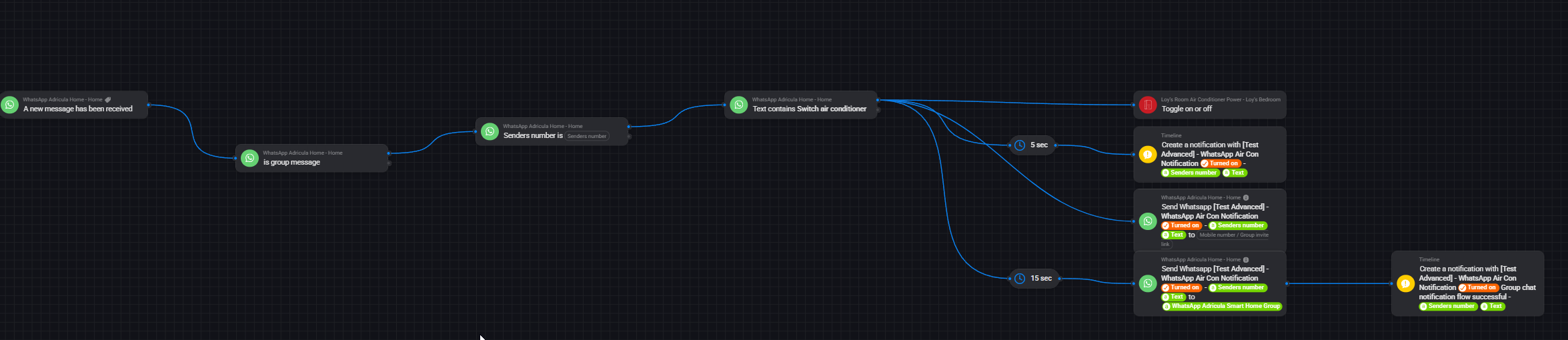
the first scenario are you referring to me replying on a received message in the group chat? meaning selecting one of the messages in the group chat and select reply? or just messaging in the group chat. ill check it out again in the next couple of days. ill do both selecting reply to one of the messages and messaging in the group chat.
then the second one to confirm are you wanting me to remove the variable and put the group invite link when sending a new mesage? as i have done that in my testing before and didnt work. happy to do it again if thats what you want me to do again?
@martijnpoppen any idea how to avoid this? It crashed my Homey and after sending it to Homey support, they pointed to the fact that the Homey Whatsapp app consumed an increased CPU (Screenshot below) b19d87e5-815d-4e0a-ba01-699789dcc884 Screenshot is 3 days old, diagnose is just shared…
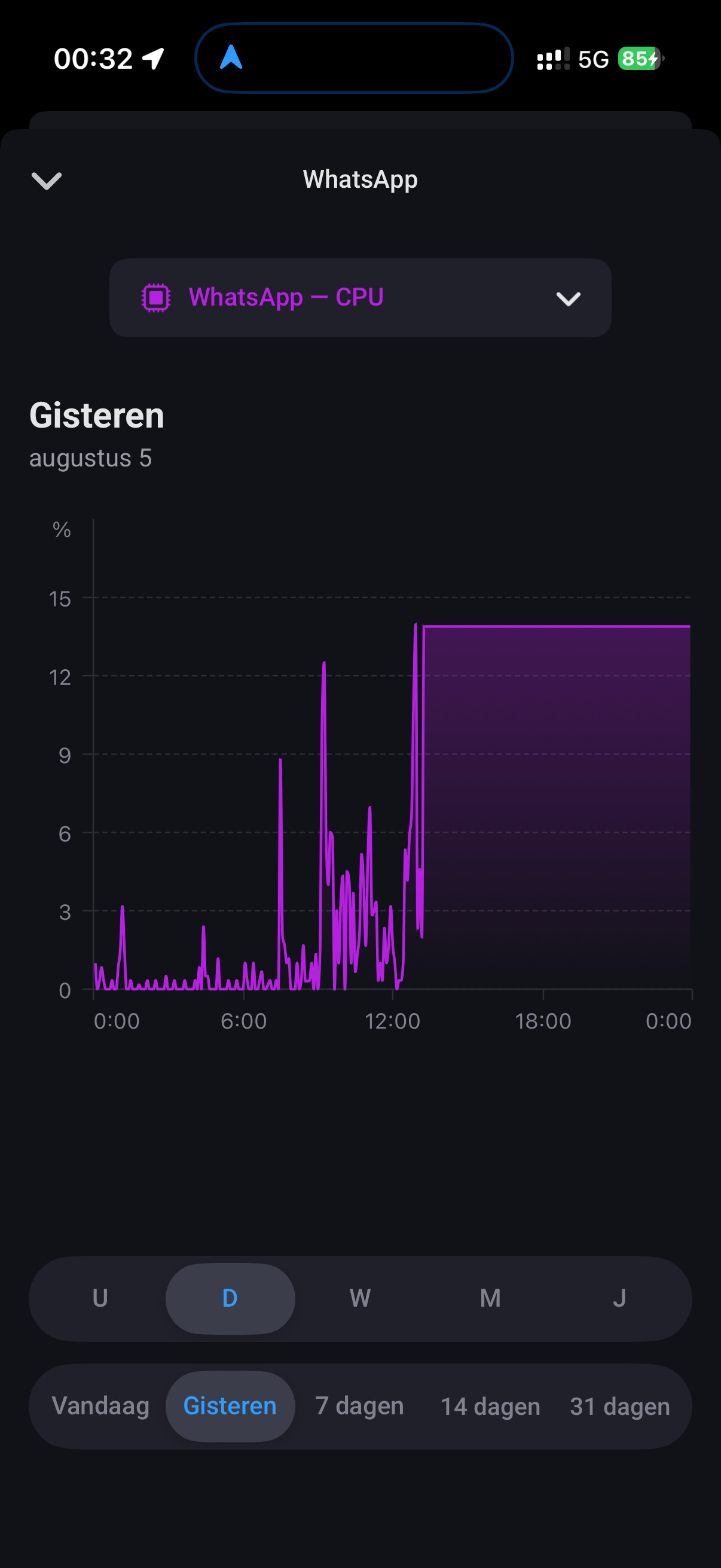
@Wout_van_den_Dool I already replied to your report.
But try to click the clear chats button in the whatsapp device, that will fix memory/cpu issues.
PS: please edit your post to english 
cool, never thought this could impact it
@Wout_van_den_Dool did it fix it?
For the dashboard widgets some chats are store in the app cache to show the conversations. Maybe I can get it working one day to get them from the cloud
I think it did, the Homey is still crashing (asked help to support) but at least not because of high CPU Load of Whatsapp from now onwards…
@martijnpoppen
Thanks for the tool. I ran it successfully before and after uninstalling Whatsapp and it saved much time!
Not sure what the underlying cause is for Whatsapp needing a new repair code.
Trying to Repair caused it to crash (I have just 300MB free in Homey memory) so I had to uninstall WhatsApp on Homey and reinstall after which I used the tool.
FYI I switched phones and while doing that I had to relink whatsapp to the whatsapp web app (of course) and I temporarily disabled end-to-end encrypted backup under Whatsapp/Chat backup. Not sure it is related, as I did not check Homey before the switch.
It’s worth adding the tool to the OP 
