[APP][Pro] Wasp in a Box - Virtual presence detection based on sensor triggers

Wasp in a Box | Homey

Smart room occupancy that stays active even when you sit still.

The Problem

We’ve all experienced this:

  • Lights turn off while you’re reading
  • Heating shuts down while you’re working at your desk
  • Security arms itself while you’re watching TV

Why? Motion sensors detect movement, not occupancy. When you sit still for a few minutes, they timeout and
trigger automations incorrectly.

The Solution

WIAB combines two types of sensors to track actual room occupancy:

  • Motion detected → Room occupied
  • Sitting still for hours → Still occupied
  • Door opens → Room empty

This state-based approach gives you reliable occupancy detection, not just motion detection.

Quick Start

Easiest way to use WIAB:

  1. Install WIAB from the Homey App Store
  2. Add a WIAB device and select your motion sensors + door contacts during pairing
  3. Add the WIAB device to your room
  4. Exclude the individual PIR sensors from the room’s activity calculation
  5. Done!

Result: Homey’s room activity becomes more reliable - no more false “room empty” when you’re sitting still!

Perfect For

  • Home office: Lights stay on while working at your desk
  • Living room: Heating doesn’t turn off while watching TV or reading
  • Bedroom: Proper occupancy state while sleeping
  • Any room: Where people spend time sitting still

Key Features

  • Combines multiple motion sensors and door contacts into one smart occupancy sensor
  • Works seamlessly with Homey’s native room activity feature
  • Configurable timers for different room sizes and usage patterns
  • Manual pause/resume for special situations (e.g., nighttime routines)
  • Full Homey flow integration
  • Works with any motion sensor and door/window contact
  • Supports multiple languages: English, Nederlands, Deutsch, Norsk, Svenska

Advanced Usage

Flow Cards

When:

  • Occupancy turned on/off

And:

  • Device is paused

Then:

  • Set occupancy state (Occupied/Unoccupied)
  • Resume monitoring

Custom Flows

You can also build custom automations using the occupancy state directly in your flows instead of (or in addition
to) using room activity.

Configurable Timers

  • T_ENTER (5-60s): Detection window after door events
  • T_CLEAR (60-3600s): Auto-empty timeout with doors open

Why “Wasp in a Box”?

The name comes from the behavior of wasps trapped in a container - they remain active and buzzing until they
escape. Similarly, WIAB keeps rooms “occupied” until someone actually exits through a door.

Links & Support

Enjoying WIAB? If you’d like to support development, you can buy me a coffee
:hot_beverage:

5 Likes

Do you need a door sensor and a closed door to benefit from this app or are there already other benefits if there is no door or with a (sometimes) open door?

Great question, Marcel!

No, you absolutely don’t need a door sensor to benefit from WIAB! The app is very useful even without any door or window contacts.

Core Benefit (No Door Sensor Required):

WIAB’s primary purpose is to aggregate multiple motion/presence sensors into a single virtual occupancy sensor. This is valuable on its own because:

  • Simplifies automations - Instead of creating complex “OR” conditions with multiple sensors, you get one unified occupancy sensor
  • Works in open spaces - Perfect for areas without doors like living rooms, open offices, hallways, or patios
  • Flexible placement - Use multiple motion sensors to cover different zones in one area

Example Without Door Sensors:

Imagine a living room with 3 motion sensors (near sofa, near TV, near window). WIAB creates one virtual sensor that shows “occupied” when ANY of those 3 sensors detect motion. Much simpler than “if sensor1 OR sensor2 OR sensor3…”!

What Door Sensors Add (Optional Enhancement):

Door/window contacts are optional reset sensors that automatically deactivate occupancy when someone exits. This is helpful for enclosed rooms where you want automatic “exit detection”:

  • Bedroom with motion sensor + door contact
  • Bathroom with presence sensor + door contact
  • Office with motion sensors + door contact

Bottom Line:

WIAB is useful with just motion sensors (no doors needed), but adding door sensors as “exit detectors” makes it even more accurate for rooms with defined exits.

Hope this helps clarify! Let me know if you have other questions.

1 Like

Hi,

thank you for develop this app. I have a problem that my wiab device is not working with the configured trigger and door sensor.

I have the following as devices. A Philips hue motion sensor and a door sensor.

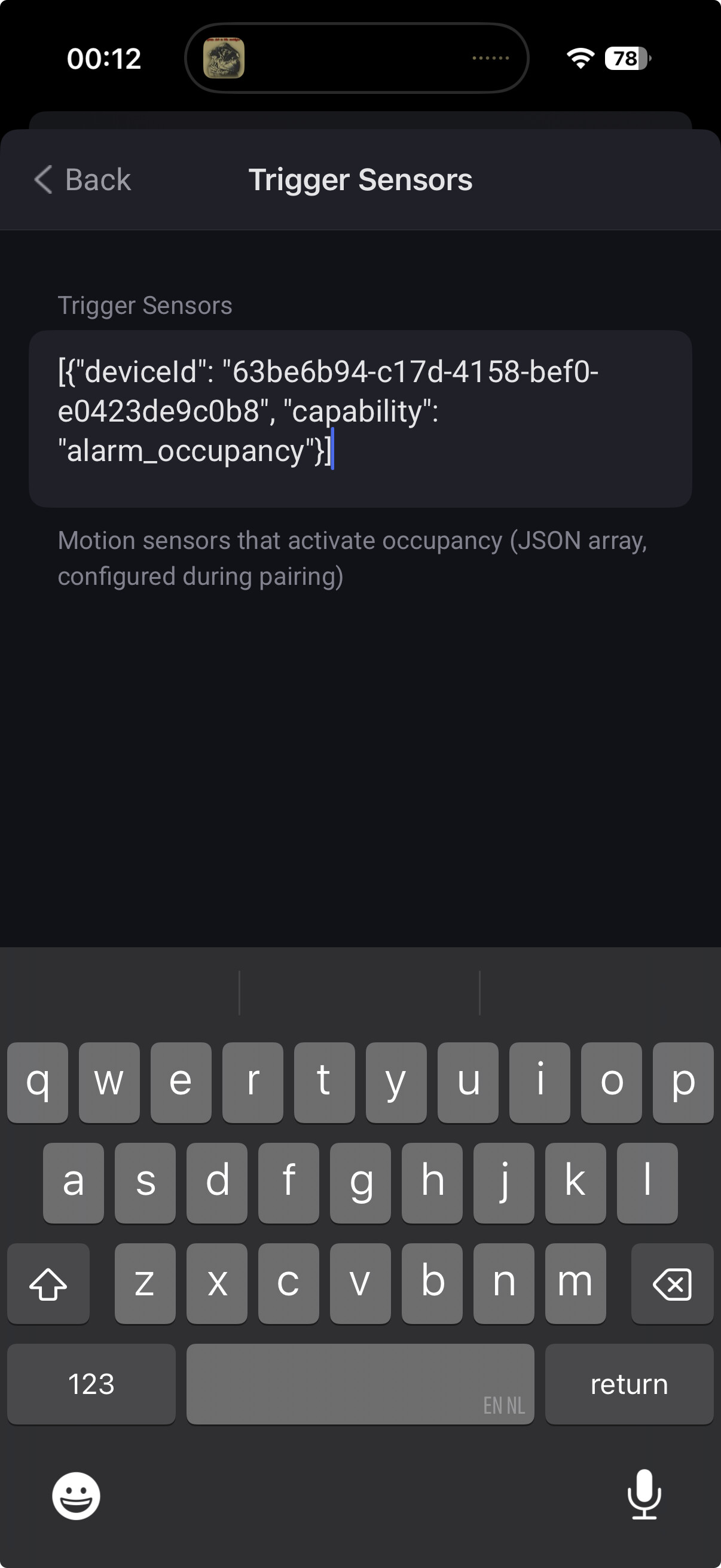
looks like the trigger isn’t working. I use the following trigger: [{“deviceId”: “63be6b94-c17d-4158-bef0-e0423de9c0b8”, “capability”: “alarm_occupancy”}]

the capability is named alarm_occupancy

Can you help me me make the device usable. How to troubleshoot this one.

Thanks in advance.

Hi D_Angelo,

Your WIAB device isn’t working because alarm_occupancy behaves differently than WIAB expects. Let me help you fix this.

First: What version are you running?

Please check Settings → Apps → WIAB in Homey. The current versions are:

  • Production: v1.0.16
  • Test: v1.2.2 (published today, Dec 25)

If you’re on v1.0.16, I strongly recommend trying the test version v1.2.2 which includes critical fixes for sensors that get stuck reporting motion.

To switch to the test version just add /test to the app store url and install from there.

The Root Issue

WIAB detects state changes (FALSE→TRUE transitions). If alarm_occupancy stays TRUE continuously, WIAB won’t see any changes. The difference:

  • alarm_motion = short pulses when motion detected (ideal for WIAB)
  • alarm_occupancy = stays TRUE for minutes after motion (problematic for WIAB)

Solution: Switch to alarm_motion

You need to edit your sensor configuration:

  1. Open your WIAB device settings in Homey
  2. Find the “Trigger Sensors” field
  3. Carefully edit the JSON - change:
    [{“deviceId”: “63be6b94-c17d-4158-bef0-e0423de9c0b8”, “capability”: “alarm_occupancy”}]
  4. To:
    [{“deviceId”: “63be6b94-c17d-4158-bef0-e0423de9c0b8”, “capability”: “alarm_motion”}]
  5. Save settings - WIAB will automatically reinitialize with the new configuration

:warning: Important: Be very careful with JSON syntax! Any typos will break the device.

Before You Edit

First, verify your Philips Hue sensor has alarm_motion available:

  • Go to your sensor device in Homey
  • Advanced Settings → Capabilities
  • Check if alarm_motion is listed

If your sensor only has alarm_occupancy, try updating to v1.2.2 first - the stale sensor detection might work around the issue.

Why v1.2.2 Helps

The test version includes important fixes since v1.0.16:

  • Stale sensor detection: Ignores sensors stuck in TRUE state at startup
  • Better timestamp handling: Prevents false occupancy from stuck sensors
  • Event-driven monitoring: More responsive than the old polling system

These fixes may help even if you’re stuck using alarm_occupancy.

What to Share

Please let me know:

  1. Which version you’re currently running
  2. Whether your sensor has alarm_motion capability
  3. If the configuration change (or version update) fixes the issue

Happy to help debug further if needed!
Andy

:tada: WIAB v1.2.x Release Candidate - Major Feature Update!

Hi everyone!

I’m excited to announce that WIAB v1.2.x is now available in the test environment as a release candidate for production. This is a massive update with three brand-new device types and numerous
quality-of-life improvements!

:new_button: What’s New

1. Circuit Breaker - Hierarchical Flow Control

Ever wanted to turn off multiple flows at once? Circuit Breakers let you create a hierarchy of “switches” that control your automations:

  • Turn off an entire floor of automations with a single action
  • Create master switches for vacation mode, sleep mode, or away mode
  • Parent-child relationships - when a parent breaker turns off, all children turn off automatically
  • Perfect for complex automation setups - organize hundreds of flows into logical groups

Example: Create a “Vacation Mode” circuit breaker that turns off all motion-triggered lights, climate controls, and notification flows across your entire home with one tap.


2. Room State Manager - Intelligent Room State Tracking

Go beyond simple “occupied/not occupied” detection with four intelligent states:

  • Idle - Room is empty
  • Extended Idle - Room has been empty for a while (configurable timer)
  • Occupied - Someone is in the room
  • Extended Occupied - Someone has been in the room for a while (configurable timer)

Why this matters:

  • Create different lighting scenes based on how long you’ve been in a room
  • Gradually dim lights after extended occupancy (preparing for sleep)
  • Trigger cleaning reminders only after extended idle periods
  • Manual override mode - temporarily force a state and return to automatic when ready

Pre-configured room templates included:

  • :bed: Bedroom (optimized for sleep patterns)
  • :shower: Bathroom (quick response times)
  • :briefcase: Home Office (balanced for work)
  • :cooking: Kitchen (moderate timers)
  • :couch_and_lamp: Living Room (comfortable delays)
  • :door: Hallway (instant response)
  • :automobile: Storage/Garage (slower transitions)

No more guessing timer values - just pick your room type and go!


3. Zone Seal Monitor - Door & Window Aggregation

Know instantly if your home, room, or zone is properly sealed:

  • One device monitors all contact sensors in a zone
  • Visual indicator shows sealed (green) or leaky (red) status at a glance
  • Configurable delays prevent false alarms from quick door opens
  • Stale sensor detection alerts you to dead batteries or connectivity issues

Use cases:

  • Security check before bed - is everything closed?
  • Climate control - only run heating/cooling when zone is sealed
  • Pet containment - know if any doors are open
  • Smart triggers - trigger flows when zone becomes fully sealed

:globe_showing_europe_africa: Multi-Language Support

Pairing flows now display in your Homey’s language:

  • :united_kingdom: English
  • :netherlands: Dutch (Nederlands)
  • :germany: German (Deutsch)
  • :norway: Norwegian (Norsk)
  • :sweden: Swedish (Svenska)

Each device pairing now includes helpful intro pages explaining what the device does and how it works.


:sparkles: Quality of Life Improvements

Easier Flow Creation

State-specific triggers for Room State Manager mean you can now:

  • Trigger directly when room becomes “Extended Occupied” (no condition cards needed!)
  • Create separate flows for each state transition
  • Simpler, cleaner automation logic

Better Visual Feedback

  • Pulsing occupancy indicator on Room State Manager tiles
  • Color-coded status on Zone Seal monitors (like native door sensors)
  • Clear status at a glance from your device overview

Improved Reliability

  • Smarter error handling - failures no longer crash devices
  • Stale sensor detection - alerts when sensors stop reporting (dead batteries, connectivity issues)
  • Automatic capability repair - devices self-heal on updates
  • Better sensor timestamp handling - prevents false occupancy from offline sensors

Enhanced Pairing Experience

  • Explanatory intro pages for each device type
  • Room template previews showing timer values before selection
  • Multi-language support throughout pairing flows
  • Guided setup with helpful descriptions

:bar_chart: Complete Feature Summary (v1.0.16 → v1.2.x)

New Devices (3)

  1. Circuit Breaker - Hierarchical flow control
  2. Room State Manager - 4-state room tracking with timers
  3. Zone Seal Monitor - Door/window aggregation with delays

New Capabilities (5)

  • Room state tracking (idle, occupied, extended states)
  • Manual override mode
  • Zone seal status (sealed/leaky)
  • Circuit breaker hierarchy
  • Stale sensor detection

New Flow Cards (18+)

  • Room State Manager: 6 triggers, 3 conditions, 2 actions
  • Zone Seal Monitor: 6 triggers, 2 conditions
  • Circuit Breaker: 3 triggers, 1 condition, 2 actions

Room Templates (7)

Pre-configured timer settings for: Bedroom, Bathroom, Home Office, Kitchen, Living Room, Hallway, Storage/Garage

Languages (5)

English, Dutch, German, Norwegian, Swedish

Quality Improvements

  • Improved error handling and recovery
  • Better sensor staleness detection
  • Visual indicators (pulsing, colors)
  • Multi-language pairing flows
  • Explanatory intro pages
  • Automatic capability repair

:wrench: Installation

This is currently in the test environment as a release candidate. Once validated, it will be released to the Homey App Store.

For existing WIAB users:

  • :white_check_mark: Fully backward compatible - all existing devices continue working
  • :white_check_mark: No breaking changes - update without worry
  • :white_check_mark: Automatic migration - devices self-update capabilities as needed

:books: What is WIAB?

WIAB (Wasp in a Box) creates intelligent virtual occupancy sensors by combining multiple physical sensors. Like a wasp trapped in a box that stays active until it finds the exit, WIAB devices stay occupied
until your “exit sensors” (doors, timeouts, etc.) deactivate them.

Original WIAB Device combines:

  • :high_voltage: Motion sensors (trigger occupancy)
  • :door: Door contacts (reset occupancy)
  • :stopwatch: Configurable timers
  • :bullseye: Edge detection (only sensor transitions trigger actions)

:speech_balloon: Feedback Welcome!

This is a release candidate - please test and report any issues! I’m especially interested in:

  • Real-world usage of Circuit Breakers, Room State Managers, and Zone Seal Monitors
  • Room template accuracy for your use cases
  • Multi-language translation accuracy
  • Any edge cases or unexpected behavior

Let me know what you think!

Huge thanks to everyone who’s provided feedback, bug reports, and feature requests. :folded_hands:

2 Likes

Just installed test version 1.2.9. Pressed configure and the cursor is just spinning.

I just canceled it and was able to create a WIAB device. Thank you for making this app.

1 Like

Hi Chuck,

Thanks for reporting the configuration spinner issue! I’ve identified and fixed the root cause in version 1.2.11, which is now available.

What was happening:
The app was waiting indefinitely for the Homey API during device initialization, causing the configuration UI to freeze with no timeout or error message.

What’s fixed in v1.2.11:

  • Added 30-second timeout protection to all device types (WIAB Device, Zone Seal, Room State, Circuit Breaker)
  • If initialization takes longer than 30 seconds, the device will show a clear warning instead of hanging
  • Optimized the initialization process to reduce typical setup time by ~50%

What this means for you:

  • Configuration should complete quickly and reliably
  • If there are any issues, you’ll see a clear warning message instead of an endless spinner
  • The device will still function even if some initialization steps are slow

Could you test creating a new WIAB device with v1.2.11 and let me know if you still experience any issues? Your feedback on the configuration experience would be really helpful.

Thanks again for the bug report

Best regards,
Andy

It works! Thanks for a very quick turn around.

1 Like

Thank you for making this app.

Question: How do you recommend I use it to handle a 2 story house? The first floor is an open concept with LR, DR, K. The problem is there is a second floor. When all the people are upstairs the first floor is empty but wiab thinks it is occupied since there is no exit trigger.

I have a Everything Presence One device which has a PRI and mmWave. I’m thinking of using it’s “Occupancy became inactive” as an exit trigger in a new flow that sets the wiab to “unoccupied” followed by a “resume monitoring”.
Any other ideas?

BTW: The wiab is now flashing a data quality warning. What does it mean and how to i reset it.

Hi Chuck! Great questions - let me address both:

Multi-Story House Solution

Your proposed approach will work, and you’re on the right track! Here’s how to implement it:

Flow Setup:

  1. Trigger: Everything Presence One - “Occupancy became inactive”
  2. Action 1: WIAB Device - “Set occupancy state” → Select “Unoccupied”
    • Note: This automatically pauses the device in the unoccupied state
  3. Action 2: WIAB Device - “Resume monitoring”
    • This unpauses and reinitializes based on current sensor values

Important Considerations:

  • EPO timeout setting: Make sure the EPO’s inactivity timeout is long enough to avoid false triggers (e.g., 5-10 minutes). If it’s too short, it might mark the first floor as unoccupied while someone is just sitting still.
  • Resume behavior: When you call “Resume monitoring”, WIAB will check all trigger sensors’ current states and reinitialize. If any motion sensor is currently detecting motion, it will immediately go back to occupied.

Alternative Approaches:

  1. Add a manual “upstairs” button/flow:
    • Create a virtual button or use a real button device
    • When pressed → Set WIAB to “Unoccupied”
    • More explicit control than relying on EPO timeout
  2. Zone-based tracking:
    • Create separate WIAB devices for each floor
    • First floor WIAB: Reset sensors = staircase door/gate (if you have one)
    • Second floor WIAB: Trigger sensors = staircase + upstairs motion
    • Requires physical boundaries at the staircase
  3. Consider the Room State device:
    • WIAB has a companion device type called “Room State” that’s designed for more complex scenarios
    • It uses event-driven state tracking instead of polling
    • Might handle multi-floor transitions more gracefully
    • Worth exploring if your EPO workaround doesn’t work well

Data Quality Warning

The flashing “Data Quality Warning” means one or more of your sensors are stale (haven’t reported data recently).

What causes it:

  • By default, if a sensor hasn’t updated in 30 minutes, WIAB marks it as stale
  • This is a fail-safe feature - better to warn you than trust potentially outdated data

To diagnose:

  1. Check your Homey app logs for the WIAB device - it will show which sensors are stale
  2. Look for messages like: Data quality warning: 2 sensor(s) are stale

To fix it:

  1. Check sensor batteries - Low battery is the most common cause
  2. Check sensor connectivity - Make sure sensors are still reachable on your network
  3. Check sensor settings - Some sensors have sleep/power-saving modes that affect reporting frequency
  4. Once fixed, the warning auto-clears - As soon as all sensors report fresh data, the warning disappears automatically

To adjust sensitivity:

  • Go to WIAB device settings → “Stale sensor timeout (minutes)”
  • Increase it if you have sensors that naturally report less frequently
  • Default is 30 minutes, but you can adjust based on your sensor behavior

Flow cards for stale sensors:

  • Trigger: “Data became stale” / “Data became fresh”
  • Condition: “Data is/isn’t stale”
  • You can use these to create alerts or automation based on data quality

Hope this helps! Let me know if you need clarification on any of this.

Andy

1 Like

Hi Andy,

My Philips Hue motion sensors only has the following capabilities:

So there is no alarm_motion capability.
I’m currently running version 1.2.16 and it is not working in this version as well.

Any other actions I can take to get this to work?

Thanks for the screenshot, that’s exactly what I needed to see!

Your sensor has alarm_occupancy but no alarm_motion - this is common with certain Hue integrations (especially Zigbee2MQTT).

Good news: adding alarm_occupancy as a supported trigger capability is straightforward since it behaves identically to alarm_motion (boolean true/false for presence). I’ve created feat: add alarm_occupancy as supported trigger capability · Issue #168 · NdyGen/wiab · GitHub to track this.

The update (V1.2.17) is now in test: Wasp in a Box | Homey

Your Philips Hue motion sensor should now appear in the sensor selection list during pairing.

If you already have a WIAB device configured, you can either:

  1. Re-pair to select the sensor through the UI, or
  2. Edit the device settings and manually add your sensor to the triggerSensors JSON

Let me know if you have any issues!

Brother you are really fast. I have tested it and it works!. Thank you very much wife will be happy.
Do you also have a preset for toilet perhaps :stuck_out_tongue:

1 Like

You’re welcome :wink:

Give me the presets for the toilet and I’ll make a template for it.

Andy

Hi sir, I thought it was all good but I have the following. My door sensor is connected to zigbee2mqtt. In zigbee2mqtt the door sensor shows contact when door closed and no contact when door is open. But in Homey the sensor is the opposite. Is there a way in wiab to invert the state or do you know a workaround to get this working?

Already got it working with a virtual device with type door/window sensors and flows to set state based on the real sensor

1 Like