Testversion 1.1.20 with a technical redesign for heater and thermostat is online. Coming from previous version it should not be necessary to re-pair the devices.
Help! Tuya app worked since yesterday flawless.
Yesterday my 3 heaters gave the red triangle, so unreachable and something was wrong.
Now I found out on iot.tuya.com that my IOT CORE subscription only was one month and it was expired!?
So I renewed my subscription for 6 months and got it.
But still my devices won’t work again.
Already removed devices and reinstalled the Tuya app.
But adding my heaters again isn’t possible, it keeps saying: configure the app first.
But i’ve nothing changed and the app is configured properly (it also has worked for a month).
What’s going wrong?
I can see on iot.tuya that IOT CORE says : an exception occurs but the service still works. All the resources are ‘in service’ and ive a subscription till 2023-04-20
This is my subscription, and all’s fine. I have only lights and sockets. Is it heater specific? Or are they your only devices?

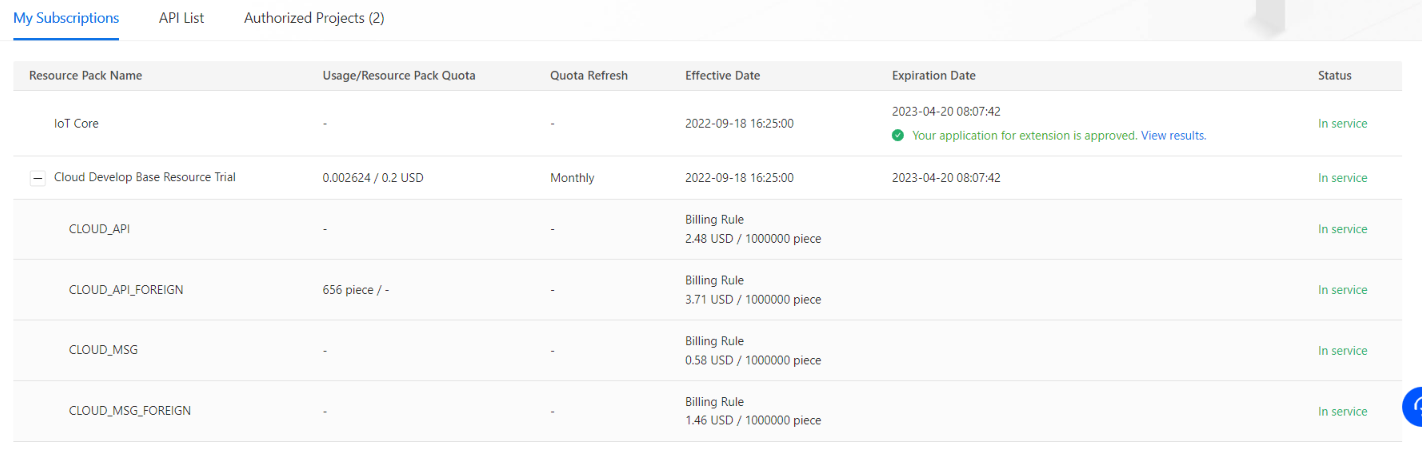
This is what they look like… I’ve only 3 heaters, but I can’t add devices anymore.
I’ve already removed my heaters and use the Smart Life app instead of Tuya. But that doesn’t matter.
In the tuya app/smart life app everything works fine. So it’s the Tuya Cloud app in Homey that can’t read my API or something anymore.
Also made a new project on iot.tuya with a new API key, same problem. And also tried the experimental Tuya Cloud app, also same problem: devices aren’t reachable and can’t add them again after I removed them (configure app first)
Yeah, that should mean the issue is not with iot Core? On the other hand you mention
Where is that mentioned? with your devices, or somewher at the iot core page?
I’m not a ‘deskundige’/expert here, but it is often just about checking every (little) point in the chain.
Can you explain your situation a bit? Is it only heaters, or do you also use Tuya lights sockets or whatever? And if yes, do they also fail?
I’ve edited my post with some information and all the possible things I did… Even setting up a whole new project…
The phrase: ‘‘an exception occurs but the service still works’’ Is what I can read when I hover above the ‘alerting’ text at the status… Are you also having the ‘alerting’?

Hi Tim,
I have a Tuya Wifi roller blinds controller switch (up, pause, down) like this one https://nl.aliexpress.com/item/33052311020.html?spm=a2g0o.order_list.0.0.21ef79d2SSmCej&gatewayAdapt=glo2nld. This used to work but the roller blinds had to be replaced. (30 years old) So after 3 months the new one was installed and in the meantime Tuya changed the way they work. I cannot get it to work anymore.
I guess it should work with tap-to-run scenes, or else with text events (raw commands):
I’m pretty sure it has something to do with this yeah…
I was done with it: made a new iot.tuya account and everyting works again in the Tuya cloud app on homey…
For at least one month… Then my subscription is ending again…
Thanks for the help at least!
YW! Extend the subscription before it expires I would say 
I directly did it ha-ha! Hope they won’t mess it up with weird alerts and a half working IoT Core…
Hi,
The app used to work. I can not add new devices.
So I checked all the steps in the manual on the Homey-forum, including the very clear how to in my native language, Dutch. No result.
I removed the app, started all over. Did everything as described. No result.
I created a new dev account at Tuya, wrote down the id and secret. Granted the correct api rights et cetera. Filled the config of the app in, with the correct login for the Tuya ios app.
Eh … No result.
So I checked it over and over again. Read a lot tricks and tips online. No result.
So I read your advice, to install the Beta … No errors. Only: ‘Please configure the app first’ …
I can save all correct (?) data and the app asks me to restart. I do. Result: ‘Please configure the app first’.
Arghhh.
i have checked all the things people advice, like id, password and secret for unneeded spaces, check if the login and pass for ios app are correct, api-settings. The datacentre is also okay. But … no result. Even replaced my Gmail-login for ios app with regelar emailaddress.
I also looked at the source code and I see there are 12 mentions of ‘Please configure the app first’ in the code. But I can not figure out which of these triggers the message. And because I can not login at my Homey I can not continue the troubleshooting.
ofcourse I looked at the logs of my routers, but I do not see any abnormal messages.
I love the app, I do appreciate your hard work but this is rather frustrating.
What is wrong? Please help.
Okay, created new dev. Account and it works now.
Is your trial IT core subscription In iot Tuya cloud maybe over? Was the case for me……
does anyone know how to integrate Tuya Wi-Fi Smart IR Controller to Homey? Device link
I saw that these devices are not part of the items mentioned on the Tuya apps.
actual apps:
Tuya Cloud
Tuya
Yup, it can be done with the Tuya Cloud app, tap-to-run method
In short
@ Tuya smart app on your phone:
- Create a virtual remote for your IR device
- Create tap-to-run scenes for every virtual IR remote button you need
F.i. Amplifier volume up:
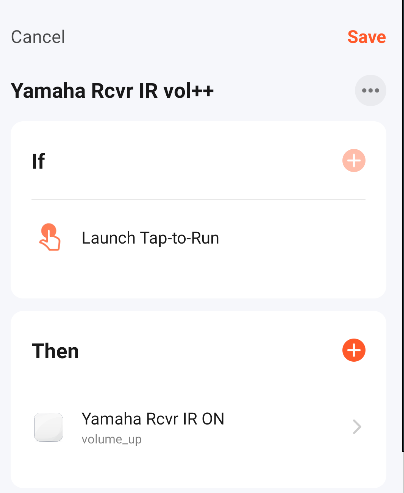
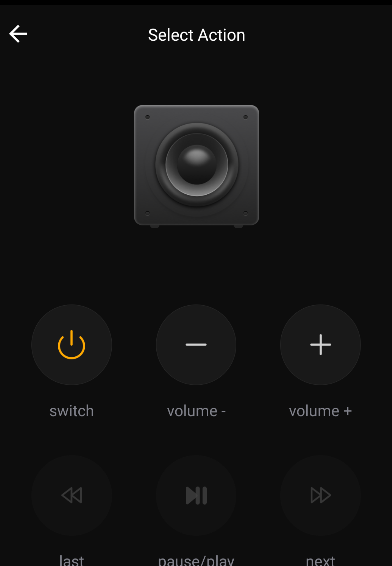

@Homey:


Thank you @Peter_Kawa for help.
It’s working now!
Hi,
I have an issue with the connection to the API. I changed from legacy to official a while back with any problems but a few weeks ago it all lost connection. I have tried all the hacks I have found in this thread, restarted the app, resintalled the app, created a new API with new ID and Secret and almost everything I can come up with. What is the next step to take?
- Everything works from the Tuya App
- I have extended the license to 6 month
- There is no error in the homey app when I try to turn on /off the light, they just don’t change
- When I try to remove a buld and re-add it it says “Please Configure the app first”.
Please help, I have a looot of these bulds (like 20) and right now its chaos in my house 
Hi @Jurgen_Heine,
I recently bought a couple of electric heaters (gas is too expensive ) I’ve added them to the tuya app and are now also through the homey cloud app on homey. The device is working okay I can set temperature and turn it on and off. The measured temprature is however stuck at -20. and the power (1250/2000watt) is not available. Is this something you plan to add/fix?
Thanks,
Maarten
I added this driver.
The watt selection is not possible in the device. It’s not implemented as mode but as scene from Tuya.
So you can use the set scene flow card (for the app, not device). There your should see scenes for.
Can you please make a screenshot of your temperature view in homey and the device debug information from Tuya cloud (the JSON definition for the capabilities)?
