I got it working now! Now the siren sounds when my door sensor is activated. This is great! I’m happy and extremely satisfied with my accomplishment 
These small wins are always nice!
Nice to hear you succeeded.
So, you’d better lower your expectations on things “just popping up” with Homey, usually they don’t 

It’s not Home Assistant 
Well, in general things do just pop up. And as Paul Hibbert says:”It just woooorks, dunnit?”
Tuya on Homey is a different breed.
I was referring to devices, Rudi. They don’t pop up just like that…
In general we have to install each and everyone one when not using 3rd party hubs. At least with the apps I’m using
And that was what Ganesha was doing, right? Add the siren and then after hitting add device in Homey and choosing a device from the Tuya app if it is supported, it should just pop up. At least in my case they do
Thats funny, I got the Homey after buying a HA because I thought the Homey was more straight forward and more “click and play” 
I did see the post about the Tuya API and Athom not working together anymore a little bit too late. In fact I Google first if the Homey supported Tuya and got a yes, then I bought the Homey. Got a little bit misled and it’s my own fault of course. The Homey is a wonderful machine nonetheless, I’m glad that I got it working, BUT I hope Athom/Homey could solve the problem with Tuya in the near future because I think people will go for the HA alternative more and more as it becomes more user friendly. And all the guides that’s do exist for the HA is enormous. But I’m not giving up on Homey just yet, to expensive device to let it go… I just need to get the disconnected thing sorted as well 
Maybe this time it’s really happening!  Doekse’s message is from just a couple of hours ago!
Here’s the link: https://community.homey.app/t/app-tuya-connect-any-tuya-device-with-homey-by-tuya-inc-athom/106779/1079

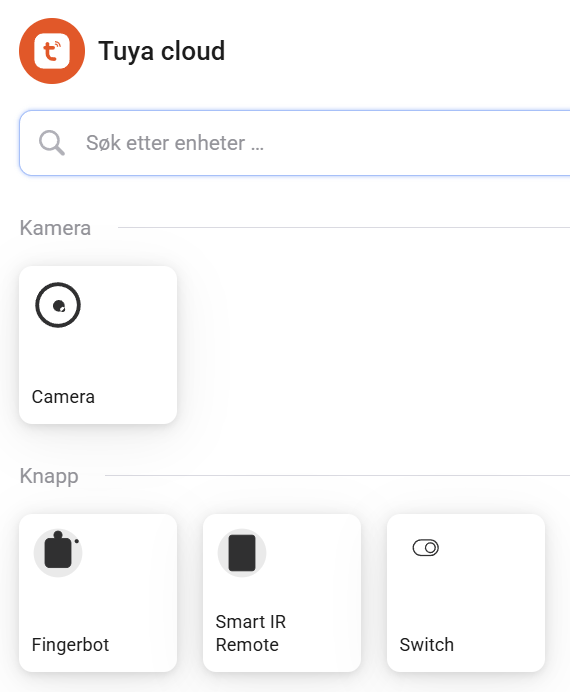
While waiting for the official Tuya app to start working again in Homey, I decided to try Tuya Cloud and see if I could make AI integrate more devices, and it worked!
I’ve added almost every Tuya device Homey ignores, like temperature sensors, soil sensors, a universal remote and the movement detector from a camera, in just a few minutes!
You’ll need to:
-
Download Cursor or another AI coding app.
-
Downloading the Tuya Cloud github repository.
-
Install Homey CLI.
-
Add your devices in the Tuya mobile app.
-
Create a Tuya cloud project using the credentials from the Tuya mobile app: Tuya Smart Developer Center
-
Find your devices in the project’s Devices, select one and click Debug Device.
-
Copy Device information, Standard Instruction Set and Standard Status Set, and ask Cursor to add a new device.
-
Open a terminal window in the folder of the downloaded repository, and run homey app install to upload it to Homey.
-
Open Homey, configure the Tuya Cloud app with api key and password from the project in the Tuya web app.
-
Add a New device, choose Tuya Cloud, choose the category of devices, and your device should appear.
AI made it so easy anyone could make this work. Some devices like Fingerbot shows as offline in the web app, so I am unable to operate it. Next I’ll try to make my camera capture an image and display it.
I’ve just started looking into this, but ideally new device ids and settings should be collected in a public list. Maybe someone knows the Tuya Cloud code well enough to modify it so we can just drop in a yaml file for each device?
I was unable to upload all links and images, you’ll find them here:
Tuya cloud:
Whats the point of doing this? I mean the original way that’s is explained in 1 post works like a charm. Sure I have to use a virtual device but that doesn’t Mather, it works just as same. can you explain the benefits of doing your way, cause I don’t get it?
I appreciate your enthusiasm and solutions. But please keep things realistic, the average TC app user isn’t a coder, and AI makes stuff up. This will take hours if not days for non-coders;
I mean who even knows what “Install Homey CLI” means for example?
(meaning: you assume everyone knows)
So, can I make a suggestion to some other ways to add the new device support, which the app users can use through (app store) app updates?
-
Why not transfer the app to yourself, and add the easy stuff for all app users? Jurgen Heine is open to transfer.
-
Or at least create pull requests: afaik Jurgen is still so kind to merge valid PR’s and publish it as app updates.
Thanks,
Peet
I’m afraid it can be a long wait, but, who knows, soon™ is quite a flexible ETA
I think the benefit here is that you actually add new devices to your own version of the app. It’s a little bit like how you can add devices to the Tuya Zigbee app
Is he open to transfer? If someone would take over ownership of this app that would be great! So far this is still the best way to include Tuya devices in Homey
Absolutely, but like Peter said, doesn’t feel so user friendly and that what’s Homey is about I think. But yes, good for people maybe that has the knowledge.
Best option is of course if a Athom official app gets created for all Tuya devices.
Second best is a maintained working Tuya community app. Like this Tuya Cloud app. However, the current one isn’t maintained anymore. The RAW commands and tap-to-run solutions will most likely work, but also entail quite some steps involved.
If Jürgen Heine is not willing to handover the current app or no one wants to take over the app development, perhaps @Einar_Vaagland can share his development version of the app. The only thing people need to do then is to install that version of the app. That is something that is already explained in step by step guides here on the community. And that way people will have the Tuya Cloud app with all current functionality and the added devices that Einar has time to add.
I guess I could set up a web server for users to submit their Tuya Developer Platform definitions, and have the AI upload new versions. 
But ideally we should create an online device library of yaml files, and download the ones we need for our devices.
I haven’t had time to look at Jürgen Heine’s code yet, but this would be a flexible solution without the need for constant updates.
But most devices work with Zigbee2MQTT, so maybe a conversion of their drivers is a simpler way forward, I’ve had success with the AI creating drivers for it.

Yea I’m sure Jurgen is liking to transfer the app to “new blood”, Rudi.
Quote:
.
I don’t think many would disagree on that, Rudi. However, this “promise” below, doesn’t give me much hope to a “quick”, (like a few months), release. But, I was wrong on that before 
And Athom founders saying it’s all crap and don’t recommend Tuya to anyone, does not help here. As posted before:
https://community.homey.app/t/app-pro-tuya-cloud-this-app-allows-you-to-connect-homey-to-the-tuya-cloud/21313/2508
My best guess is sometime in Q1 at the latest, but it could end up being a Christmas present. It all depends on how the other projects move along
I did reverse engineer the login from the Tuya Home Assistant integration some time ago. However I don’'t know how to continue with it, since the Tuya API appearantly uses some kind of extra signing system.
Here is the code if someone needs it. This is only for login, since I couldn’'t get anything else to work.
import axios from 'axios';
import readline from 'readline';
import qrcode from 'qrcode-terminal';
import mqtt from 'mqtt';
import crypto from 'crypto';
import { v4 as uuidv4 } from 'uuid';

const TUYA_CLIENT_ID = 'HA_3y9q4ak7g4ephrvke';
const TUYA_SCHEMA = 'haauthorize';
const LOGIN_API_URL = 'https://apigw.iotbing.com';
let API_BASE_URL = '';


const rl = readline.createInterface({
  input: process.stdin,
  output: process.stdout
});

async function getQRCode(userCode) {
  const url = `${LOGIN_API_URL}/v1.0/m/life/home-assistant/qrcode/tokens?clientid=${TUYA_CLIENT_ID}&usercode=${userCode}&schema=${TUYA_SCHEMA}`;
  const response = await axios.post(url);
  return response.data.result;
}

async function pollLoginResult(token, userCode) {
  const url = `${LOGIN_API_URL}/v1.0/m/life/home-assistant/qrcode/tokens/${token}?clientid=${TUYA_CLIENT_ID}&usercode=${userCode}`;
  for (let i = 0; i < 30; i++) {
    const res = await axios.get(url);
    if (res.data.success) {
      return res.data.result;
    }
    await new Promise(resolve => setTimeout(resolve, 1000));
  }
  throw new Error('Login timed out');
}


async function main() {
  rl.question('Enter your Tuya user code: ', async (userCode) => {
    try {
      const qr = await getQRCode(userCode);
      console.log(qr);
      console.log('Scan this QR code with the Tuya app:');
      const qrtoken = qr.qrcode;
      const finalqr = 'tuyaSmart--qrLogin?token=' + qr.qrcode;
      qrcode.generate(finalqr, { small: true });

      await new Promise(resolve => {
        rl.question('\nPress Enter after scanning the QR code...', () => resolve());
      });
      console.log(qr);
      const loginResult = await pollLoginResult(qrtoken, userCode);
      console.log(loginResult);
      API_BASE_URL = loginResult.endpoint;

    } catch (error) {
      console.error('Error:', error.message);
    } finally {
      rl.close();
    }
  });
}

main();
Hello everyone…. I am not sure where to sign up for the API and secret code. Does anyone have the link for where I can sign up?
Thanks so much!
Have you read the first post of this thread?
