I agree with you, perhaps it sounds easier than it is.
FWIW my ‘Tuya’ devices have proved very reliable both with Homey and Amazon devices. Worth setting a reminder to renew every 6 months or so.
If you are keen to bypass that issue, the Amazon skill doesn’t have it so, if you have an Alexa, you can use the Homey Alexa skill instead to link your devices to Homey.
Andy
I tried to get my Tuya Power sockets into Homey.
I did everything as described. The Tuya Cloud app in Homey seems to connect with the smart life app and the cloud (I suppose). It doesn’t give any faults when configuring the app in Homey. Also the smart life app is working fine with the sockets.
I chose “only use official”
When I choose add device, it takes some time waiting and than comes back with “Please configurt the app first”
It is configured as described. When I use a different password and/or a different cloud key it fails, so I know it realy connects with those two.
I am realy out of options what to try…I hope anyone can help me with this…

You probably forgot something, @Floris_J , really all info is in the first post. I followed it word by word, and it worked the first time. Not to brag, but to aknowledge the manual is 100% OK.
Floris, maybe this is the issue: people in Western Europe tend to decide for themselves the datacenter they need is ‘West Europe’, but it is ‘Central Europe’ most of the time.
But the manual shows a list of all country(numbers) which Tuya decided to which datacenter they should connect!
If you are in Netherlands, “Central Europe” datacenter should be used
As explained in the manual:
But OK, the link name here is a bit obscure 
Floris, please show your (anonymized) iot.tuya.com screens as well here, so I can scan them for input errors.

I requested renewal yesterday evening, today it is renewed until august and working again…
Maybe this problem will also be gone after next Wednesday, there are rumours that Tuya is releasing a new update where you no longer need to get a developer API key and that you can use simply your Tuya app to create and connect a login… (so create i think an API key in the Tuya app and use that for Integration) .
I hope these rumours are correct and they really release this, that would make it much more stable and easier to use, especially for newbies…
Hi @Peter_Kawa , because the don’t work.
The history of the smoke detector in Homey is also not updated, last value unknown.
Just tested once more with this card and this card was not triggered.

All other flows with cards for the smoke detectors are disabled.
All info scenes in the Tuya are disabled.

And yet I get this info in my timeline without my doing. This also happens for my sensor I added, I keep getting all kind of unwanted info and I have no idea how to stop it.
This is added to the timeline without any kind of flow.
I know state 1 is alarm and state 2 is recovered alarm but I can’t tell what smoke detector this is.

With this flow I receive a timeline notification from a text message and not from the boolean card.
So I can work with that but I want to stop the other unwanted messages in my timeline.

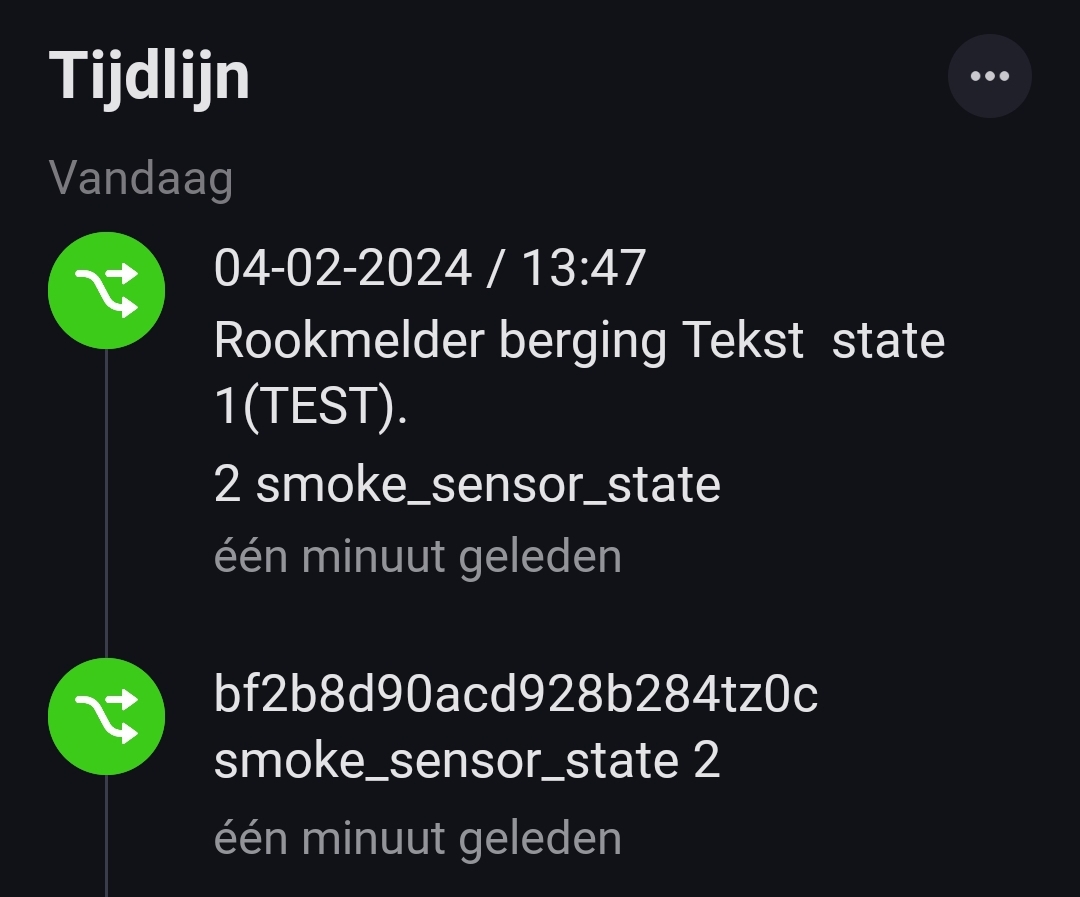
Thanks.

There’s no other way you still have an active flow somewhere in a dark corner of your Homey.
Also, the icon in front of it is a Flow icon (sent from flow)!
These “unknown” messages are one of the reasons why I always add the flowname to any messaging/log flowcards…
The app does not send RAW event timeline notifications by itself. Impossible, sorry.
.
The number wich is displayed should match a device in your devices overview @ iot.tuya.com
You are right, there was a standard test flow that I created on my phone that I had forgotten about.
After removing that flow, the messages stopped.
Thanks
As of today it seems Tuya Cloud app stopped working for me. Restart and reloading of scenes doesn’t help. All my scenes are gone and flows broken. More people have this?
Read the past 20 comments or so  It seems renewing the IoT trial subscription fixes the issue
Hi Peter, thnx for the reply and goodto hear that it seems that I made some mistake. Than at least we will get this working…
Here are the screenshots from the iot.tuya.com


This is from the smart life app (it runs version 5.9.2 on my android phone.

This is what happens when adding a new device (power socket) via the Tuya cloud app in Homey.


YW!
Did you set the setting below to use both API’s? If yes:
Hi Peter,
I did set it to “official only” as suggested in the first post.
I don’t get any fault codes when connecting the Homey Tuya Cloud app to the Tuya cloud, so that seems to be working. It is just that it doesn’t show the power socket devices, which are shown in iot.tuya.com (and the Smart life app).
Some considerations though: The first step in the “manual” it says to create an account (register) via the Smart Life app and than it says to go to the iot.tuya.com and login there. I first assumed that I should login at the iot.tuya.com with the same cridentials as used in the Smart life app, but that didn’t work. So I signed up at the iot.tuya.com with different cridentials (same email as the app and different password). Is that how it should be?
Another thing is that the sockets I use are from Hombli, which basically are rebranded Tuya sockets as I understand. In the Tuya app they work fine. They are recognised as Hombli Sockets. Might that be a problem?
Did you see any other strange things in my screenshots from before (iot.tuya.com and Smart life app)?
Hi Peter, got it working now.
I didn’t put in the authorization part in the iot.tuya.com, although it is quiet different(outdated) than as described.
In the description from github Tuya IoT Platform Configuration Guide Using Smart Home PaaS · tuya/tuya-homebridge Wiki · GitHub
Where is referred to in the manual (as how to subsribe to the iot.tuyca.com cloud) it says the following about the authorisation:

Currently it is quiet different as you can go via “service API” to the authorisations.
In the screenshot from github, there they mention(highlight) to select the “device status notification” and that the others shown in the screenshot are selected by default.
Currently it seems nothing is selected by default, and I only could find “IoT Core” and “Device status notification” Service, so I started the trial for both of them.
After that is is working and I finally can see my power socket and build a flow using it:-).
So do you thing it is correct this way?


Hello everyone,
I configured some switches and outlets via this guide, and worked fine for some months.
Now I cannot control them anymore via Homey/this app.
When I try to re-add the devices, I get the message I need to configure the app first.
However the app is configured and it says its okay and need to be restarted for the changes to come into effect.
Via Tuya Cloud app I can still control the devices.
Any idea what might be wrong?
Hello Nick,
You obviously forgot a step or a setting.
For example
You can try this guy’s nice howto in Dutch:
Hi Peter,
I checked everything and all was correct.
I did see yesterday that my trial had expired and I requested an extension.
Could the expiration of the trial also cause this?
Seems to work again, and I don’t see the warning that my trial expired…
Cheers, Nick.
Ah, I see. I was focussed on the error “configure the app first” and obviously missed the “it worked for months” part 

When the app suddenly stops working after months, it’s almost always an expired trial.
Unfortunately there’s no warning for an expired trial period.
I made a agenda item which repeats itself every 6 months to keep me from surprises.
