I think that is the last remaining missing flow card compared to the official app from Athom. I made a comparison earlier and this was indeed on of the cards (playlist = afspeellijst).
Will try to add that in the next version.
I’ll look into this. It seems the Playbar behaves differently compared to the newer soundbars.
I’ll also check if I can find something regarding the status light on the stereo pair. It’s checking the speaker to see if it’s supported, maybe the older Play:1’s don’t support it via the API? Do you happen to run Home Assistant? If so, could you check if it’s available there?
Unfortunately I don’t use HA, so cannot check that. The status light on/off is supported though via Sonos’ own mobile app (I have all lights turned off). Is there some other info I can provide that would help?
By the way!
- The status light control and tag are now available on my Play:1 stereo pair.
- Also the audio input format from the TV is now shown.
I don’t know why they did not show up yesterday  .
.
I am transferring all my flows from the official Sonos (cloud API) app to your local API app  .
.
There seems to be something strange going on with the ‘Set relative volume (%)’ flowcard on my Playbar setup.
- Most of the times it does not actually increase/decrease the volume. I am using 1% point steps (so +1% and -1%);
- When it does increase/decreases the volume, the associated tag that stores the current volume level ‘Set volume’ (Volume instellen) is not updated. In my case it stays at 7%;
- Also when it does change the volume, the change is not relative to the current volume level but to a past level (in my case 7%). So e.g. when I change the volume from 7% to 2% (-5% relative change) and then perform a 5% relative increase, the volume increases to 12% (prior level 7 + 5) instead of 7 (current level 2 + 5). I assume this is caused by the not updating current volume tag.
EDIT - Additional info: After I restarted your app the volume control was working again on my Playbar setup: I could apply +1 en -1 steps. However then the issue moved to/occurs on my other Sonos setup (two Play:1s in stereo pair). And after a subsequent restart both setups experience the issue.
Amazingly fast update, thanks!
The Roam 2 code is S54 but the original Roam is code S27 so you might need to use that for the icon (they look almost exactly the same).
Tested most of V1.5.0 and I’m not seeing any immediate issues, nice work!
If I may, some suggestions pertaining to the audio input format for soundbars.
Could it also be possible to add a trigger on audio input format change?
So something like “Audio-ingangsformaat veranderd” (with the relevant tag I suppose) here:

Also (really minor thing) I’d add an icon for this sensor (a TV  ?) , the square gives me the sense something is broken? See:

And lastly, when there is no audio input format the sensor becomes empty which looks a bit weird and is somewhat awkward to use in automations (you now have to target it trough logic cards using an empty space?).
I feel like Home Assistant handles this a bit more cleanly, they use “No input” and “No audio” in this case, see:
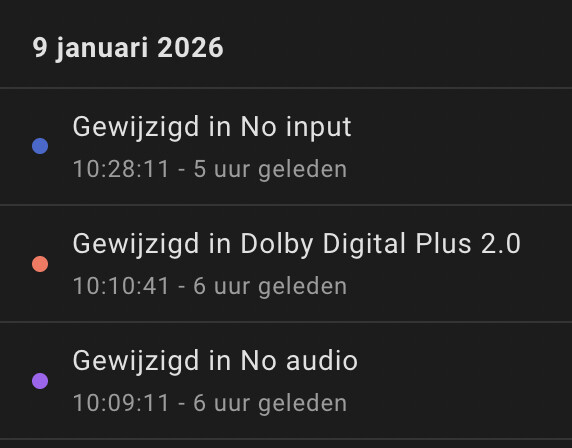
Thanks again!
After some more testing I’ve found a little bug when trying to toggle speech enhancement on both of my Sonos Beam’s connected to my TV’s, it’s saying: “Speech enhancement is not supported on this player”.
Sonos Beam Gen 2:

Sonos Beam Gen 1:

Same thing for both when manually trying to change it from the device in the app.


Nobody? (S2 = second Sonos OS, because S1 is not fully compatible)
@Amersfoort Using that card I can group my two Sonos setups together, so that they play the same music in sync. The card shows a pull down list of your Sonos setups/systems, in which you select the Sonos system you want to group with.

Two small observations:
When I press the device tile of my Sonos system I get the following error:

I am not sure whether pressing the tile has a function (like a play/pause toggle) or has no function.
I normally power down my Sonos system after use. It then becomes unavailable, which is fine. However the album art is not cleared when the system becomes unavailable:

Two more things from my side.
Whenever I’m pressing the play/pause button on the dashboard or triggering play/pause trough a flow the play/pause action seems to trigger twice:

You can clearly see the dashboard widget quickly toggling states again after you’ve pressed it (as in when I press pause, the icon turns to play, then back to pause and back to play again).
Also (minor cosmetic thing), when shown on the dashboard the older Homey Sonos integration shows a specific image of a HDMI port when the input is TV:

The Sonos iOS app solves it like this, with an abstract TV icon that I think is a bit more understandable than an actual HDMI port:

Could you perhaps use something similar like the iOS Sonos app, but for the Homey dashboard widget?
So let’s say, when the input switches to (now called) “HDMI/Optical”:
- show a nice TV icon for the album cover image
- make track name “TV” (or “Tv”? Not sure what would be more correct but “Tv” irks me for some reason)
- make artist name either “HDMI” or “Optical” depending on the input
- make album name the actual input (for example “Dolby Digital Plus 2.0”)
All of this is just an idea, not sure if it’s the best way to do it like this, let alone remotely possible to implement in the app somehow…
Thanks for listening to my midnight ramblings  .
.
Have a great weekend!
@SunBeech Thanks for your reply.
I think “music” is the key word in the group feature. I tried using the Sonos Local api talk function in combination with this group to make an announcement through all the Sonos speakers, but that didn’t work. The music function did work.
An additional observation: I normally power down my Sonos system after use. When powering on again and after all speakers have started up, the app does not generate triggers or respond to events initiated by other Sonos controllers. Also the device tile remains in the ‘off’ state. After I restart the app, it starts responding again.
For now I have included a restart action of the app as part of my power on flow. I do have to note that with Athom’s official cloud API app, I also had to restart that app in order to get it to respond again after a power cycle. I don’t know whether this behavior in inherent to Sonos or it is something that can be fixed in the app.
Hopefully fixed in v1.6.0
Pressing the tile should act as play/pause. (works for me) Is this on all speakers or only the Playbar?
In V1.6.0 this is cleared. Also, do you have the “Ignore if offline” enabled or disabled in the device settings?
I think this is because there is no “next” when playing or is there some kind of playlist behind Sonos radio?
In v1.6.0 I’ve updated the icon for S54, you have to remove and add the device to see it. Unfortunately Home doesn’t dynamically update.
Do you have more equipment polling the speakers? While making the app I have to reinstall / restart the app many times and I have noticed that this sometimes messes up my app, HomeAssistant or the official Sonos app. I think it’s because multiple apps are trying to subscribe to events on the speakers. After a while everything settles and it works.
Added in v1.6.0 can you test?
It’s a TV now in v1.6.0
@SunBeech Can you try speech enhancement with v1.6.0?
@xiutit Could you please give some feedback on my posts 38 and 39 in this topic?
I looked into this some more. On v1.6.0 it indeed starts/pauses playback when there was a prior radio station or track playing. I do still get the error when
- The Sonos Playbar is set to the TV input. I assume there is no track to start/pause, that results in the on screen error;
- I power on the system and there is no prior track selected. This happens on both my Sonos systems (with the Playbar and with the stereo-pair).
It is set to ‘no’ (disabled). So I see the red exclamation mark when unavailable.
In v1.6.0 the album art now indeed clears when the system becomes unavailable  .
.
I had the official Sonos app from Athom running in parallel, but I have disabled that and it did not make a difference. In addition I
- Have the Sonos integration running om my Unfolded Circle Remote 3. That also works via the local API of the speakers.
- Occasionally use Sonos’ own mobile (cloud) app to start non-favorite radio stations or local music on my NAS.
I did not ran into this issue prior to using your app.
Yes, it works now !
I’ll check this at a later stage. I’ve seen the same on my Arc Ultra
What do you mean with this? If you change it in Homey it doesn’t update in the Sonos app? It sometimes takes a few minutes to update there.
Is this still the case with v1.6.0?
Is this still the case?
This isn’t that easy. There is a “progress” field, but haven’t really check what it shows exactly.
Will look into this at a later stage.
Is it possible to show this TV icon in the widget too then? Perhaps a bit more “fancy” icon, like cover art?
Thanks for this great app! Very pleased with it!
Thank you for the feedback and the very fast app update!
When Sonos is playing, pressing pause works instantly now so seems fixed I would say.
When Sonos is paused, pressing play still seemingly goes into a little loop before actually starting (again also clearly visible on the dashboard widget):

Pressing the tile only works on the main node of the group for me (the others give an error) and sees the same “little play/pause loop” behavior when activating a speaker.
I’ve added the Roam 2 again and see that it has a fitting icon now, so no worries, nice work!
Audio input format change trigger works as expected and seems to be a lot faster than when I used it trough the Home Assistant Sonos integration, loaded in Homey.
TV icon on the Beam looks really slick now, nice! Minor thing again but perhaps having something like “No input” here would be better instead of just nothing, when the TV is not playing:

This would also improve the audio input format change trigger, because now if you want to target the “TV not on according to soundbar” mode you have to put it like this in your flows to make it work:

You can do it by adding a space and saving, but it’s not very user friendly that way I fear.
Thanks again!

