Did yoy also filled in the IP adtess of your inverter in your network the in advanced settings of the Homey app?
Why can’t i set the inverter to Remote Control anymore? It automatically goes to Backup Only.
no clue did you get some firmware upgrade like 4.21.or 4.22?

yep, also have 4.21 but don’t have any issues see Solaredge firmware 4.21.xx and 4.22.xx breaks remote battery storage commands · Issue #109 · biemond/solaredge.modbus · GitHub
you can make a support call to solaredge why remote is not enabled. someone did a reset and the night batch enabled it again.
most of the people asked for a rollback to 4.20
Thanks!
I mailed solar edge to tuns it on again or do a firmware rollback…
Hi,
I would like to inquire about the possibility of adding a new feature to the app that would allow users to schedule the charging of their Huawei Luna2000-7-S1 battery based on the lowest electricity prices from Nord Pool. This integration would enable the app to automatically adjust the charging times according to real-time spot prices, ensuring that users can optimize their energy costs by charging their battery during the most economical periods.
I believe this feature would significantly enhance the app’s functionality and provide great value to Homey Pro users, especially those managing energy storage solutions. By leveraging Nord Pool’s spot pricing data, this capability could provide substantial cost savings and offer a more intelligent, automated energy management system for users.
@Waqas_Chaudhary Hi!
Familiar with advanced flows? I’m not sure if your Huawei accepts the same parameters as a Growatt, but this is something for the app maker to consider. Here is an example of one of my setups, using a flow to regulate AC charging under certain conditions.

yeah , try it out yourself, it is good learning experience . for sure I am not gonna implement it. but looks like the new energy dashboard will go that way because everyone is doing the same thing.
if I need to do something for that , like a common way of charging etc so homey can call you, I will do that.
if you do anything with inverter values always try to use 5 min average values as triggers , before you know you are overloading your inverter with commands and can damage your inverter.
Hello,
I’m trying to add my SUN2000-4.6KTL-L1 using this app but I’m a bit confused as to which steps I need to take.
When trying to add it through the Homey app I need to provide an IP address and port number. The first part is easy, but I haven’t been able to find the port number. Additionally it says I need to enable a reporting function, but since I have configured the inverter to use Wifi (via FusionSolar) I seemingly can’t directly connect to it anymore (it’s also linked to my installer). I do have full access to it using the FusionSolar app and web dashboard.
Do I have any other options or am I a bit stuck here?
hey,
are you using s-dongle or emma ? I don’t have 1 but can be a bit tricky and s-dongle is not so stable but very cheap. you can better the home assisitant docs. it is about who is the modbus master , is this ip , modbus port reachable ? what is the modbus id for inverter, dongle, meters, batterij.
sorry it is not out of the box like solaredge.
Good question! I shall take a look at the inverter itself. I believe it’s using a dongle. I can also ask my installer if he can open the necessary ports, though it does look to be convoluted with this type of inverter.
The inverter has its own WLAN network. You have to log in with the Installer Account for TCP Modbus unlock. Here you can also enter the port address. Until that has happened, you will not find the inverter via the app
Aha okay, seems like I’ll have to ask my installer then.
Hi All,
I have 2 Huawei inverters who are connected to 1 Dongle.
I can add both inverters to Homey, they share the IP address and port, but they have different ID’s.
Now it turns out that Homey does not sync with both inverters. Only one of the inverter’s data is synced. Is this a known issue, and could there be a fix for this please?
I’ve had Homey to sync with either one of the inverters, just not both of them at once.
Thanks for your help!
Quin
yep s-dongle cannot handle it , but you can use the double Huawei s-dongle device.
Did you fix the problem? I have some screendumps for you since I’m using similar …
USR-W610_8E68
Hi,
Firstly, thanks for all the work on this project! I have it mostly working, the only issue I face is that I get unusable values from my meter.
Here is the raw output:
Manufacturer: SolarEdge
Model: SE5000
Version: 0003.2016
Serial: <redacted>
Modbus ID: 1
SunSpec DID: 101
Current: 6914
L1 Current: 6914
L2 Current: -1
L3 Current: -1
Current Scale Factor: -3
L1 Voltage: 2404
L2 Voltage: -1
L3 Voltage: -1
L1-N Voltage: -1
L2-N Voltage: -1
L3-N Voltage: -1
Voltage Scale Factor: -1
Power: 16500
Power Scale Factor: -1
Frequency: -15498
Frequency Scale Factor: -3
Power [Apparent]: 16575
Power [Apparent] Scale Factor: -1
Power [Reactive]: 15850
Power [Reactive] Scale Factor: -2
Power Factor: -9954
Power Factor Scale Factor: -2
Total Energy: 58151496
Total Energy Scale Factor: 0
DC Current: 3978
DC Current Scale Factor: -3
DC Voltage: 4208
DC Voltage Scale Factor: -1
DC Power: 16741
DC Power Scale Factor: -1
Temperature: 3923
Temperature Scale Factor: -2
Status: 4
Vendor Status: 0
RRCR State: 15
Active Power Limit: 100
CosPhi: 1
Storage Control Mode: 2
Storage AC Charge Policy: 1
Storage AC Charge Limit: 0
Remote Control Command Mode: -1
Remote Control Charge Limit: 3300
Remote Control Command Discharge Limit: 3300
meter1 Modbus ID: 201
batt1 Modbus ID: 24
batt2 Modbus ID: 25
meter1 Modbus ID-Manufacturer: WattNode
meter1 Modbus ID-Model: WNC-3Y-400-MB
meter1 Modbus ID-Mode: Export+Import
meter1 Modbus ID-Version: 24
meter1 Modbus ID-Serial: 4013603
meter1 Modbus ID-Modbus ID: 1
meter1 Modbus ID-SunSpec DID: 201
meter1 Modbus ID-Current: -32768
meter1 Modbus ID-L1 Current: -32768
meter1 Modbus ID-L2 Current: -32768
meter1 Modbus ID-L3 Current: -32768
meter1 Modbus ID-Current Scale Factor: -32768
meter1 Modbus ID-L-N Voltage: -32768
meter1 Modbus ID-L1-N Voltage: -32768
meter1 Modbus ID-L2-N Voltage: -32768
meter1 Modbus ID-L3-N Voltage: -32768
meter1 Modbus ID-L-L Voltage: -32768
meter1 Modbus ID-L1-l2 Voltage: -32768
meter1 Modbus ID-L2-l3 Voltage: -32768
meter1 Modbus ID-L3-l1 Voltage: -32768
meter1 Modbus ID-Voltage Scale Factor: -32768
meter1 Modbus ID-Frequency: -32768
meter1 Modbus ID-Frequency Scale Factor: -32768
meter1 Modbus ID-Power: -32768
meter1 Modbus ID-L1 Power: -32768
meter1 Modbus ID-L2 Power: -32768
meter1 Modbus ID-L3 Power: -32768
meter1 Modbus ID-Power Scale Factor: -32768
meter1 Modbus ID-Power (Apparent): -32768
meter1 Modbus ID-L1 Power (Apparent): -32768
meter1 Modbus ID-L2 Power (Apparent): -32768
meter1 Modbus ID-L3 Power (Apparent): -32768
meter1 Modbus ID-Power (Apparent) Scale Factor: -32768
meter1 Modbus ID-Power (Reactive): -32768
meter1 Modbus ID-L1 Power (Reactive): -32768
meter1 Modbus ID-L2 Power (Reactive): -32768
meter1 Modbus ID-L3 Power (Reactive): -32768
meter1 Modbus ID-Power (Reactive) Scale Factor: -32768
meter1 Modbus ID-Power Factor: -32768
meter1 Modbus ID-L1 Power Factor: -32768
meter1 Modbus ID-L2 Power Factor: -32768
meter1 Modbus ID-L3 Power Factor: -32768
meter1 Modbus ID-Power Factor Scale Factor: -32768
meter1 Modbus ID-Total Exported Energy (Active): 0
meter1 Modbus ID-L1 Exported Energy (Active): 0
meter1 Modbus ID-L2 Exported Energy (Active): 0
meter1 Modbus ID-L3 Exported Energy (Active): 0
meter1 Modbus ID-Total Imported Energy (Active): 0
meter1 Modbus ID-L1 Imported Energy (Active): 0
meter1 Modbus ID-L2 Imported Energy (Active): 0
meter1 Modbus ID-L3 Imported Energy (Active): 0
meter1 Modbus ID-Energy (Active) Scale Factor: -32768
meter1 Modbus ID-Total Exported Energy (Apparent): 0
meter1 Modbus ID-L1 Exported Energy (Apparent): 0
meter1 Modbus ID-L2 Exported Energy (Apparent): 0
meter1 Modbus ID-L3 Exported Energy (Apparent): 0
meter1 Modbus ID-Total Imported Energy (Apparent): 0
meter1 Modbus ID-L1 Imported Energy (Apparent): 0
meter1 Modbus ID-L2 Imported Energy (Apparent): 0
meter1 Modbus ID-L3 Imported Energy (Apparent): 0
meter1 Modbus ID-Energy (Apparent) Scale Factor: -32768
meter1 Modbus ID-Total Imported Energy (Reactive) Quadrant 1: 0
meter1 Modbus ID-L1 Imported Energy (Reactive) Quadrant 1: 0
meter1 Modbus ID-L2 Imported Energy (Reactive) Quadrant 1: 0
meter1 Modbus ID-L3 Imported Energy (Reactive) Quadrant 1: 0
meter1 Modbus ID-Total Imported Energy (Reactive) Quadrant 2: 0
meter1 Modbus ID-L1 Imported Energy (Reactive) Quadrant 2: 0
meter1 Modbus ID-L2 Imported Energy (Reactive) Quadrant 2: 0
meter1 Modbus ID-L3 Imported Energy (Reactive) Quadrant 2: 0
meter1 Modbus ID-Total Exported Energy (Reactive) Quadrant 3: 0
meter1 Modbus ID-L1 Exported Energy (Reactive) Quadrant 3: 0
meter1 Modbus ID-L2 Exported Energy (Reactive) Quadrant 3: 0
meter1 Modbus ID-L3 Exported Energy (Reactive) Quadrant 3: 0
meter1 Modbus ID-Total Exported Energy (Reactive) Quadrant 4: 0
meter1 Modbus ID-L1 Exported Energy (Reactive) Quadrant 4: 0
meter1 Modbus ID-L2 Exported Energy (Reactive) Quadrant 4: 0
meter1 Modbus ID-L3 Exported Energy (Reactive) Quadrant 4: 0
meter1 Modbus ID-Energy (Reactive) Scale Factor: -32768
...
You’ll notice all the meter1 values are unusable, yet I get data on the SolarEdge app/website. Any ideas what might be going on here?
Thanks,
John
hey,
had to scroll down , let me check it, so you have meters installed ( by wire, not zigbee)? and optional some batteries?
also curious if export / import restrictions works for you. Or the solaredge app shows the house load correctly at least.
So where did you get this data from? and you use inverter with battery on homey as device . battery is optional.
this is mine from the homey app.
solaredge:  meter1-c_manufacturer SolarEdge xxx Manufacturer
solaredge:  meter1-c_model SE-MTR-3Y-400V-A xxx Model
solaredge:  meter1-c_option Export+Import xxx Mode
solaredge:  meter1-c_version 79 xxx Version
solaredge:  meter1-c_serialnumber xxxx xxx Serial
solaredge:  meter1-c_deviceaddress 2 xxx Modbus ID
solaredge:  meter1-c_sunspec_did 203 xxx SunSpec DID
solaredge:  meter1-current 7672 -3 Current
solaredge:  meter1-l1_current 3765 xxx L1 Current
solaredge:  meter1-l2_current 854 xxx L2 Current
solaredge:  meter1-l3_current 3051 xxx L3 Current
solaredge:  meter1-current_scale -3 xxx Current Scale Factor
solaredge:  meter1-voltage_ln 22928 -2 L-N Voltage
solaredge:  meter1-l1n_voltage 22928 xxx L1-N Voltage
solaredge:  meter1-l2n_voltage 23066 xxx L2-N Voltage
solaredge:  meter1-l3n_voltage 23109 xxx L3-N Voltage
solaredge:  meter1-voltage_ll 0 xxx L-L Voltage
solaredge:  meter1-l12_voltage 0 xxx L1-l2 Voltage
solaredge:  meter1-l23_voltage 0 xxx L2-l3 Voltage
solaredge:  meter1-l31_voltage 0 xxx L3-l1 Voltage
solaredge:  meter1-voltage_ln_scale -2 xxx Voltage Scale Factor
solaredge:  meter1-frequency 5000 -2 Frequency
solaredge:  meter1-frequency_scale -2 xxx Frequency Scale Factor
solaredge:  meter1-power -12814 -1 Power
solaredge:  meter1-l1_power -6138 xxx L1 Power
solaredge:  meter1-l2_power -1672 xxx L2 Power
solaredge:  meter1-l3_power -5075 xxx L3 Power
solaredge:  meter1-power_scale -1 xxx Power Scale Factor
solaredge:  meter1-export_energy_active 324581300 -2 Total Exported Energy (Active)
solaredge:  meter1-l1_export_energy_active 94 xxx L1 Exported Energy (Active)
solaredge:  meter1-l2_export_energy_active 14020451 xxx L2 Exported Energy (Active)
solaredge:  meter1-l3_export_energy_active 582527450 xxx L3 Exported Energy (Active)
solaredge:  meter1-import_energy_active 555693700 xxx Total Imported Energy (Active)
solaredge:  meter1-l1_import_energy_active 67278350 xxx L1 Imported Energy (Active)
solaredge:  meter1-l2_import_energy_active 453437100 xxx L2 Imported Energy (Active)
solaredge:  meter1-l3_import_energy_active 306944900 xxx L3 Imported Energy (Active)
solaredge:  meter1-export_energy_active_scale -2 xxx Energy (Active) Scale Factor
Or you did something wrong when data type = INT16 and not UINT16
    meter_registers: Object = {
        "c_manufacturer": [0x9cbb, 16, 'STRING', "Manufacturer"],
        "c_model": [0x9ccb, 16, 'STRING', "Model"],
        "c_option": [0x9cdb, 8, 'STRING', "Mode"],
        "c_version": [0x9ce3, 8, 'STRING', "Version"],
        "c_serialnumber": [0x9ceb, 16, 'STRING', "Serial"],
        "c_deviceaddress": [0x9cfb, 1, 'UINT16', "Modbus ID"],
        "c_sunspec_did": [0x9cfc, 1, 'UINT16', "SunSpec DID"],

        "current": [0x9cfe, 1, 'INT16', "Current"],
        "l1_current": [0x9cff, 1, 'INT16', "L1 Current"],
        "l2_current": [0x9d00, 1, 'INT16', "L2 Current"],
        "l3_current": [0x9d01, 1, 'INT16', "L3 Current"],
        "current_scale": [0x9d02, 1, 'SCALE', "Current Scale Factor"],
                case 'INT16':
                    resultValue = response.body.valuesAsBuffer.readInt16BE().toString();
                    break;
                case 'SCALE':
                    resultValue = response.body.valuesAsBuffer.readInt16BE().toString();
Love this app - thank you very much! Great to have high frequency data updates. One request - or maybe I just don’t understand it correctly:
I have two SolarEdge inverters, one new SolarEdge Home Hub inverter ( SE10K RWB48BFN4) with 5x low 4.6KW voltage batteries attached to it and one SolarEdge (wave?) inverter type SE6K RW0TEBEN4.
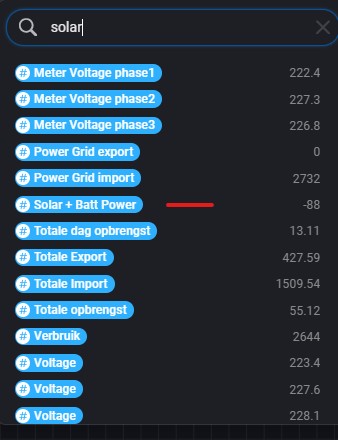
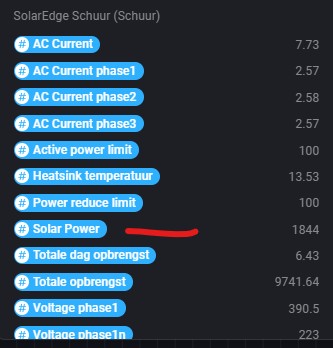
For the SE6K inverter, I can use a tag named “Solar Power” and with the Home Hub inverter I miss this tag. I do see “Solar + Batt Power” but not only “Solar Power”. Since I want to know in Homey how much Solar Power I generate combined, I cannot just add “Solar Power” with “Solar + Batt Power” as the batteries are either charging or discharging. In the SolarEdge app, the combined value is shown, however the refresh rate is very low.
Would it be possible to make the tag “Solar Power” available for the Home Hub Inverter series?