I could not find anything on the NAS on either BSD RFC5424. So I do not know on which it is.
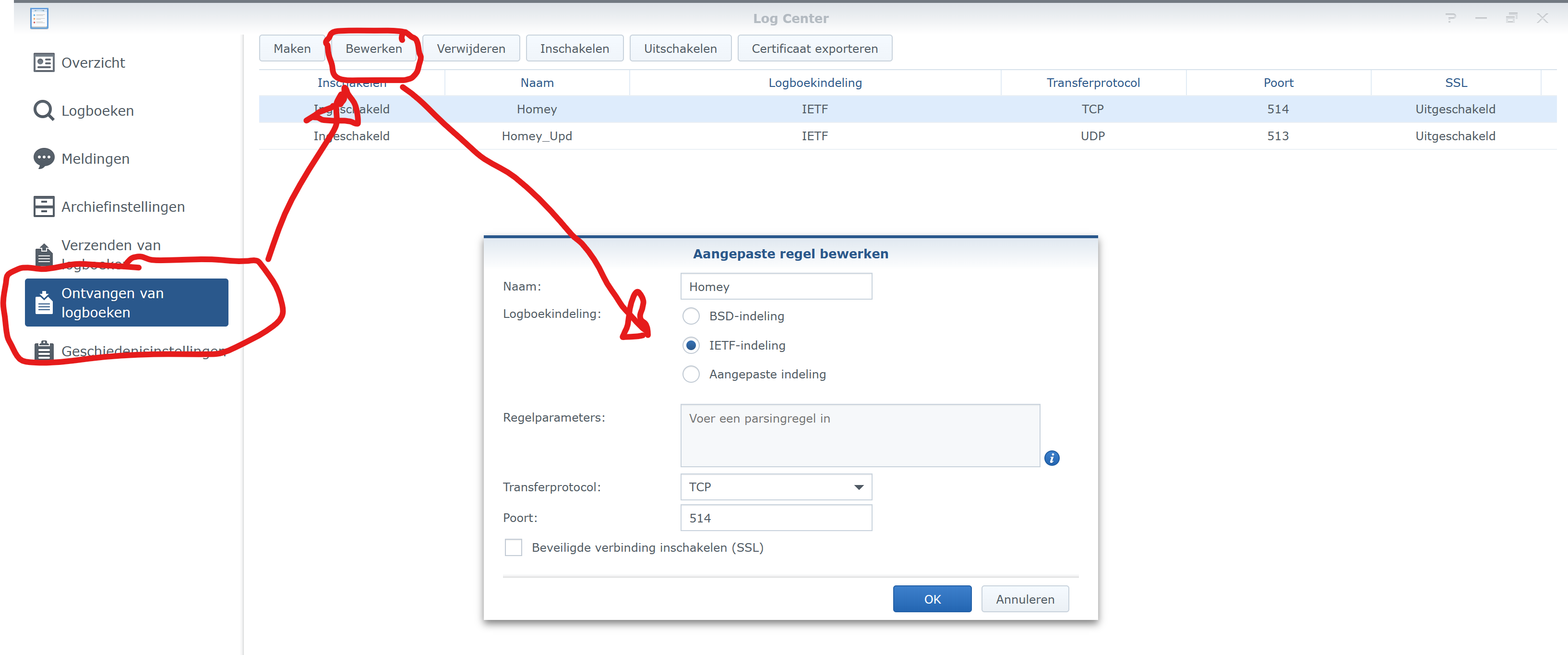
You are right, my screen looks exactly the same.
Thanks for the extra info. As far as I’m concerned, I am not changing anything at the moment as it is working.
Well, the other options are better in my opinion, more fields etc.
If you change them both IT WILL WORK!
I use it that way: IETF on NAS and rfc5424 (which are differend names for the same protocol).
I developed it with the NAS and tested it very much 
And it will allow for one for field, not sure which one it was atm.
Just configured Syslog to add events to my Syno NAS and it works great!
- One thing I noticed is that the time is in short format (HH:mm), no seconds. I checked the BLL/SimpleLog/NAS config, but I can’t find a setting for this? The IETF setting does not seem to do much for me, BLL region is set to Dutch now.


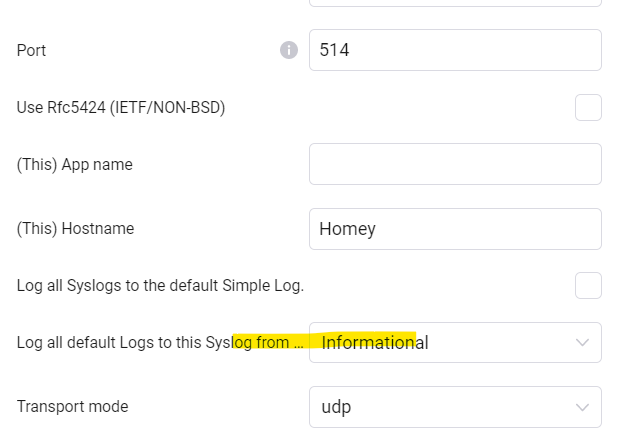
- And I’m also wondering what the setting “Log all default Logs to this Syslog from…” does?
BTW: Using syslog to log all Motion Alerts & Sensor Updates. Let’s see if it has performance impact on HP23. 

Well, it should also send seconds, it does for me.
Which app do you use on Synology NAS for the logs?
The log center?
- If you set it to IETF, you also need to set the Syslog Client Device to Use RFC5424, it will then even send milliseconds (altho, the NAS will not show )
But IETF + RFC5424 is the better/new protocol for Syslog and send the data in a somewhat better way with more info.
The BSD + RFC3164 / the non-rfc5424 does send the seconds, but not milliseconds.
And on my NAS, that works fine, i do see the seconds (just not the milliseconds, not sure how to enable this).

- This means that, when you log to SimpleLog with the Default SimpleLog App flowcards (and not the device specific ones), it will send “copies” of those to this syslog client.
So, when use use the App flowcard f.i. Add * to Log and Timeline, it will also send it to this client, without the need for more flowcards.
Thanks, I’m indeed using DSM Log Center.
And the strange thing is that in the “Overview” page I do see the time with seconds in teh raw events:
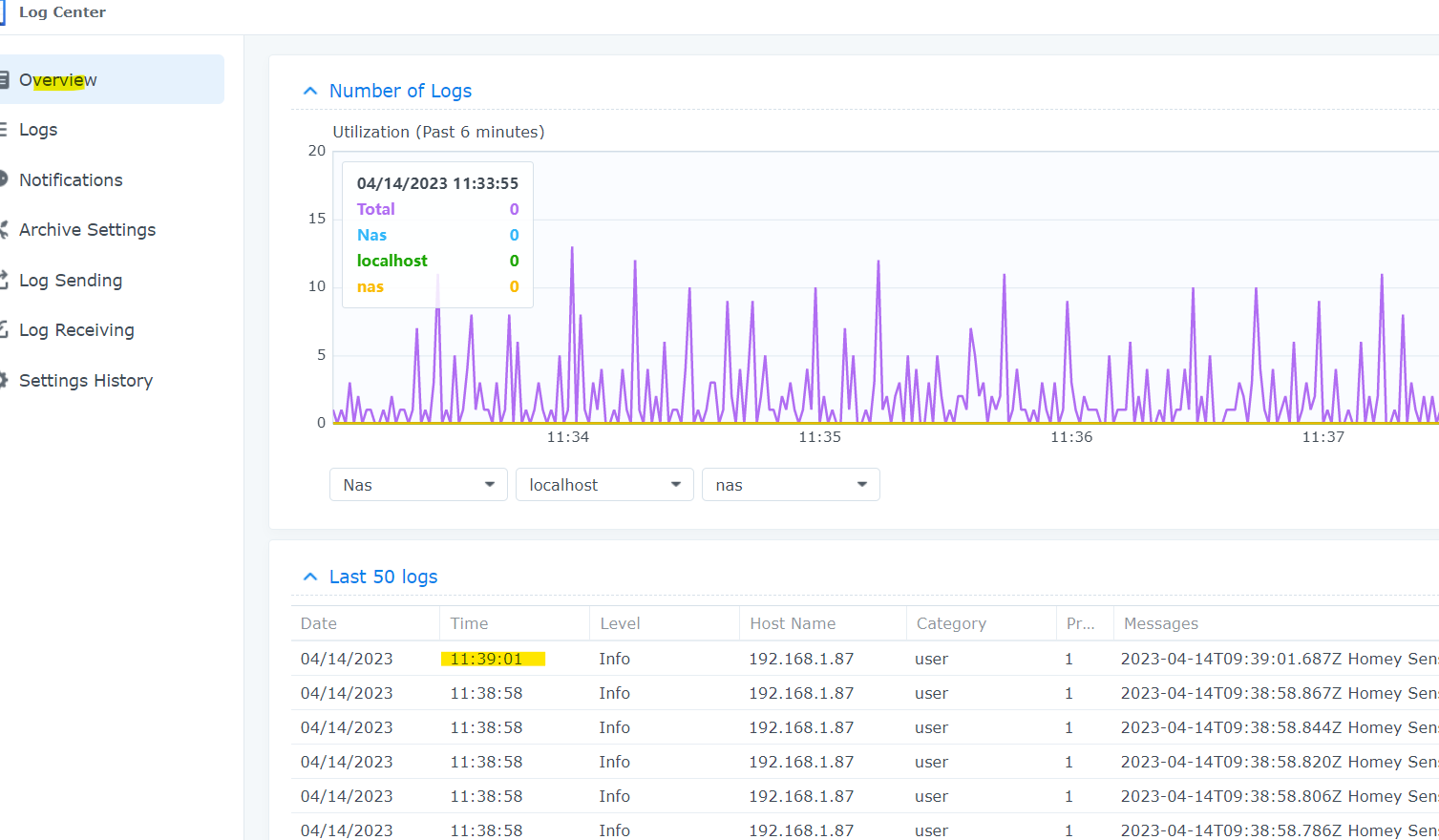
But no seconds in the “Logs” view.

BTW: When I check “Use RFC5424” on the syslog device, I get times in UTC on the NAS (2h behind as mentioned in previous posts).

About the option: might be more clear if its called "Log all Simple Logs to syslog: " (the “default Logs” and “from” terms had me confused).

Thanks, could you (try) to create support tickets for both points?
Utc and description?
Thanks!
Tried creating a ticket, but the project does not allow me adding support tickets. I have the same UTC issue when using RFC/IETF on Synology NAS log viewer. Perhaps someone can create the ticket.
BTW: it is not just time, also sometimes the data is set 2 days back. This seems like a bug although not sure whether a Synology or Simplelog issue.
Loving the new test version, it is much more useful and means I am able to remove some flows.
Though having to install better logic is a bit annoying and there is a significant overhead for each app we install, and installing better logic pushed my homey out over the edge and out of memory.
Idea : Timeline Log Level
Not sure if this would be useful, but for me I have a variable set up called timeline-log-level which automatically sent logs to the timeline which matched that level.
Ie I have a flow for each level - if variable level >= this level log and add to timeline else just log.
Then I call the flows to call the log app rather then directly calling them.
It could be useful to add to the app so that “always report errors/notices/logs/warnings on timeline”. Rather the. Choosing for each an every flow.
Idea : Trace
It is really common with in logging to have a level below debug called ‘trace’, this can be useful for tracing through actions which are happening to see the end cause (and removing them from the filter).
The TRACE log level captures all the details about the behavior of the application . It is mostly diagnostic and is more granular and finer than DEBUG log level. This log level is used in situations where you need to see what happened in your application or what happened in the third-party libraries used
Can we please add this level?
Idea : Additional Options in Facility.
Could we please add two more options into the facility, its common with homey to break your flows up into two types, triggers and scenes, to better manage them. Would it be possible to add these ‘trigger’, ‘scene’ to the facility options?
Idea : Trigger Flows.
It would be great to have triggers and conditions for the sys log, so that for example - when a emergency is logged - I can create a flow to send me a notification.
- WHEN syslog is generated
- AND severity is
- AND app/group is
- AND facility is
Thanks again for the app, and this really great test version
Please send me printscrens of every page/message you encounter while trying to submit a bug. I am in contact with Atlassian about the issue, but could use printscreens.


See PM
30MB here with the new version 2.10.20
I have just released version 3.0.2 off Simple (Sys) Log to Live!
If the lines are empty, please send a diagnostic, it will contain info about the error in the line.
Hey @Henk_Renting and @Peter_Kawa ,
The removal script, was that one working for you all?
Last time I checked it didn’t work.
But I see you have modified the script since then, so will try again and let you know.
Thanks again!
No, not really.
Give me a sec.
Okay, use version 1.0.4, that should work.
Or not, getting a 5 seconds timeout…
Okay, 1.0.5 is working correct for me now.
Let me know how it works for you!
