Added to the backlog
New update (Test: 1.17.2)
Changes include
- ADD: Battery measurement for Room Sensor
To test this version, please install from above test version link.
If you do not want to test this version anymore, you can return to the live version by installing it from the app store.
@RickardDehlin , battery status now available in test version for Room Sensor.
Installed and works like a charm, many thanks!

Thank you @Rickard_Back for reporting your issue. Could you please do the following:
- Restart the Sensibo app in Homey
- Try to add your Sensibo device
- If it still fails, go the Sensibo app from the
… moremenu in the mobile app, or find the app from the Web UI. Go to settings from the gear icon and theCreate diagnostics report. Add your name and short description of the issue to remind me about this.
@Rickard_Back, have you already resolved your issue?
Hola @OH2TH … this works now! Thanks for your assistance.
@OH2TH Hi Tapio,
CPU usage at 2.7%
I have 8 Sensibo’s and the app is using constantly approx 2.7% CPU (HP2023).
I am not using my ACs in this period, so other than checking a state, not much is done.
Is 2.7% normal, or can it be improved? Any tips?
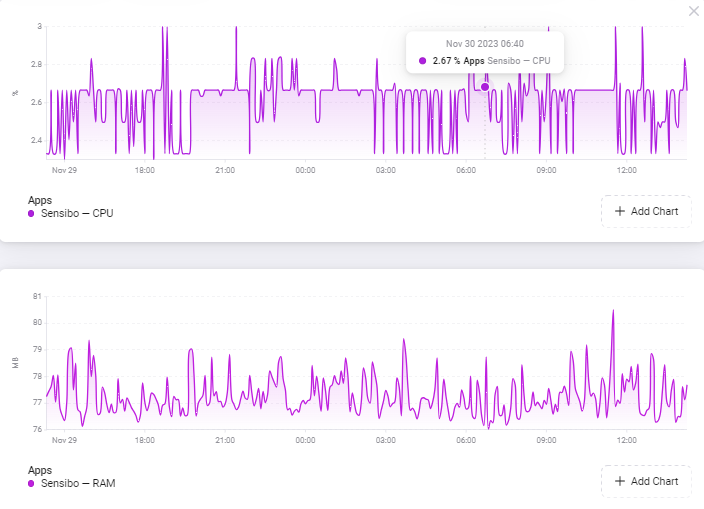
Not much that could be done. 2.7% isn’t that much as it goes for CPU usage. The app has several interval timers for the devices, so wether your devices are in use or not, the intervals are still running and performing device data updates from the Sensibo API.
Those would cause a constant CPU usage. Optimizing how timers are used in the app could help, but that would need quite some work to refactor the code.
I thought so too until I checked all my apps:
- Philips Hue 4% (Athoms legacy app) - 50 devices of which 20+ motion sensors, 3 bridges
- Sensibo 2.7% - 8 devices
- Device Capabilities 1.5%-2.5% with higher peaks: this app is intensively used with 50 devices
- All other apps are below 1%
The total CPU Load is 20-35% with peaks to 50% so my system is not overloaded. Still apps that seem do so little should not use >1% (I assume)?
I am not a programmer, but are there any CPU intensive calculations/text functions active in Sensibo?
What I also wonder is why the Sensibo CPU load is relatively constant 2.4%-2.7%?
Since the update to version 1.17.3 this morning around 11:00h my Sensibo Sky is not reporting any temperature changes anymore. The temp changes are visible in the Sensibo app, but since the update the temp hasn’t changed in Homey, not even 0,1 degree. Other temp sensors (non-Sensibo) in the same room do report temp changes. Could this be some regression introduced in the new version? @OH2TH
Thanks for notifying of this issue. Found the problem and fixed it. Updated version available in the store.
Thank you for the very quick solution!
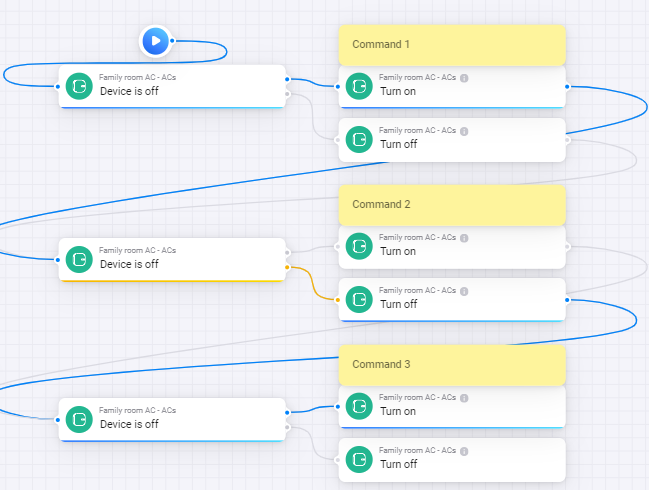
I use Homey with 8 Sensibo’s for years, but now a turn on/off command in a flow does not work consistently and most of the time does not work. I do not know when this started as I was not using my airco’s for a while.
Command 1: The card completes, but the airco is not turned on. No confirmation beep is heard
Command 2: No confirmation beep is heard
Command 3: Airco is turned on, confirmation beep is heard
But the next time I run this it is not consistent.
In Home Assistant (which I hardly use) I see the devices flipping between available and not available so this may indicate something. I switched off HA for the purpose of checking this out further.
I removed Homey from Google Home to avoid interference from there.
In Homey Developer Tools I see the devices as available and last seen is in the past minute. Does this mean the issue is in the Sensibo cloud (the Sensibo phone app works well)?
Anybody else see this behaviour?
How should I further analyze this?
Where can I find the API key that is currently in use?
I took your flow and replicated the same on my Sensibo Air Pro and it had now issues to go through all steps correctly.
- Which Sensibo model do you have?
- You could try some delays into the flow as it is hitting the AC quite rapidly on/off/on.
- Has your environment changed in any way that could interfere with the IR commands sent?

The API key is stored in the device’s storeValue and is not shown anywhere. You can do maintenance → repair on the device to reset the API key to one that you have set during installation,
Sky
Works somewhat better. Note I have the minimum polling set to 15
No it works fine with the Sensibo phone app.
It worked slightly better, but not 100%. I know from the past that there needs to be time between commands, eg. when each AC schedules (in the Sensibo app) trigger at the same time, triggers get lost. I therefore ensure the scheduled events are never at the same time. I will check further.
Great, thanks!
Hi! Lately Ive had alot of error 429 and “device can not be found” errors.
Ive sent you diagnostic you can have a look 
059481ed-ea8b-4217-91b9-7b6d91930078
Same here!
429 and 403 error and cannot control the AC via sensibo hub in homey pro 2023.
Sensibo app on android works fine it seems like.
Have worked flawlessly for months now and these issues started yesterday afternoon (14th of april) for me.
Have also started a bug thread in github
Kind regards from
Jørgen
@Sindre_Langberg and @Joergen_Ask , I can see there are errors from the API, I will need to dig deeper to see where those are coming from.
