Hi Arjan, can you explain how you did this?
Hi All,
is it possible to turn on alarm on satel when last person leaves the home?
I am considering buying the HomeyPro for this support
Yes that’s possible
Hi Everyone,
I have a Satel Integra 64+ installed by our Security installer.
I don’t know anything about Satel Integra. But they gave me all the identifiers they have on their computer.
So I download Satel Integra 64 Software (DLOADX), but I’m not able to do a connection.
The connection is established but cannot communicate due to Identifier not matching. But I don’t know where is the problem. I’ve seen the config on their computer and they are the same…
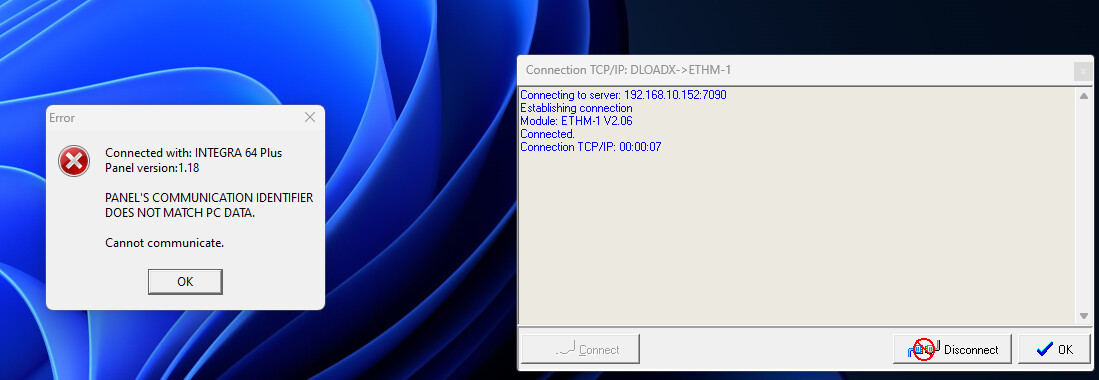
The trick is then for now is to make a connection with the cable to the PC and Integra. I can’t imagine your installer going to give their identification code (there is a other option  ) But why do you want a connection with de PC, its not relevant for Homey and this is a Homey forum
As I told you I have the codes from the installer.
I’m asking because as mentionned above by the developper we need to setup things like fixed IP adress (in my case it is already) but also other option.
It’s a homey forum for the Satel APP so I just ask some help…
When I setup the app here is the result:
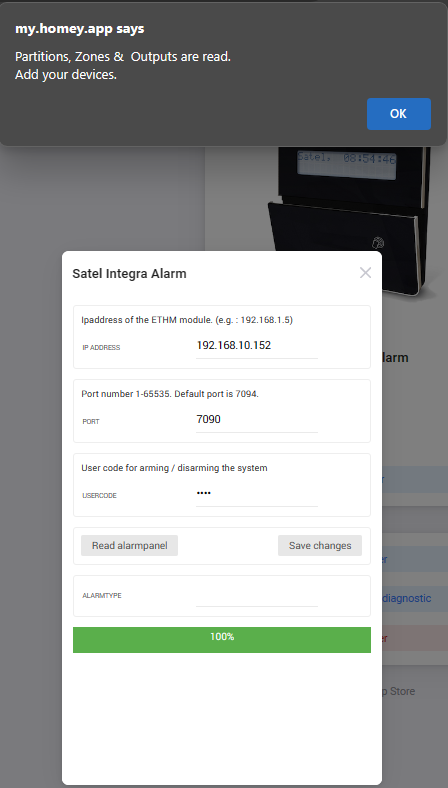
But it’s not working. I could setup anything in the app the result is the same.
AS you can see my Integration port (7094) is not enabled:

Hi Duncan,
Do you have the master code from the installer?
If you have that try to enter the master code in the code panel and a * after that.
In the menu push up and again up there will be service mode. Enter that. At configuration you can search for code panel and there will be also the ethm module. There you can configure the ip and poort settings. Without any pc connection.
Hope this will help.
Hi zuur,
Thanks for your reply. I don’t know what is mastercode…
As I read it’s to do it directly to the panel. The only code I have is the Code to open DLOADX and the DLOADX Key
You need the code from the installer.
Like your code to set the panel armed.
The installer have a code with more more rights. With that code you can program the panel.
Do you have a active connection with the Satel server with push messages (Ethm-1plus) or not (Ethm-1).
For a connection with DloaldX you need to have the following data:
INTEGRA ID
DLOADX ID
With TCP/IP
IP
Gate
With Satel Server
ETHM-1 ID
ETHM-1 MAC
Hello,
Maybe I have stupid and basic questions, but I would like to have confirmation about this app integrity and will be grateful for your kind feedback 
House configuration:
- Satel Integra 128
- module ETHM-1 Plus
- perimeter protection: windows/doors sensor
- indoor and outdoor motion sensors (wire and wireless, from Satel, Bosch etc.)
- 2* keypads / touch keypads
- defined zones
- Integra 128 Plus also supported?
- Keypads are combined with Homey? How you arm and disarm alarm? By Homey shortcut/button/Satel keypads? From Homey also possibile?
- Are zones combined with zones created in Homey?
- Can we see all sensors with status in Homey and use them for flows/automations?
- Can Zigbee (Homey devices) somehow trigger actions also on Satel?
- Is it possible to still have one line (GSM) for security company?
In my case, Satel is a must have and I am just wondering how much advantages we get from Satel to Homey. To not double sensors and easy arming for zones etc. by Homey for example.
If you have some examples how it works by you I will be grateful. Thanks!
Mateusz
You can use the Satel sensors to make some flows in homey , so you don’t have to put a extra sensors in a room just for homey flows.
Examples :
-
Using the arm/disarm of my main partition to switch lights on/off and my heating system.
-
Using a motion sensor of satel to set a timer and turn on light for X seconds after last movement in the room.
-
Using door/windows sensor of satel to turn AC off when windows are open.
-
Swicth a 2 SatelOutput from Homey to control my sunscreen (sunscreen is connected thu the satel din-rail relay module)
-
Disarm the system when doorsensor is activaed and mobile phone is in wifi rang
-
etc etc
Thank you so much for detailed feedback! Cooperation od both systems sounds really good
Hello colleagues,
Is there anyway to troubleshoot connection?
I have connection from dloadx or my phone integra app, i have "INTEGRATION=ok, and port 7094 as default.
I try to connect from Homey Satel integration, but when i hit ‘Read alarmpanel’ it read nothing for alarmtype.
Any idea how I can analyse the issue?
Dloadx or the satel.intergra app(phone) used differentent connections then the integration port 7094(default)
You can check if port is reacable by telnet(windows) or netcat(Linux)
nc -v 7094
Telnet 7094
If you get response then the port is reachable and accessable.
Make sure no other domotic system like home assistant or openhab is connected, there can only be one integration system.
thanks,
i did test, i have connection via telnet on 7094; but still integration cannot connect, nor find any devices;
usercode should be ok;
any further ideas welcome?
| 2024-12-21 10:13:55 | Looking up host 192.168.1.111 for Telnet connection |
|---|---|
| 2024-12-21 10:13:55 | Connecting to 192.168.1.111 port 7094 |
| 2024-12-21 10:13:55 | client negotiation: WILL NAWS |
| 2024-12-21 10:13:55 | client negotiation: WILL TSPEED |
| 2024-12-21 10:13:55 | client negotiation: WILL TTYPE |
| 2024-12-21 10:13:55 | client negotiation: WILL NEW_ENVIRON |
| 2024-12-21 10:13:55 | client negotiation: DO ECHO |
| 2024-12-21 10:13:55 | client negotiation: WILL SGA |
| 2024-12-21 10:13:55 | client negotiation: DO SGA |
| 2024-12-21 10:13:59 | Connected to 192.168.1.111 (from 192.168.1.153:59159) |
Send me some.screenshots in a PM of your dloadx config(especially de ip-settings and all other tabs from the ethm2 module).
Send me some screenshot of the settings in homey for the satel app.
-restart the homey app, try connecting and after 5 minutes create a app diagnostic report and let me know the id of this log
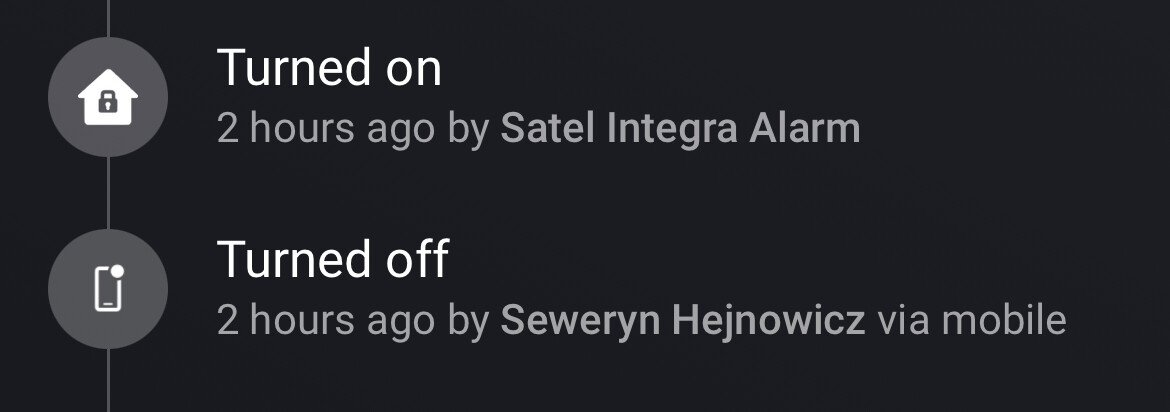
Hi guys, I’m new to both: Satel and Homey and need some help on solving my issue. I have Satel integra 64 controlled with Integra Control mobile app. It works, i can arm/disarm alarm from this app. I also installed Homey app, read configuration successfuly so I can see all my parritions, outputs and other staff. Can see the partition state changes, when I arm/disarm from outside of Homey app.
The issue I have is that I can’t arm/disarm from Homey app. If the alarm is disarmed and want to arm from Homey, the device log says mobile armed, but immidiately there is another log that Satel Integra Alarm disarmed.
The same for disarmig
What can be a reason?
Thanks in advane
Hello are there any plans for new devices like Versa IP integration ?
