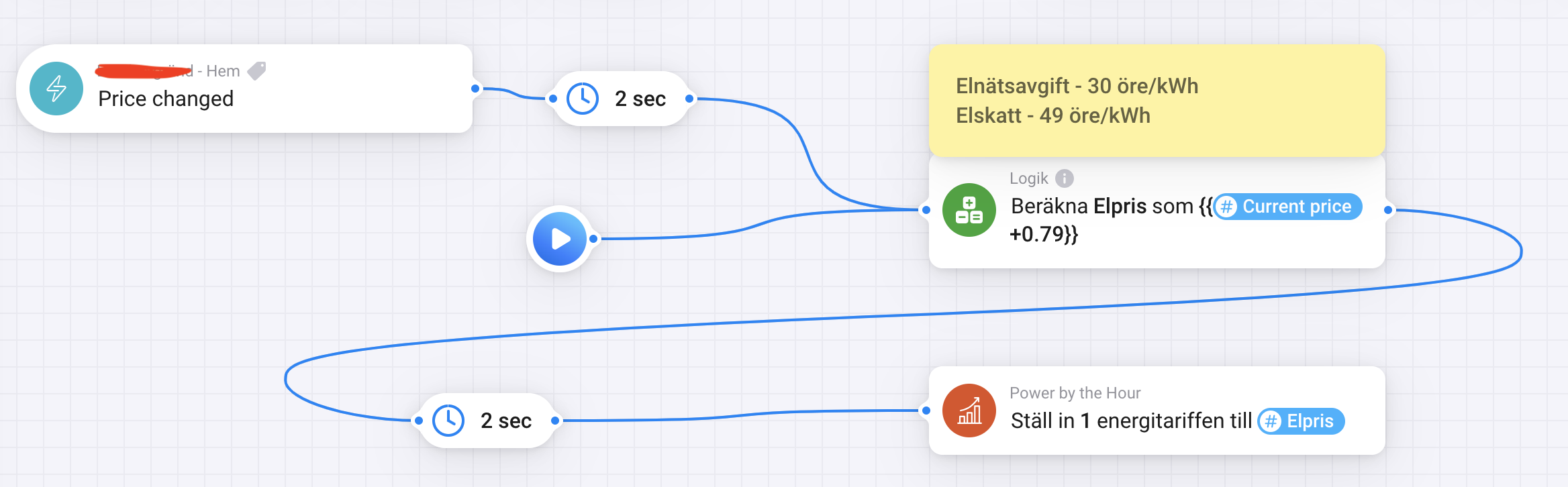
This is how I have done it for Tibber in Sweden. I take the current price from tibber, add the fixed cost from my distributor that is a fixed cost per kWh and one for tax per kWh, then add that price to a variable that I can use in other flows and last update the price that PBTH uses. It updates every hour and is correct +/- a few kWh and SEK per month.
You also have to add the fixed cost for the Total Summerizer, that is 39SEK/month from tibber and 405 EK/month from my distributor, total of 444 SEK here:
You can indeed use the current price from the Tibber app. But when you setup DAP in PBTH you have all future price as well, and all the good flowcards that come with that
Searched most of this thread and tried a lot myself, but didn’t found the answer to my question.
Is it possible to create a flow that sends me a notification x hours (e.g. 3 or 6 hours, adjustable) before the absolute lowest price? To be honest, I don’t understand the meaning or function of some of the available flow cards either.
Ignoring unrealistic meter values will hopefully get rid of the spurious large negative usage that Shelly devices are sometimes reporting. But I don’t have Shelly myself, so no way to test it
The other features were requested by @Torch1969. Hope it works Enjoy if it does!
Edit: I did notice it is not possible anymore to add a new SUM device. Will be fixed in next test release.
Thanks.
The power meter do only report energy used in kWh the last hour. It does not show total energy used, so this is why I try to use PBTH to get daily, monthly, and yearly usage only for this device.
Do you mean reset to zero each hour, since I send new data for used kWh last hour every hour
That wont work then. Ask the app developper to add a meter_power that provides the total electric power in kWh that was used in total (e.g since unit was installed or since app was installed)
I have been working on and off on this version for a few months now. It introduces a completely new way to calculate the best Battery ROI strategy. I had to learn how to model a Linear Programming Solver, and find a solver that I can use with Homey. And I’m really happy I was able to create something that (as far as I tested) works extremely well!
With this new ROI method the battery will be able to use a number of (dis)charging speeds, depending on the efficiency of a certain speed. So in the Battery device settings you need to set some extra (dis)charging values, with the accompanying losses in efficiency. Per default the Sessy Battery speeds/efficiencies are available.
The ROI calculation is performed using a THEN card (only available in advanced flows). The card produces the best actual charging power:
0 Watt: do not charge/discharge
Positive Watt: Discharge the battery with the given power
Negative Watt: Charge the battery with the given power
Also available is the optimum duration (most often 60 minutes when you start it at the beginning of an hour) and the SoC after this duration. For hackers amongst you the full future strategy scheme is available as JSON.
The calculation is pretty CPU intense. Running it will use 100% of Homey CPU for a few seconds. So don’t use it too often
This is a major change, so I will not release it until some of you have tested it and have given feedback.
And yes, when all is good and I have too much spare time, I do have plans to show the strategy as an image in the battery device.
I’m still working that out myself. I think best is to trigger it at the start of every hour, with some delay (say 30s) because at the start of every hour Homey is already quite busy. So not use the ‘price has changed’ as trigger (since price could stay exactly the same between hours)
The new ROI trigger card makes running an ROI flow even simpler. Just 2 cards required! Also, this card is available for non-advanced flows as well
The card gets triggered automatically when a new hour starts. Off course it will only be triggered if you have coupled Day Ahead Pricing to the PBTH battery.


 Enjoy if it does!

 I’m really glad I managed what it does now


 .
.